


Pixlio AI
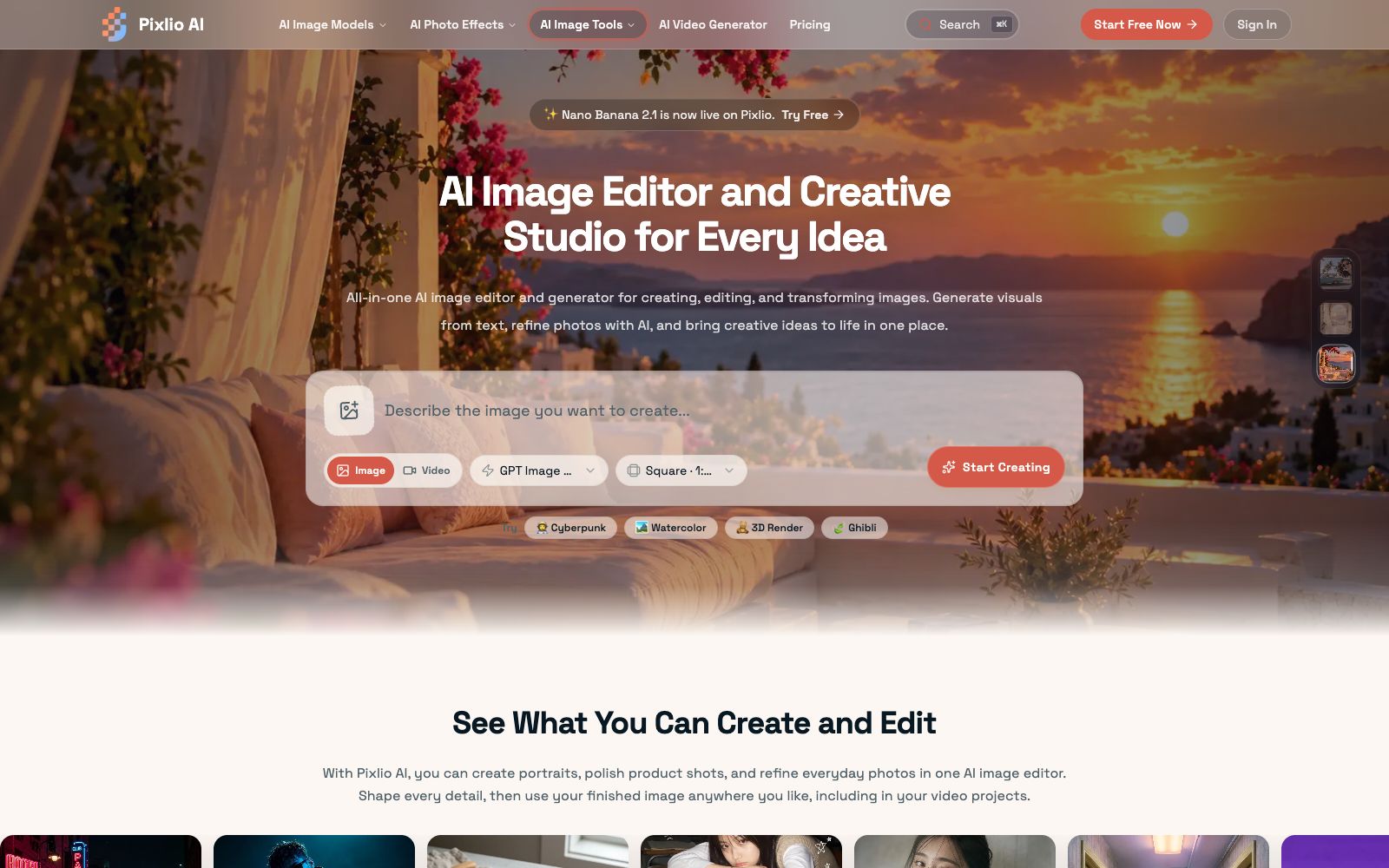
Pixlio AI is an image creation and retouching workspace in the browser. It aggregates models such as GPT Image and Seedream, enabling text-to-image generation, background replacement, deletion and modification of text in images, and application of style presets. It is suitable for e-commerce product images and social media materials.
Updated: 2026-10-27
What is Pixlio AI?
Pixlio AI is an AI image workspace that runs in a browser, integrating "generation" and "retouching" into a single interface, eliminating the need to switch between multiple subscriptions. It does not develop its own models but integrates a range of image models such as GPT Image, Seedream, Nano Banana, and Qwen Image. The official states that new models will be continuously added, and the platform has posted a notice about the launch of Nano Banana 2.1.
Who is it for?
- **E-commerce Operations**: Replace white-background product images with real-life scenes, add fill light, and create main images that can be directly listed for sale.
- **Social Media & Campaign Delivery**: A single campaign requires a batch of supporting visuals; use preset styles to quickly produce a large volume, then fine-tune each image individually.
- **Designers who revise drafts**: If the copy on old images is outdated, you can erase and rewrite it directly without going back to the original layered files.
- **Short video creators**: First use the image tool to create an opening frame, then hand it over to the video module to generate dynamic content.
- **Individuals and small teams without design software**: They don't want to install Photoshop, nor do they want to learn layers and masks.
Key features
6Multi-Model Text-to-Image
The optional models listed by the official include GPT Image 2.5, Seedream 5.0 Pro, Seedream 5 Lite, Seedream 4.5, Nano Banana 2, etc. The same prompt can be used with different models to generate different results.
Semantic-level Image Editing
It can remove or replace backgrounds, add or delete objects and text in images, enhance image quality, adjust lighting, and apply filters. The official states that the models understand context, ensuring natural coherence after edits.
Style Presets
Built-in styles such as Studio Ghibli animation, Pixar 3D, pixel art, realistic photography, pure art, and cartoons are available for application during generation. You can also convert existing photos into the same style.
Adjustable Parameters
Supports custom prompts, square/vertical/horizontal images with custom aspect ratios, seed reproduction, negative prompts, guidance scale, and multiple output formats, offering adjustment granularity close to professional tools.
High-Definition Export
The official states that the export resolution meets the requirements for printing, web pages, commercial projects and portfolios. Most operations are completed within 20 seconds, in PNG or JPG format.
Create Videos Effortlessly
The same platform features AI video generation, with the official stating it supports a maximum duration of 30 seconds and 4K output, making it ideal for first generating a keyframe and then converting it into a short video.
How to use Pixlio AI
- **Sign up for free first**: The official says new users get free credits upon registration, no credit card required, enough to try both the generation and image editing workflows.
- **Choose a plan based on usage**: The Basic plan costs $13.5 per month with an annual subscription and provides 750 credits.
- the Pro plan costs $23.9 per month and provides 2000 credits.
- the Max plan costs $41.9 per month and provides 5500 credits.
- Credit packs can also be purchased individually.
- **Commercial Use: Check the Terms**: The official stated that images generated or edited with paid credits come with full commercial usage authorization, which can be used for client projects, products, and resale.
- the usage of free credits needs to be confirmed separately.
- **Storage has a time limit**: Works in the Basic tier are kept for 6 months, while those in Pro and Max tiers are kept for 1 year.
- Remember to download and back up important finished works on your own.
- **Test styles in low resolution first**: Fix the seed and run multiple versions to select the composition, then export in high resolution after finalizing the design, which saves credits and time.
Traffic & popularity
Data month Sep 2026
Pixlio AI receives about 42.0K visits per month and ranks #972,325 worldwide.
Monthly visits
12 monthsTraffic sources
- Search62.6%
- Direct20.6%
- Social8.6%
- Referrals4.3%
- AI assistants3.8%
Top countries
- United States18.9%
- Poland6.0%
- India4.9%
- United Kingdom4.4%
- Indonesia4.3%
Estimated from third-party traffic data.
Similar tools
 DezgoDezgo is a multi-model aggregated image and video generation platform. With one interface, you can call models such as Flux, Qwen Image, and Nano Banana. It also provides free tools such as background removal, image upscaling, and redrawing, making it suitable for horizontally comparing image generation effects.
 AI Image to Image GeneratorA registration-free online image-to-image tool. Upload a photo and describe it in one sentence to change the background, adjust the style, create professional avatars, expand the canvas, and restore old photos. It is ideal for e-commerce and social media operators to quickly generate images.
 Style AIOnline AI image tool that can convert photos into styles such as Ghibli, Pixar, pixel, and sticker with one click. You can also edit images with one sentence, merge multiple group photos, and generate images and short videos.
 3D AI StudioAn online workbench that converts text or images into 3D models, aggregating multiple engines such as Meshy and Tripo. It supports AI texture mapping and automatic retopology, making it suitable for game and product design.
 Image to PromptImage to Prompt is a free image reverse prompt tool. Upload an image to generate structured descriptions that can be used for drawing models. It supports multi-model adaptation and multi-language output, making it suitable for recreating styles and organizing materials.
 ImagesArt.aiImagesArt is an AI video generator that supports three modes: text-to-video, image-to-video, and first and last frames with reference images. It can output up to 4K resolution with built-in native audio, making it suitable for social media short videos, e-commerce advertisements, and design proposals.