


ImgTo3D.ai
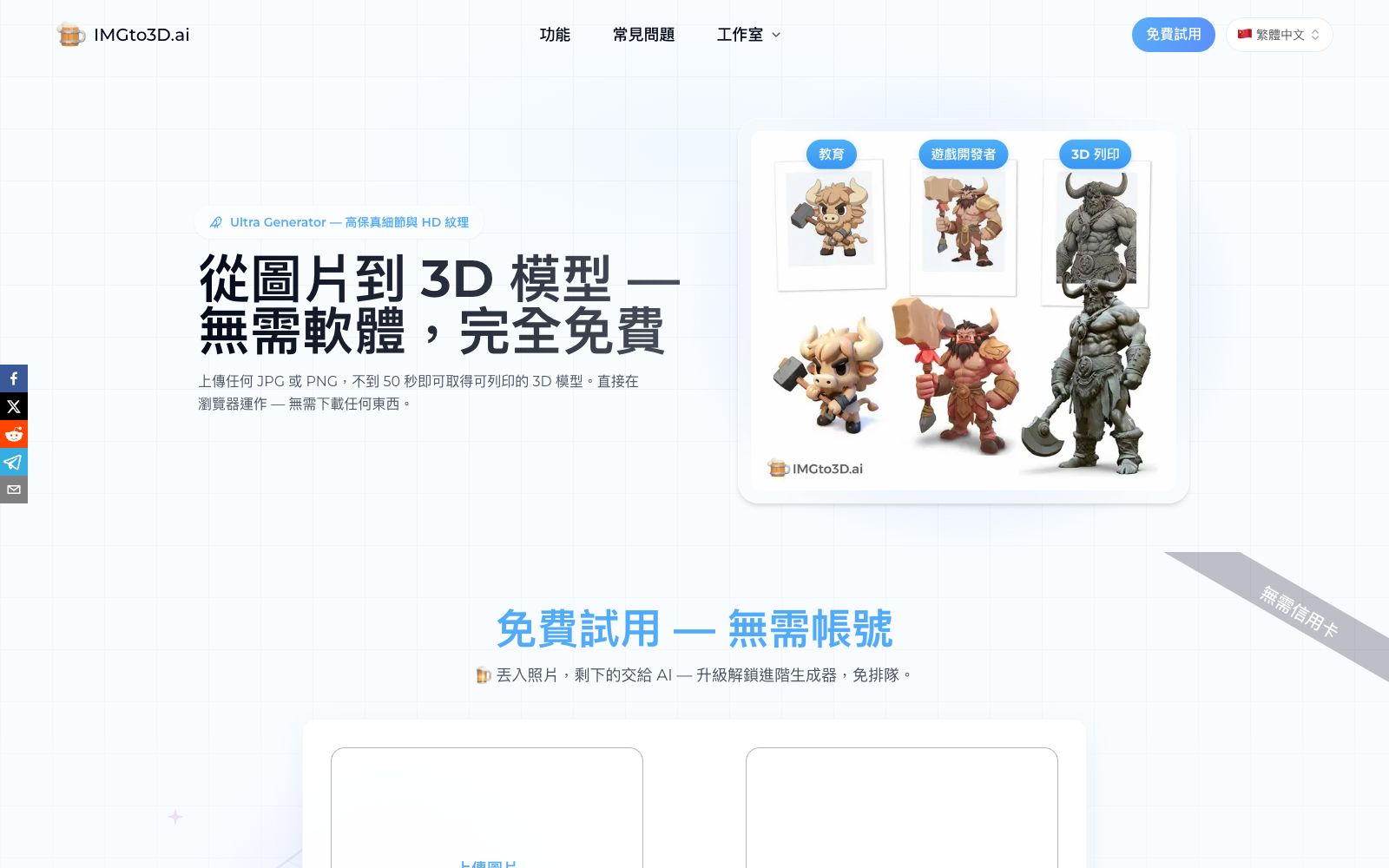
A 2D-to-3D tool in the browser that can generate textured 3D models by uploading a JPG or PNG image. The official says the free tier can produce results in less than 50 seconds, and it supports exporting OBJ, GLB and STL files.
Updated: 2026-10-27
What is ImgTo3D.ai?
What ImgTo3D.ai does is turn 2D images into 3D meshes: upload photos, sketches or illustrations, select the polygon count and generation level, wait for dozens of seconds to get a model, then export it for your intended use. It lowers the threshold to the point where you don’t need to install any software or register. The free tier lets you generate models one tier lower directly with queuing, and you only need to upgrade if you want textures, unlimited generations, or all export formats. The trade-off of queuing and using a model one tier lower in the free tier is explicitly stated by the official, making it ideal for those who want to validate their concept first before deciding whether to pay. For people without any 3D modeling experience, it shortens the steps from "having an idea" to "having a model" to a bare minimum.
Who is it for?
- Independent game developers who create placeholder assets for props, scenes and characters
- 3D printing enthusiasts who convert photos or hand-drawn sketches into printable models
- Product designers and e-commerce merchants, who need to quickly conduct shape validation and display models
- Teachers and students, for creating 3D teaching aids, courseware and graduation design materials
- Artists working on independent animations and short films who need to quickly create scene props
Key features
6Three-tier Generator
Turbo is the fastest, suitable for quickly verifying shapes; Pro strikes a balance between speed and detail; Ultra focuses on high-fidelity details and high-definition textures.
Polygon Count Customizable
After uploading, you can specify 5K, 10K, 20K, 30K, or 40K polygons. Low polygon counts are suitable for games and web pages, while high polygon counts are ideal for 3D printing and display.
Three export formats
OBJ is for Unity and Blender, GLB is for web viewers, and STL goes directly to 3D printers. The official team emphasizes no manual conversion is required.
Texture Restoration
The official website states that the generated textures match the color scheme of the source image, eliminating the need for manual recoloring.
Topology Processing
It is stated on the page that clean topology is maintained at various resolution levels, facilitating further editing in 3D modeling software afterward.
No-Account Trial
The free tier requires no registration or card binding, at the cost of using a lower-tier model and waiting in a queue; the official website also displays examples categorized by character, props, game assets, figurines, etc., allowing you to check similar results first to judge feasibility.
How to use ImgTo3D.ai
- Try one image with the free tier first to confirm the model shape is usable, then decide whether to upgrade for texture maps and all export formats.
- Only place one main subject at a time.
- for images with multiple subjects, generate them in separate blocks first and then combine them in 3D modeling software.
- The free tier requires queuing, so if you're in a hurry, first test the parameters with small images of low polygon count.
- Choose the polygon count based on the use case: don't opt for an overly high polygon count for printing.
- prioritize a low polygon count for game assets and then refine.
- After exporting, check the normals and topology in Blender before importing into the engine, as direct import often causes broken meshes and scale issues.
- Check the wall thickness before printing.
- the AI-generated meshes often have non-manifold edges and require repair software for processing.
- The scale of the generated results has no relation to the actual size.
- re-scale them according to the actual dimensions after export.
- Converting others' photos, character IPs, or artworks into 3D for public use requires you to confirm the authorization yourself.
- the tool's free quota does not mean the materials are available for use.
Traffic & popularity
Data month Sep 2026
ImgTo3D.ai receives about 22.8K visits per month and ranks #1,645,948 worldwide.
Monthly visits
12 monthsTraffic sources
- Direct48.9%
- Search44.9%
- Referrals4.2%
- AI assistants1.3%
- Social0.8%
Top countries
- United States31.4%
- Italy9.9%
- Brazil6.3%
- Turkey6.0%
- Taiwan, China5.6%
Estimated from third-party traffic data.
Similar tools
 3D AI StudioAn online workbench that converts text or images into 3D models, aggregating multiple engines such as Meshy and Tripo. It supports AI texture mapping and automatic retopology, making it suitable for game and product design.
 TRELLIS 3D AITRELLIS 3D AI is an online tool that converts images into 3D assets. It can generate textured models and export them in multiple formats, supports browser preview, and is suitable for 3D material creation in games and e-commerce.
 RodinAI 3D model generator that supports generating UV-enabled models from text or images, provides three spatial controls and local editing (bounding box, voxel, and point cloud), and can be exported to mainstream modeling software for further processing.
 Alpha3DA 3D generation tool that turns prompts or photos into usable models. It completes retopology, UV unwrapping, texture mapping and automatic rigging in the same workspace, and can be directly exported to mainstream engine formats. It is suitable for independent developers, 3D printing and e-commerce modeling.
 ColorifyAIColorifyAI is a free AI coloring page generator. You can enter text or upload photos to generate printable black-and-white line drafts. It offers a variety of painting styles, batch generation and supporting line draft tools, and is suitable for parent-child activities, classrooms and handmade material production.
 Palette.fmPalette.fm is an online tool for colorizing black-and-white photos. It offers more than 20 color filters and keyword fine-tuning, supports batch processing, and allows for high-definition image export. It is suitable for people who restore old family photos and creators who work with historical materials.