


ChatSPSS
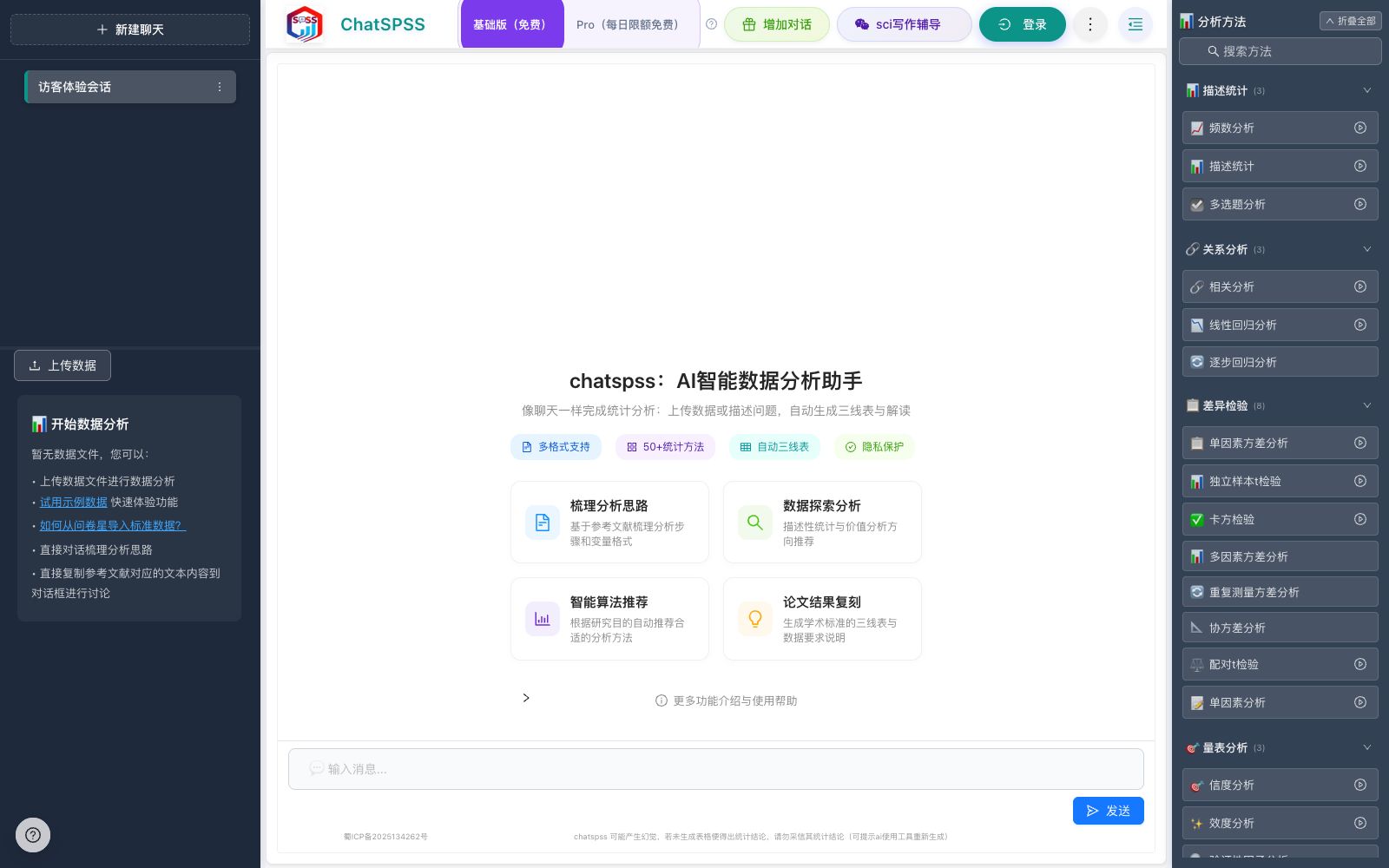
The online statistical analysis tool launched by Chengdu Nature Intelligence Technology supports uploading CSV, Excel, SPSS and Stata data. According to the official website, it covers more than 27 statistical methods and automatically generates three-line tables and interpretations.
Updated: 2026-10-26
What is ChatSPSS?
ChatSPSS is operated by Chengdu Nature Intelligence Technology Co., Ltd. Its official website positions it as an "AI intelligent data analysis assistant (SPSS online analysis)". The difference between it and traditional SPSS lies in the interaction mode: the official description states that "statistical analysis can be completed like a chat" — by uploading data or directly describing research questions, the system automatically generates three-line tables and professional interpretations, eliminating the need to click through menus item by item.
Who is it for?
- Students writing graduation theses who need to conduct questionnaire data analysis.
- Analysts conducting market research and consumer satisfaction studies.
- Medical and nursing researchers who need to conduct routine statistics and ROC analysis.
- Researchers in psychology and other fields who conduct scale research and need reliability and validity tests.
- Statistical users who are familiar with SPSS reports but do not want to repeat menu operations.
Key features
8Multi-format data upload
The official states that it supports online analysis of CSV, Excel, SPSS (.sav) and Stata (.dta) files.
Descriptive Statistics and Difference Tests
The official listing includes descriptive statistics, frequency analysis, multiple-choice question analysis, t-tests, paired t-tests, Analysis of Variance (ANOVA), chi-square tests, and non-parametric tests.
Correlation and Regression Analysis
The official lists correlation analysis, regression analysis, stepwise regression, hierarchical regression, as well as binary, multinomial and ordinal logistic regression.
Scale Research
The official listing includes reliability analysis (Cronbach α), validity analysis (EFA), and confirmatory factor analysis (CFA).
Advanced Analysis
The official listing includes mediation analysis (Bootstrap), moderation analysis, and cluster analysis.
Diagnostics and Visualization
The official listing includes normality tests, collinearity (VIF) diagnostics, ROC curves and AUC, as well as charts such as box plots, scatter plots, and heatmaps.
Automatic Three-line Tables and Interpretations
The official statement says it can automatically generate three-line tables and charts, along with professional interpretations.
Method Tutorial Library
The official website provides tutorials from questionnaire data analysis, P-value interpretation to various statistical methods, as well as comparative explanations with tools such as Excel, Jamovi, Questionnaire Star, Python, and SAS.
How to use ChatSPSS
- 1First confirm the data structure (independent variables, dependent variables, scale item groups) before uploading; a clear structure is more important than fancy methods.
- 2Run descriptive statistics and normality tests first, then decide whether to use parametric or nonparametric tests to avoid choosing the wrong method.
- 3For scale research, it is recommended to proceed in the order of reliability analysis, validity analysis, and factor analysis, with mediation and moderation analysis conducted after the scale has passed the assessment.
- 4The automatically generated interpretations can be directly referenced, but when reporting statistics, significance levels and effect sizes in the paper, you must check them yourself.
- 5The official website clearly reminds users to interpret P-values correctly and not to equate statistical significance with practical implications in a simplistic manner.
- 6The uploaded raw data may contain respondents' privacy. Before use, please confirm the scope of authorization and data compliance requirements, and read the official privacy policy.
- 7The official website page is loading the application, and the actual functions and free quota shall be subject to the on-site instructions.
Traffic & popularity
Data month Sep 2026
ChatSPSS receives about 16.6K visits per month.
Monthly visits
12 monthsEstimated from third-party traffic data.
Similar tools
 CeleusCeleus provides AI statistical analysis for researchers. Upload your data and it recommends appropriate methods, then runs them deterministically in R—without the AI ever accessing raw data rows. The company says it supports 39 statistical methods.
 Vizly AIAI data analysis assistant: After uploading a table, you can directly ask questions in natural language. It automatically generates visualizations, statistical analysis and prediction results, and can export reports to various formats such as Word and PDF.
 KNIMEKNIME is a free and open-source data analysis platform. It uses visual nodes and workflows for ETL, analysis, predictive AI and agent building, and can connect to numerous data sources and be deployed in enterprise production.
 marmosA conversational data analysis tool under the Tencent ecosystem that can connect to databases or local files, generate SQL, visual dashboards and reports through conversations, and support workflows, subscription alerts and team collaboration.
 Better AnalystBetter Analyst (formerly Formula Bot) is an all-in-one data analysis application that can connect to data sources and generate analyses, dashboards, reports, and automated workflows. It is designed for individuals and growing businesses without a dedicated analytics team.
 PowerdrillPowerdrill Bloom is a memory-enabled AI data analysis workspace that allows querying across documents and databases in natural language. Every figure can be traced back to page and line numbers, and it supports private cloud and on-premises deployment.