

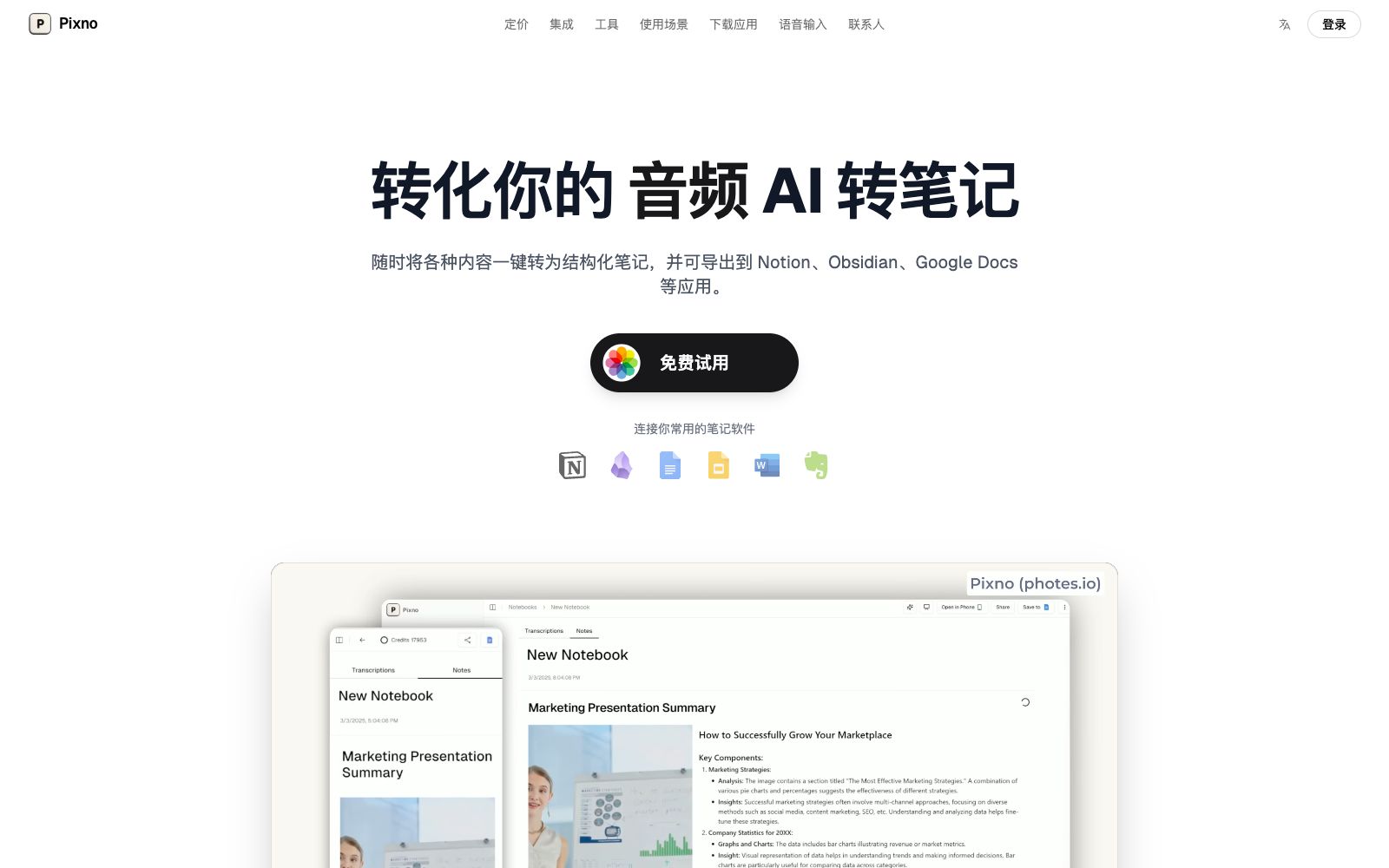

Pixno AI Notes
Pixno is an AI note-taking assistant that can convert photos, PDFs, audios and videos into structured text notes, support export to applications such as Notion and Obsidian, and cover scenarios such as textbooks, recordings and slides.
Updated: 2026-10-26
What is Pixno AI Notes?
Pixno (brand name: Pixno, official website: photes.io) is an AI note-taking assistant, officially positioned as "turning photos, documents, audio and even videos into text notes". Unlike tools that only support handwritten notes, it emphasizes "multimodal capture" — take a photo, upload a recording or slideshow, and the AI can generate structured notes and export them to your commonly used note-taking software. According to the official website, its image text extraction leverages GPT-4 Vision and GPT-4o, surpassing traditional OCR. It can understand the context and chart content of images and supports integration with Obsidian plugins.
Who is it for?
- Students who take photos of blackboards in class and want to quickly turn textbooks and slides into review notes.
- Researchers and content creators who use audio recordings to organize interview and meeting materials and sync them to Obsidian.
- Office workers who need to take voice notes quickly at their computers and don't want to switch away from their current window.
- Self-learners who want to expand the depth of their notes through AI-recommended related readings.
Key features
6Image to Notes
Take a photo and get organized text notes within seconds. The official claims it surpasses traditional OCR and can understand charts and context.
Audio & Slides to Notes
Upload audio recordings or take photos of slides, and the AI will automatically generate well-structured notes, ideal for classes and meetings.
Comprehensive Recognition
It can understand all information in images such as text, Venn diagrams, and statistical charts, rather than just extracting text.
Multi-app Integration
Supports exporting to note-taking apps such as Notion, Microsoft Word, and Google Docs to avoid content silos.
Voice Input
Pixno Voice Input can convert speech into organized text in any typing-enabled application on a computer, supporting macOS and Windows.
Cross-device Syncing
Notes are synced in real time across mobile phones, tablets and desktops, allowing you to pick up where you left off at any time.
How to use Pixno AI Notes
- Start with photo-to-note onboarding: This is the most intuitive feature—take a photo of a blackboard or document and experience the effect in one try.
- Export to your main note-taking app: First, link Notion or Obsidian to avoid having your notes scattered in different places.
- Pay attention to citations and copyright: The online readings recommended by AI are for extended reference only.
- When officially citing documents or materials, please verify the original sources.
- official features and pricing may be adjusted, so confirm before use.
- When you first start using it, it is recommended to go through the core workflow with the free quota first.
- After confirming that the output quality meets your expectations, you can then evaluate whether it is worth upgrading to a paid plan.
Traffic & popularity
Data month Sep 2026
Pixno AI Notes receives about 138.3K visits per month and ranks #246,500 worldwide.
Monthly visits
12 monthsTraffic sources
- Search46.4%
- Direct35.5%
- Referrals8.4%
- Social4.2%
- Mail1.8%
- Other3.7%
Top countries
- United States12.9%
- India6.7%
- France6.6%
- Colombia5.4%
- Peru5.3%
Estimated from third-party traffic data.
Similar tools
 NotebookLMNotebookLM is Google's AI research assistant. After uploading sources such as PDFs, web pages, and videos, it answers questions based on the original text with citations attached. It can generate audio overviews, video overviews, mind maps, flashcards, and quizzes, and supports notebook sharing.
 NoteGPTAll-in-one AI workbench that can summarize videos and PDFs, transcribe audio and video and separate speakers, generate documents, slides, spreadsheets and podcasts, and the official claims that the number of registered users exceeds 80 million.
 Slay SchoolAn AI note-taking and flashcard tool for students that can convert lecture notes, PDFs, videos and handwritten notes into flashcards, quizzes and essays. Its official website states that it supports export to Anki, UWorld and Quizlet.
 XinzhiA knowledge recording tool focusing on the "digital garden" concept, which the official says helps you connect fragmented knowledge to build a knowledge network. It supports card notes, voice shorthand, multi-level tags and interconnection between notes.
 CluelyCluely is an undetectable AI meeting assistant that records and provides answers in real time during meetings. Unlike traditional tools that only organize content after meetings, its official website states that no bots are present in meetings and they are only visible to oneself.
 CleftA voice-first note-taking app built exclusively for Apple devices, it performs on-device offline transcription and organizes dictations into summaries, to-do lists and transcripts, and can be sent to Notion, Obsidian, etc., with one click.