

OpenWorker
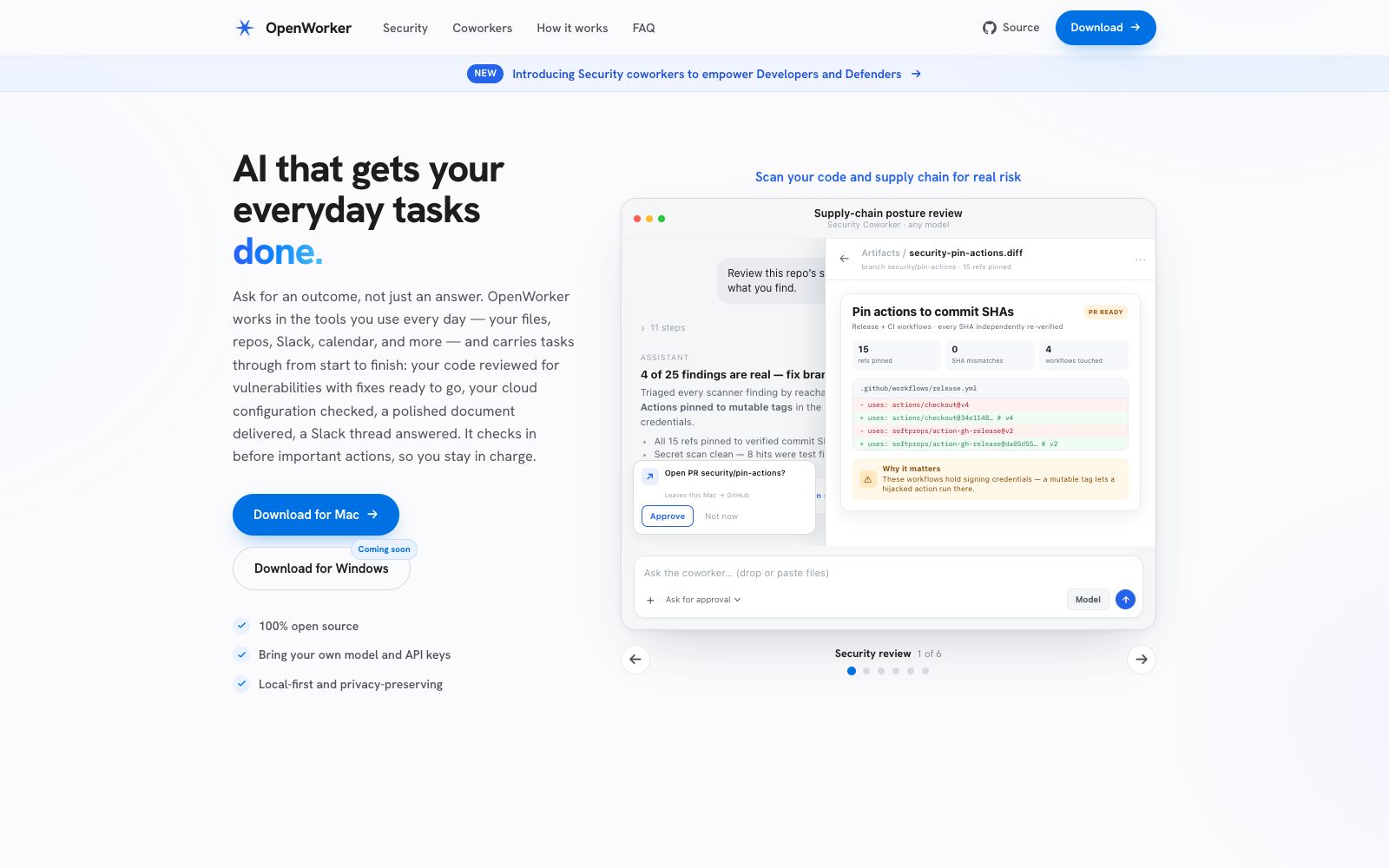
OpenWorker is an open-source AI agent that runs on your own computer. According to its official website, you just need to state the desired outcome, and it will complete tasks in daily tools such as files, code repositories, Slack, and calendars, delivering code reviews, cloud configuration checks, documentation, and session responses. It covers research and development, security, and daily office scenarios.
Updated: 2026-10-26
What is OpenWorker?
The official website of OpenWorker positions itself as "AI that gets your everyday tasks done": an open-source agent that runs on your own computer. The difference between it and chatbots that only provide answers lies in what the website states: "We deliver results, not just answers" — it integrates into the tools you already use (files, repositories, Slack, calendars), sees tasks through from start to finish, delivering code reviews and fixes, cloud configuration checks, completed documents or a single session response, and seeking confirmation before important actions. The website emphasizes 100% open source, local-first, and a strong focus on privacy.
Who is it for?
- Development and security teams conduct routine reviews of supply chains, cloud configurations and dependencies
- Teams that want to use AI agents to handle tasks but cannot let data leave their local machines
- People in sales, marketing, and operations who want to delegate customer research, follow-up emails, and weekly reports
- Engineering teams that have built their own model integration solutions and want to connect it to their daily toolchains
- Roles that need to keep "completed work" as auditable deliverables (diffs, PRs, reports)
Key features
6Security Review Colleague
Drive semgrep and secret scanning, triage findings based on reachability rather than severity, and provide fix PRs that align with your codebase's conventions; the official website example pins 15 Actions with mutable tags to verified commit SHA values.
Cloud Configuration Check
Scans Terraform and cross-references with the actual cloud environment. The official website states that each conclusion is accompanied by a reproducible evidence command, only mentions infrastructure PRs, and does not write to the cloud or run `terraform apply`.
Dependency Auditing
Identify vulnerable dependencies, prioritize those that are actually reachable, only propose minimal upgrades that fix the issues, never go beyond the minimum secure version, and do not merge when tests are failing.
Self-hosted Models
The official website states that you can bring your own models and API keys. It supports closed-source cloud models, open-source weights, or local Ollama runtime. The listed vendors include OpenAI, Anthropic, Gemini, DeepSeek, Qwen, Mistral, etc.
Daily Tool Integration
Slack, Outlook, Gmail, Google Calendar, Notion, HubSpot, GitHub, Jira, Linear, Dropbox and other tools can be connected with one click or manually.
Triggered Background Execution
Set a trigger condition once, and it will start automatically when there is a Slack reminder, a new email, or a schedule arrives. The delivered results can be chat replies, Slack messages, as well as Markdown, PDF or image files.
How to use OpenWorker
- 1The official website offers free download for the Mac version, with "coming soon" noted for the Windows version, and the source code is available on GitHub for independent audit.
- 2First connect a read-only scenario (such as code scanning only) to go through the approval process, then enable write operations such as PR creation.
- 3Provide your own model and API key; for private repositories, prioritize using Ollama local models to avoid sending code to third parties.
- 4When authorizing Slack, email, and calendar access, only grant the necessary folders and scopes, and keep approval records on file for future reference.
- 5It performs actions on your local machine. For keys and production environment operations, it is recommended to maintain read-only access. All changes are merged after undergoing PR review.
Traffic & popularity
Data month Sep 2026
OpenWorker receives about 14.9K visits per month and ranks #2,641,798 worldwide.
Monthly visits
6 monthsTraffic sources
- Search40.4%
- Direct27.4%
- Social17.7%
- Referrals11.7%
- Display ads1.6%
- Other1.3%
Top countries
- United States35.0%
- Taiwan, China15.3%
- Germany12.1%
- Vietnam7.7%
- India7.2%
Estimated from third-party traffic data.
In these collections
Similar tools
 OpenClawOpen-source AI assistant, which according to its official website runs on your own machine, can be invoked on channels such as WhatsApp, Telegram, Slack, and iMessage. It helps you organize your inbox, send emails, and manage your schedule, and is licensed under MIT.
 QodoAn AI platform for code review provides cross-repository context and more than 15 agent workflows, covers IDE, PR and security scenarios, and transforms team specifications into executable governance rules.
 WorkAnyA locally running desktop AI Agent, according to its official website, can organize files, generate websites, documents, spreadsheets and presentations with natural language. It supports real-time preview, sandbox execution and MCP expansion.
 MausBotMausBot is an open-source desktop AI agent app that gives each agent its own dedicated computer. It supports models including Claude, Codex, Grok, and Kimi, and connects to the apps you use every day through Composio.
 ContinueOpen-source AI code assistant project, focusing on integrating any model for custom completion and conversation; the team has been acquired by Cursor, and the open-source code repository is still freely available for self-deployment and modification.
 DiaDeveloped by The Browser Company, Dia is an AI browser that can read the context of calendars, emails, messages and tabs. It can generate morning briefings, cross-tool composite reports and slides, with privacy controls handed over to users.