

OpenTypeless
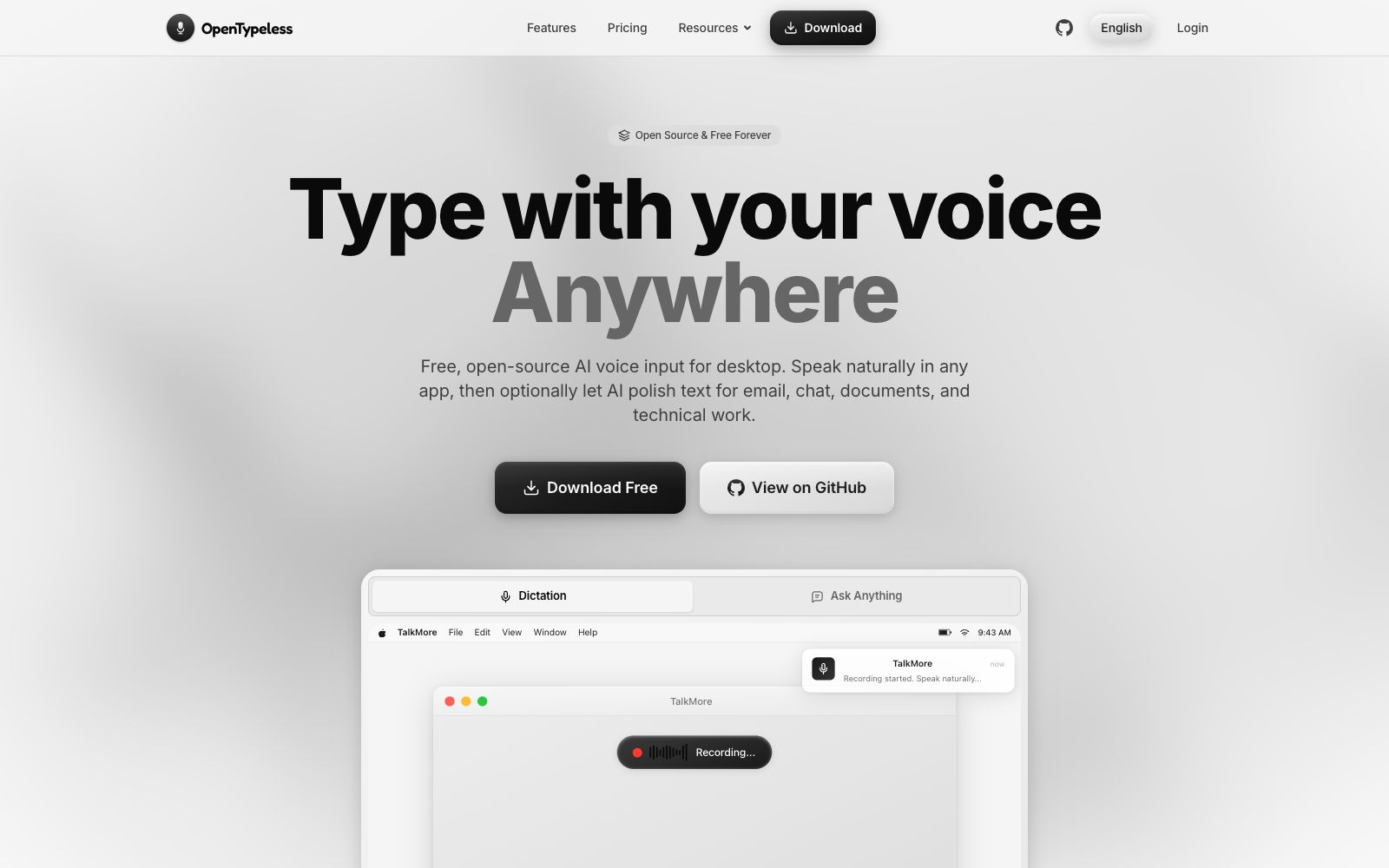
OpenTypeless is a free and open-source desktop AI voice input tool that supports Windows, macOS and Linux. Press the global shortcut key and speak, use the recognition service of your choice for real-time transcription, and then the AI can optionally polish the grammar; after enabling app awareness, you can turn dictation into emails, group chats or documents.
Updated: 2026-10-26
What is OpenTypeless?
The official website of OpenTypeless positions itself as a desktop AI voice input tool with the slogan "Open Source & Free Forever": you can speak naturally in any application, and then optionally let AI polish the text for emails, chats, documents, and technical work. The difference between it and the system's built-in dictation lies in the second half of the back-end link—transcription is just the first step. According to the official website, AI polishing will correct grammar, punctuation and tone, and rewrite the output form according to the current window when application awareness is enabled.
Who is it for?
- Professionals who write a lot of short texts in emails, work orders, and documents every day and want to type less
- Developers who use editors like Cursor and are accustomed to dictating requirements and code review comments
- People who need to handle multilingual communication and want to dictate once to directly get text in the target language
- Users who are unwilling to hand over their voice data to fixed vendors and want to build their own STT or local models
- People who need a cross-platform solution and are not satisfied with the native dictation on Mac
Key features
6Three-step workflow
The official website states the process is "Speak → Transcribe → Polish": Press the global shortcut key to speak, use your chosen STT service for real-time transcription, and the AI will correct grammar and style before directly inputting the text at the cursor position.
App-Aware Rewriting
The official website states that it adapts outputs through local app classification plus 71 built-in profiles. The same dictation is turned into a formal email in Gmail, a team message in Slack, a document paragraph in Google Docs, and a technical note in Cursor. App matching is completed locally, and unrecognized apps fall back to General.
Self-contained service provider
The official website states that BYOK is supported. For speech recognition, you can choose Deepgram Nova-3, AssemblyAI, GLM-ASR, OpenAI Whisper, Groq Whisper, etc. For polishing models, you can opt for DeepSeek, OpenAI, Gemini, Qwen, Claude, Ollama, OpenRouter, etc., without vendor lock-in.
99 Languages
The official website states that automatic language detection is available, and you can also set a target language list of up to five languages; the official website recommends checking the current STT routing document and testing with representative speakers before going online.
Shortcuts & Dictionary
The official website states that you can set up to three shortcuts each for Dictate, Ask, and Translate, supporting two modes: holding to speak and switching. Custom dictionaries can include personal names, product names, and technical terms, with import and export support.
Ask Anything
The official website states that it allows you to record a spoken question and get a focused answer directly without opening a chat thread; there is also a translation entry and history records.
Things to know
Usage Tips
- Run with only pure dictation for a day first to verify the recognition accuracy and shortcut feel, then turn on AI polishing; the official website emphasizes that polishing is an optional switch and it works even when turned off.
- First, fill your custom dictionary with names of people, product names and technical terms, which will take effect faster than switching models.
- Microphone and Permissions: Grant system microphone access on first use; it also needs to read the name of the current app for app matching. Turn off app awareness if you're unsure.
- Data Destinations: The official website provides a separate data flow guide covering Cloud, BYOK, self-built Whisper-compatible endpoints, Apple Speech, and local LLMs; confirm the flow of audio and text before processing sensitive content.
- The official website states that the desktop application is free and open source (MIT licensed) and does not require an account registration; when using BYOK, you will incur fees for your own API keys.
Traffic & popularity
Data month Sep 2026
OpenTypeless receives about 8.0K visits per month and ranks #3,262,820 worldwide.
Monthly visits
11 monthsTraffic sources
- Direct39.7%
- Search34.6%
- Referrals10.9%
- Social6.1%
- Display ads2.8%
- Other5.8%
Top countries
- United States18.2%
- South Korea18.1%
- India11.5%
- United Kingdom8.0%
- Brazil7.6%
Estimated from third-party traffic data.
In these collections
Similar tools
 SuperWhisperSuperWhisper is a cross-platform speech dictation tool. You can speak in any application to get polished text. It supports over 100 languages, offline transcription and automatic meeting recording, and is suitable for writing, programming and daily office input.
 SpokenlySpokenly is a free AI dictation tool that supports Mac, Windows, Linux and iPhone. It can run offline with the local Whisper model and supports over 100 languages.
 StrevaStreva is a real-time voice translation and dictation tool that translates and transcribes in over 100 languages directly within the app where your cursor is active. It automatically formats text based on context, making it ideal for writing emails, chatting, taking meeting notes, and collaborating across languages.
 OpenLessOpen-source cross-platform voice input tool that supports macOS, Windows and Linux. Press the hotkey and speak to transcribe locally and polish into clean text or structured prompts. Released under MIT License, with data local-first.
 SayItOpen-source voice input tool for Windows: Press the shortcut key and speak, then the AI removes filler words and organizes the content according to custom prompt words, directly inputting it into Claude Code, Codex, Kiro, or any inputable area.
 WisprkeyA Mac voice assistant built by a Swedish team, offering speech-to-text in any app, multilingual text-to-speech, and on-device meeting notes. The official claim is 98% transcription accuracy, making it useful for writing code, editing documents, and reviewing meetings.