

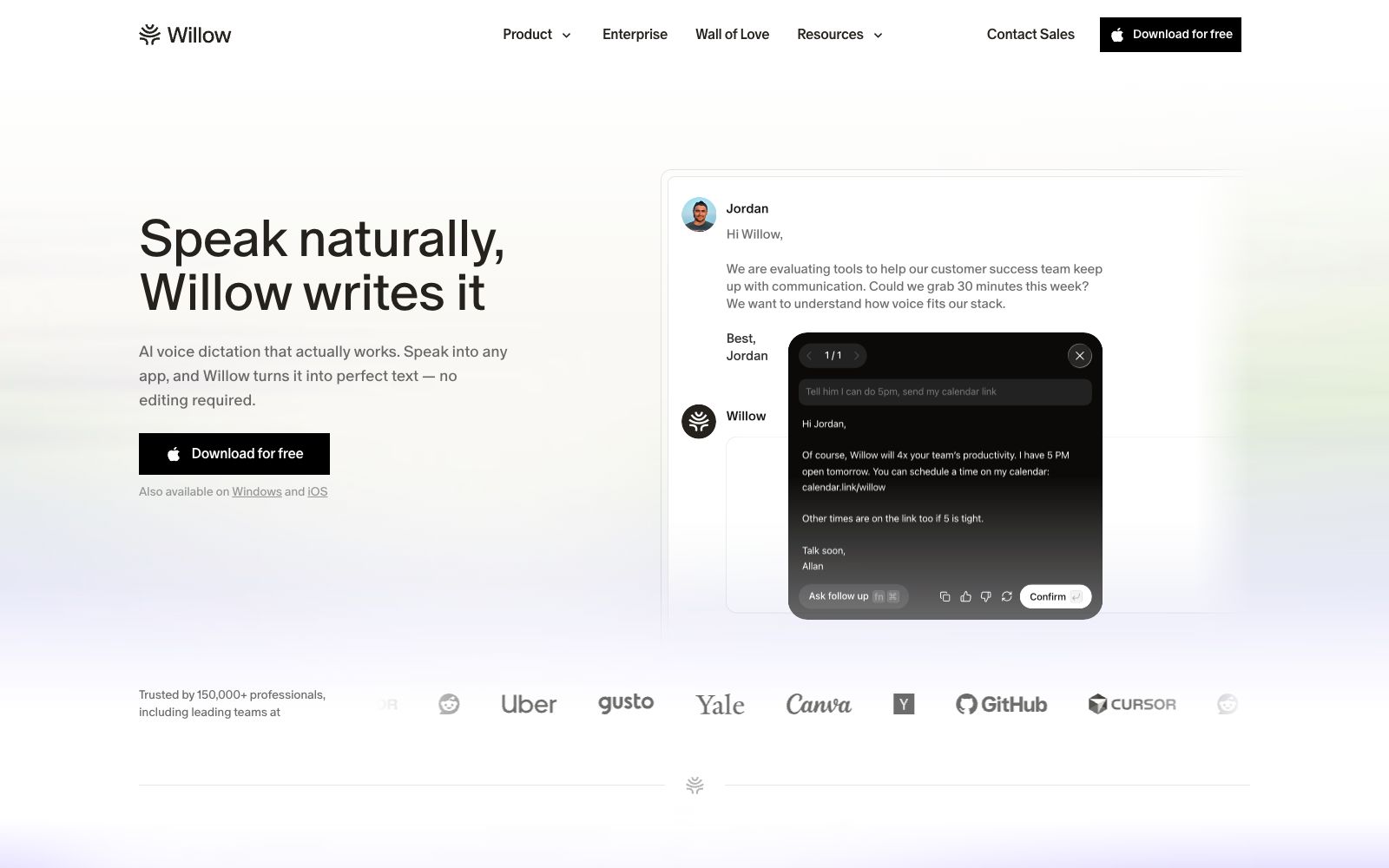

Willow Voice
Willow is a cross-application AI voice dictation tool. Press the shortcut key and speak, and the formatted text will directly fall into the cursor position. It supports more than 100 languages and offline use. It is suitable for people who write emails, reply to messages and write prompts for AI.
Updated: 2026-10-26
What is Willow Voice?
Willow is a voice dictation tool that turns "speech" into "finished text", supporting Mac, Windows and iPhone. The usage is straightforward: hold down the shortcut keys in any input box to speak, and the typeset text will appear at the cursor when you release it—no need to switch windows, copy and paste, or clean up afterward afterward. The official website claims that its writing speed in various applications can be four times that of a keyboard, and emphasizes that it is more accurate than the built-in system dictation. Compared with tools that only do audio recording and transcription, it focuses more on "immediate usability" and a consistent cross-application experience.
Who is it for?
- Knowledge workers who write a large number of emails and instant messages every day: Turn replying from typing into speaking.
- People who write code using tools like Cursor: Dictating prompts and comments is faster than typing them out.
- People with hand discomfort: Reduce keyboard strain when carpal tunnel or RSI flares up.
- Practitioners subject to compliance requirements: Value zero data retention and HIPAA compliance.
- Multinational teams that mix Chinese and English: Switch between over 100 languages at any time.
Key features
6Dictation in any app
Works in any typing area such as Slack, Gmail, Cursor, Notion, and iMessage without altering your existing workflow.
Smart Formatting
Automatically removes conversational fillers, adds punctuation and adjusts formatting; the official claims that the text is ready to send as soon as you let go.
Speed and Accuracy
The official claim is that it is three times more accurate than the built-in dictation on the system, with text appearing in as fast as 200 milliseconds.
Gets more tailored to you over time
It learns your speech patterns and word choices, automatically adding names, product names, and abbreviations to its dictionary; common phrases can also be saved as shortcuts.
Multilingual & Environment Adaptation
Supports switching between over 100 languages at any time, and is optimized for background noise, whispered speech, and fast speakers.
Security & Offline Mode
Certified with SOC 2 Type II and compliant with HIPAA; the official states that there is zero data retention and end-to-end encryption; local dictation on the device is fully available even without an internet connection.
How to use Willow Voice
- Master the three steps first: Place the cursor in any input box, hold down the shortcut key to speak, and release to see the result.
- You'll build muscle memory after three tries.
- Focus on just one scenario in the first week: Master its use in emails first, then expand to instant messages and AI prompts.
- Feed the dictionary: Add frequently occurring names, product names, and technical terms to the dictionary, which will lead to the most obvious improvement in accuracy.
- Use Whisper Mode in noisy environments: The official states that it has been optimized for background noise and quiet speech.
- For enterprise procurement, compliance is key: Teams can download and try it for free.
- the enterprise version requires contacting the sales team.
- For use cases involving medical records or customer data, first confirm the scope of the certifications before rolling it out widely.
Traffic & popularity
Data month Sep 2026
Willow Voice receives about 56.5K visits per month and ranks #737,164 worldwide.
Monthly visits
12 monthsTraffic sources
- Search47.4%
- Direct36.1%
- Social7.8%
- Referrals7.7%
- AI assistants1.0%
Top countries
- United States38.5%
- India7.4%
- Portugal6.5%
- Canada6.3%
- Germany3.1%
Estimated from third-party traffic data.
Similar tools
 SuperWhisperSuperWhisper is a cross-platform speech dictation tool. You can speak in any application to get polished text. It supports over 100 languages, offline transcription and automatic meeting recording, and is suitable for writing, programming and daily office input.
 SayItOpen-source voice input tool for Windows: Press the shortcut key and speak, then the AI removes filler words and organizes the content according to custom prompt words, directly inputting it into Claude Code, Codex, Kiro, or any inputable area.
 Sonic-3Cartesia's real-time speech synthesis model, officially claimed as the first with an audio package below 90 milliseconds, a single model covering 44 languages, supporting voice cloning and custom pronunciation dictionaries, is mainly targeted at the voice Agent scenario.
 OpenLessOpen-source cross-platform voice input tool that supports macOS, Windows and Linux. Press the hotkey and speak to transcribe locally and polish into clean text or structured prompts. Released under MIT License, with data local-first.
 Voice ChangerVoice Changer is a free online voice changer. You can upload audio, record with a microphone or type text to generate speech, and then apply dozens of effects such as monster, robot, phone, and cave echo. It is suitable for spoofed dubbing, short videos and sound effect experiments.
 VoiceboxAn open-source local voice studio that clones timbre from a few recordings, generates speech across multiple TTS engines, and enables global dictation in any application. The official description states that it is a free local alternative to ElevenLabs and WisprFlow.