


MovieFlow
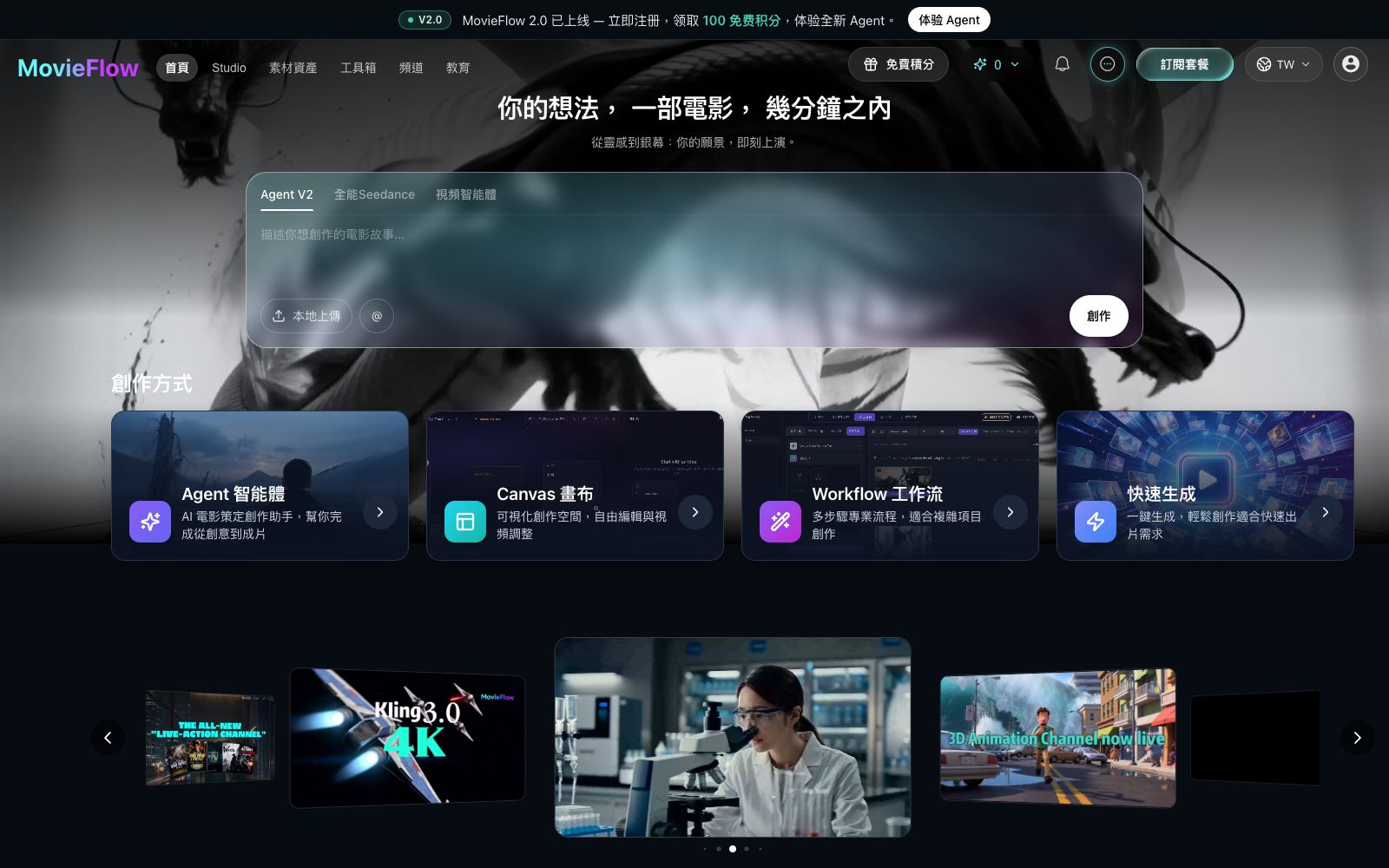
An AI video platform that generates narrative short films by inputting a single sentence or a complete screenplay. It breaks down stages such as screenwriting, storyboarding, and shooting into callable Agents. It also provides two editing methods: canvas and workflow, with multiple video and image models to choose from.
Updated: 2026-10-27
What is MovieFlow?
MovieFlow positions itself as an "AI film studio", emphasizing long narratives rather than single clips: give it a single sentence, a screenplay, or a batch of materials, and it assembles the film following the movie production process. Compared with tools that only generate single shots, it splits links such as screenwriting, storyboarding, shooting, and dubbing into dividable agents, then uses a canvas and workflow to string the results into a timeline that allows revision segment by segment. The official website's slogan is "Your idea becomes a movie in minutes."
Who is it for?
- Independent creators who want to make short films with a narrative length of a few minutes or longer and do not have a crew for photography, lighting, and editing.
- Cross-border e-commerce merchants and brand owners can derive try-on effects and color variants from a single product image, and mass-produce launch materials.
- Teams operating virtual avatar accounts who need to maintain the same face and consistent character settings across multiple videos.
- Planners of short plays, advertisements and promotional videos first verify the scripts in a quick mode and then proceed to refinement through the workflow.
- For agency companies that need to create multiple versions of proposals for clients, they can use the Canvas to quickly piece together different creative directions.
Key features
6Agent Creation Mode
The official website describes it as an AI film and television assistant from idea to finished film. After the user describes the story, the agent advances the subsequent links, which is suitable for individuals who do not have a production team.
Canvas Free Canvas
A visual workspace for free editing and fine-tuning of videos, suitable for on-the-go modifications and shot-by-shot replacement, rather than one-time full generation.
Workflow Multi-step Process
Designed for complex projects, it breaks down production into multiple sequential steps, making it easy to control the pace, fix the source of materials, and reuse the same set of parameters.
Quick Generation
One-click video production mode for quickly validating creative directions, without the need to first build a complete process and then make trial and error.
Multi-model Task Matching
On the in-site video side, you can see Seedance, Veo, Kling, Vidu, MiniMax, etc.; on the image side, you can see Nano Banana, Seedream, GPT Image, etc. The official statement is that it matches more suitable models for each creation task, rather than just providing a single general entrance.
Character and Asset Reusability
Official case studies mention that once a character is saved, the same face can be carried over to subsequent new scenes; the asset library and tool library are used to accumulate commonly used assets.
How to use MovieFlow
- Condense the script into one page: clearly outline the characters, settings, and key actions.
- Structured input generally yields higher fidelity than a prose paragraph.
- For first-time users, it is recommended to first use quick generation to get a feel for the styles of various models, then move to frame-by-frame replacement on the Canvas, and finally use the Workflow to solidify the stabilized process.
- When the same character appears across multiple scenes, first create the character assets and then generate in batches, which is more stable than re-describing their appearance every time.
- The platform has a wide range of models with rapid version updates.
- The same prompt yields significantly different results across various models.
- For important projects, fix the model version before starting production.
- No clear free quota is stated on the official website.
- Please review the subscription and credit rules beforetrial.
- confirm the material and portrait authorization before using the generated content for commercial purposes.
- The official rules may be adjusted, so recheck before signing a contract.
Traffic & popularity
Data month Sep 2026
MovieFlow receives about 278.2K visits per month and ranks #92,305 worldwide.
Monthly visits
12 monthsTraffic sources
- Search42.7%
- Direct31.2%
- Social11.1%
- Referrals7.7%
- AI assistants5.1%
- Other2.2%
Top countries
- United States28.0%
- India14.1%
- China8.5%
- Iraq5.7%
- Netherlands4.9%
Estimated from third-party traffic data.
Similar tools
 Lanta AIOnline AI video generation platform that supports text-to-video, image-to-video and video-to-video. It allows setting scenes and camera movements, maintaining character consistency across shots, and synchronously generating sound effects and dialogue. It is suitable for social media short videos, product advertisements and story-based content.
 RenoiseAn AI video and image workbench that aggregates models such as Seedance, Kling, and Midjourney. It can generate videos and images with just one sentence description. The official claims it can ensure the consistency of characters and products, and uses Agent to plan storyboards.
 Sea Imagine AISea Imagine AI is an all-in-one creation platform integrating text-to-video, image-to-video and image generation. It allows switching multiple mainstream models in the same interface and connecting the generation process with an infinite canvas, making it suitable for creating social short videos within 15 seconds.
 AutoAEAutoAE is an AI tool that turns a single sentence, script or image into dynamic graphics. Templates allow for replacing text and materials, enabling the export of watermark-free 1080p videos in minutes. It can also be integrated into programming agents. Ideal for short video hooks, product launches and lip-sync packaging.
 Anijam AIAn AI tool for generating videos via chat divides cinematic short films, animations, UGC ads, and social media short videos into different studios. It supports four types of inputs: text, scripts, images, and audio, and requires no editing skills.
 HighReachThis AI suite integrates models such as Kling, Veo, Seedance, and FLUX into a single creation platform, covering text-to-video, image-to-video, lip-sync, and soundtrack matching. The official states that it can directly go from product inspiration to final video export.