

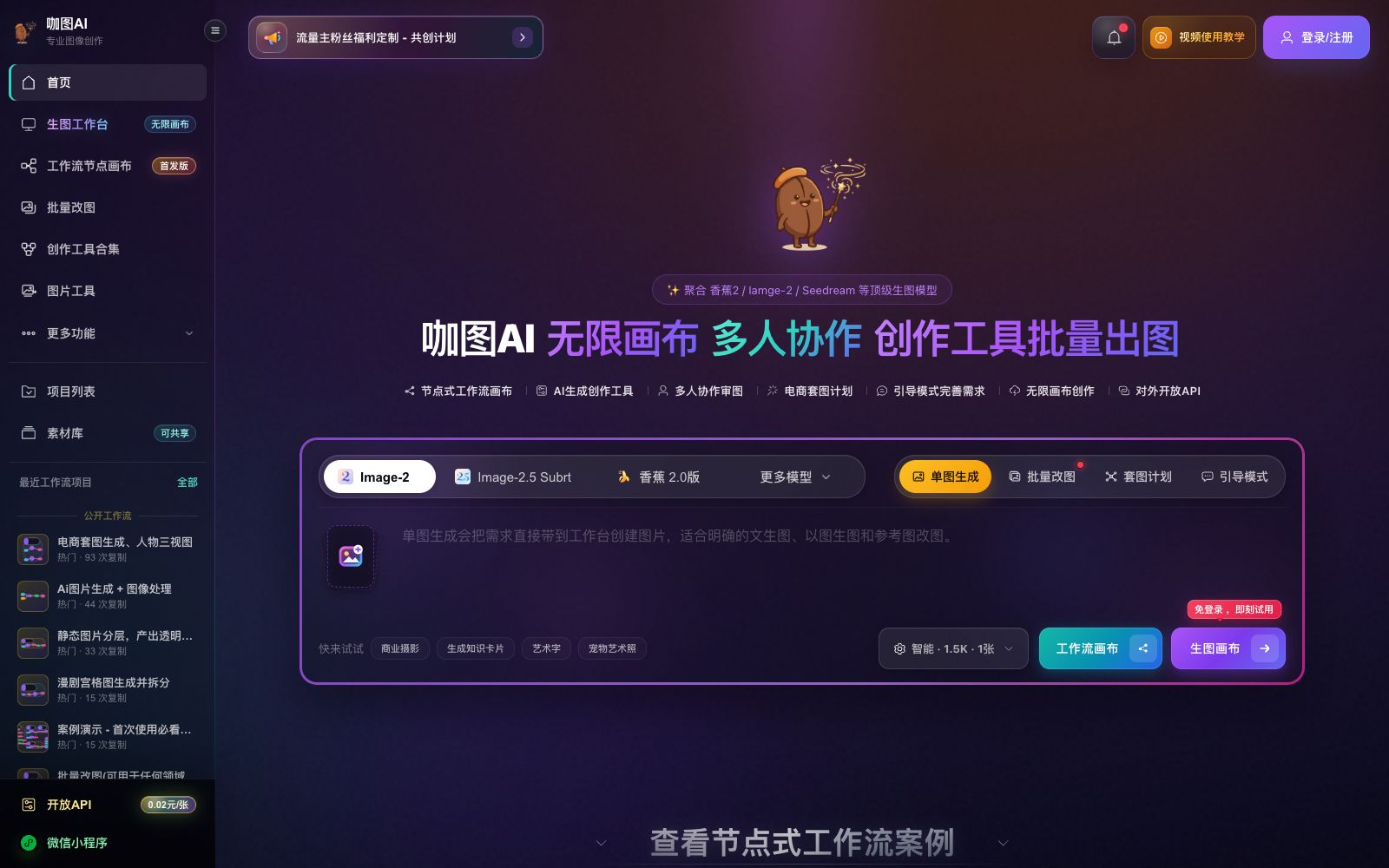

Katu AI
Katu AI is a node-based AI workflow canvas and multi-model image generation workstation. It supports copying public templates, batch image generation, image processing pipelines, e-commerce image sets and multi-person collaboration. The official stated that it can consolidate image generation steps into saveable, copyable and repeatable workflows.
Updated: 2026-10-26
What is Katu AI?
Katu AI positions itself as a "node-based workflow and multi-model image generation workstation", using an infinite canvas to string together prompts, reference images, image generation, batch processing and output into a visual process. Different from image generation platforms that "generate one image from one sentence", it emphasizes consolidating repetitive image generation tasks into templates that can be saved, copied and run repeatedly. The official description states that it is "more like an enterprise AI design workstation than a regular AI image generation website".
Who is it for?
- E-commerce operation and design teams: Teams that need to produce daily main product images, module images for detail pages, and selling point images, and reuse the same image generation standards.
- Brand marketing and content operations professionals: Those who need to quickly generate multiple versions with different backgrounds, aspect ratios, and selling points around the same requirement, then centrally compare and review them on the canvas.
- Enterprises with existing product libraries or content systems: The official states that AI image generation can be integrated into internal backends and office automation systems through open APIs.
- Light creators who need mobile office work: The official states that they can upload materials, view results, and continue creating across multiple devices.
Key features
6Node-based AI Workflow Canvas
It is officially stated that prompt words, reference images, AI image generation, batch image generation, image processing and result output can be visually connected.
View and Copy Public Workflow Templates
The official description states that you can first open the official public workflows to view the organization of nodes, connections, and parameters, then copy them to your own projects after logging in and replace the materials and models.
Multi-Model Text-to-Image and Image-to-Image
The official statement says it aggregates a variety of image generation models that can be switched according to tasks; different models each have their advantages in terms of character, product, text layout, and reference image consistency, and are also affected by resource and risk control fluctuations, making them suitable for production-level continuous image generation.
Batch Image Generation and Image Processing Pipeline
The official version states that batch nodes can organize multiple prompt words and multiple sets of reference images. The results can then be connected to processing nodes such as high-definition enlargement, intelligent background removal, and clarity restoration, followed by unified preview and download.
E-commerce Main Image and Series Image Generation
The official provides creative tool access points such as e-commerce model outfit changing, accessory wearing, and scene images for product main images. It also supports batch generation of images with rotation. In a single task, you can fix the product, clothing, copy, or face, and only rotate the background, model, or scene.
Multi-Person Collaboration & Infinite Canvas
The official states that each workflow is saved as an independent project to preserve nodes, parameters and canvas positions, supporting shared material libraries and team collaboration; it also provides an open API and mini-program, with accounts, Kado beans and creation data kept consistent.
How to use Katu AI
- For new users, don't start with a blank canvas: first copy an official public workflow, understand how nodes and parameters are organized, then replace the prompt words, reference images and models.
- Turn high-frequency tasks into creative tool fields: The official says the form will retain the information filled in last time, and only local fields need to be replaced when reusing, which is more stable than rewriting the entire prompt each time.
- When maintaining brand consistency, fix information such as products, faces, and copy, and only rotate backgrounds, models, or scenes.
- Generate multiple sets of comparable images in one go with multi-image rotation.
- When scheduling, pay attention to model fluctuations.
- It is recommended to prepare alternative models to prevent fluctuations in a single model from slowing down the batch image generation.
- For materials involving commercial use and collaboration, first confirm the permissions and authorization scope of the material library.
- official rules may be adjusted, and recheck before official delivery.
Traffic & popularity
Data month Sep 2026
Katu AI receives about 334.6K visits per month and ranks #125,490 worldwide.
Monthly visits
12 monthsTraffic sources
- Direct53.9%
- Referrals41.9%
- Search3.2%
- Social0.8%
- Display ads0.2%
Top countries
- China95.8%
- Hong Kong, China2.0%
- United States1.2%
- Singapore0.5%
- Taiwan, China0.2%
Estimated from third-party traffic data.
Similar tools
 Qianlu AIQianlu AI Canvas is an infinite canvas design tool for visual creators. It supports text-to-image, image-to-image, intelligent background removal, watermark removal, image upscaling to HD and 4K AI video generation, and offers team collaboration.
 Jiaodian AIJiaodian AI is a multi-category AI product image generation platform for e-commerce. Officially, it supports AI virtual try-on images for categories such as women's clothing, accessories, mother and baby products, and pets. It also provides AI background replacement, white background image production, product image retouching, and click-through rate prediction for main images on Taobao, JD.com, and Douyin.
 TusiAn AI model sharing community for free online image generation, gathering Stable Diffusion, LoRA, ComfyUI workflows and various domestic models, covering anime, Chinese style and e-commerce design.
 3D AI StudioAn online workbench that converts text or images into 3D models, aggregating multiple engines such as Meshy and Tripo. It supports AI texture mapping and automatic retopology, making it suitable for game and product design.
 AI Image to Image GeneratorA registration-free online image-to-image tool. Upload a photo and describe it in one sentence to change the background, adjust the style, create professional avatars, expand the canvas, and restore old photos. It is ideal for e-commerce and social media operators to quickly generate images.
 YouArtYouArt is a Chinese AI image and video creation platform that aggregates multiple image and video models. It provides video workflows, 3D director stations, e-commerce and tutorial templates. Some models are available for zero-point trial, making it suitable for creative teams that need to generate a large volume of content.