

Duegooder
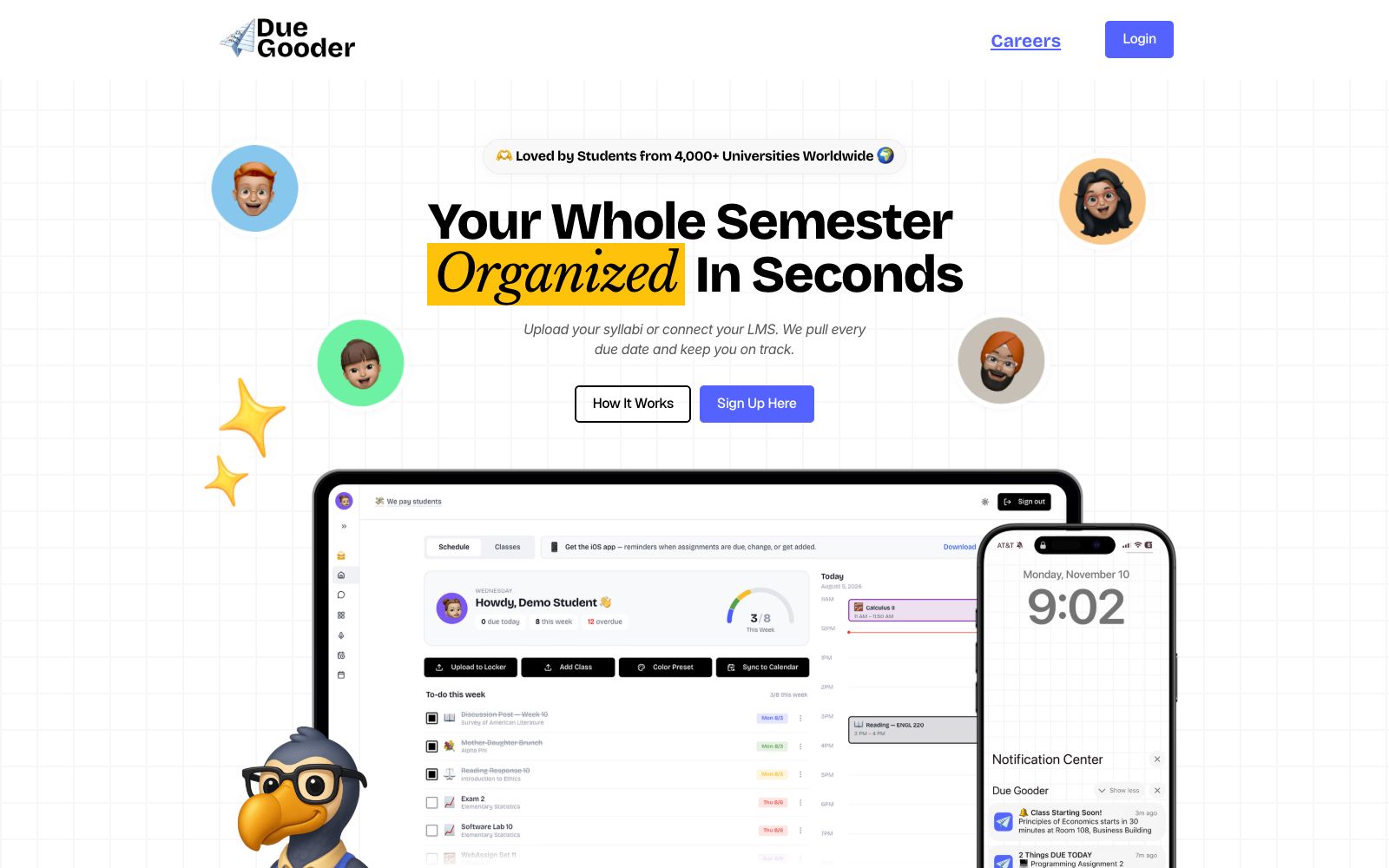
A semester planning tool built for university students. Upload your syllabi or connect your school system, and it automatically extracts assignment deadlines, creates daily to-dos, and syncs everything to your calendar. Ideal for undergraduates and international students juggling multiple courses at once.
Updated: 2026-10-26
What is Duegooder?
Duegooder is a study tool that turns course syllabi into semester plans, built for college students. Upload a syllabus or connect your school's LMS, and it pulls out every assignment and deadline, organizing them into a calendar and a to-do list pushed to you each morning. It doesn't do your homework for you—it only solves the "I don't know when to start" problem, which is what most sets it apart from general-purpose AI note-taking tools.
Who is it for?
- Undergraduates taking five or six courses a semester, with assignments scattered across multiple platforms.
- International students who get a pile of syllabi at the start of term and haven't yet sorted out the deadlines.
- People who need to take notes during class and don't want to organize recordings afterward.
- People who already use Google Calendar to plan their lives and don't want to enter every deadline manually.
- Students who want to use flashcards to fill gaps and focus on weak areas during exam prep.
Key features
6Syllabus Parsing
Per the official description, after you upload a course syllabus, the AI organizes scattered dates and assignment types into a full-semester plan and automatically syncs it to Google Calendar.
LMS Integration
You can connect directly to your school's learning management system and pull newly assigned homework into the calendar as well; the official FAQ mentions support for Blackboard, D2L, Moodle, and other platforms.
Daily To-Dos
A personalized list is pushed every morning with reminders for upcoming classes and assignments; you get notified again when deadlines change or new items are added, and the list is generated automatically from syllabus and LMS data.
Color-Coded Course Calendar
Different courses are distinguished by different colors, with synced reminders on mobile; the official site says the whole setup takes just three steps.
Class Recording Notes
Record class content to generate transcripts and summaries for easy review of key points.
Resource Locker and Adaptive Practice
Smart Class Locker archives course files and makes them searchable; adaptive learning uses flashcards and quizzes to target weak spots.
How to use Duegooder
- 1Import one course first, check whether all the dates were captured, then process the rest in bulk.
- 2Before connecting your LMS, check the authorization scope of your school account and grant only permission to read courses and assignments.
- 3Handle the morning list at a fixed time each day, and look at "must submit today" and "should start today" separately.
- 4Class recordings involve the voices of instructors and classmates; get consent before publishing or sharing them.
- 5The official FAQ covers questions such as whether it's free and whether you can invite classmates; refer to the on-site documentation for specific pricing and quotas.
Traffic & popularity
Data month Sep 2026
Duegooder receives about 1.5M visits per month and ranks #29,855 worldwide.
Monthly visits
12 monthsTraffic sources
- Direct49.9%
- Search39.9%
- Referrals6.2%
- Mail2.2%
- Social1.7%
Top countries
- United States78.2%
- Canada18.0%
- United Arab Emirates1.2%
- United Kingdom0.5%
- Peru0.4%
Estimated from third-party traffic data.
Similar tools
 FlashkaAn AI learning application for students that can convert courseware, PDFs and classroom recordings into flashcards, mind maps and mock exam papers, paired with spaced repetition and AI tutor Q&A, it is suitable for sprint exam preparation.
 MindsmithMindsmith is an AI-native courseware creation tool that can automatically convert documents, PPTs, videos, or standardized processes into interactive courses with dialogues, branching storylines and quizzes, supporting the export of standard courseware packages and learning data analysis.
 Essay GraderAn AI essay grading tool for teachers, which can grade essays of an entire class in batches based on self-built scoring criteria, provide itemized feedback, offer AI trace and plagiarism detection, and be integrated with classroom systems.
 OpenMAICAn open-source multi-agent interactive classroom project that generates immersive courses by uploading a single PDF. The official version states that the classroom features AI teachers and AI classmates participating in discussions. The platform also offers a classroom arena and course management functions.
 AuralixConvert notes, PDFs and Zettelkasten notes into interactive course learning tools. The official says it will advance teaching according to the parts you have mastered, intersperse check questions and final tests, and support making courses into templates for others to clone.
 ELSA SpeakELSA Speak is an AI learning app specializing in spoken English, with over 90 million downloads according to official data. It can score each sentence based on pronunciation one by one, and uses role-playing to practice workplace and interview conversations, making it suitable for people who want to practice speaking.