


Cartoonize
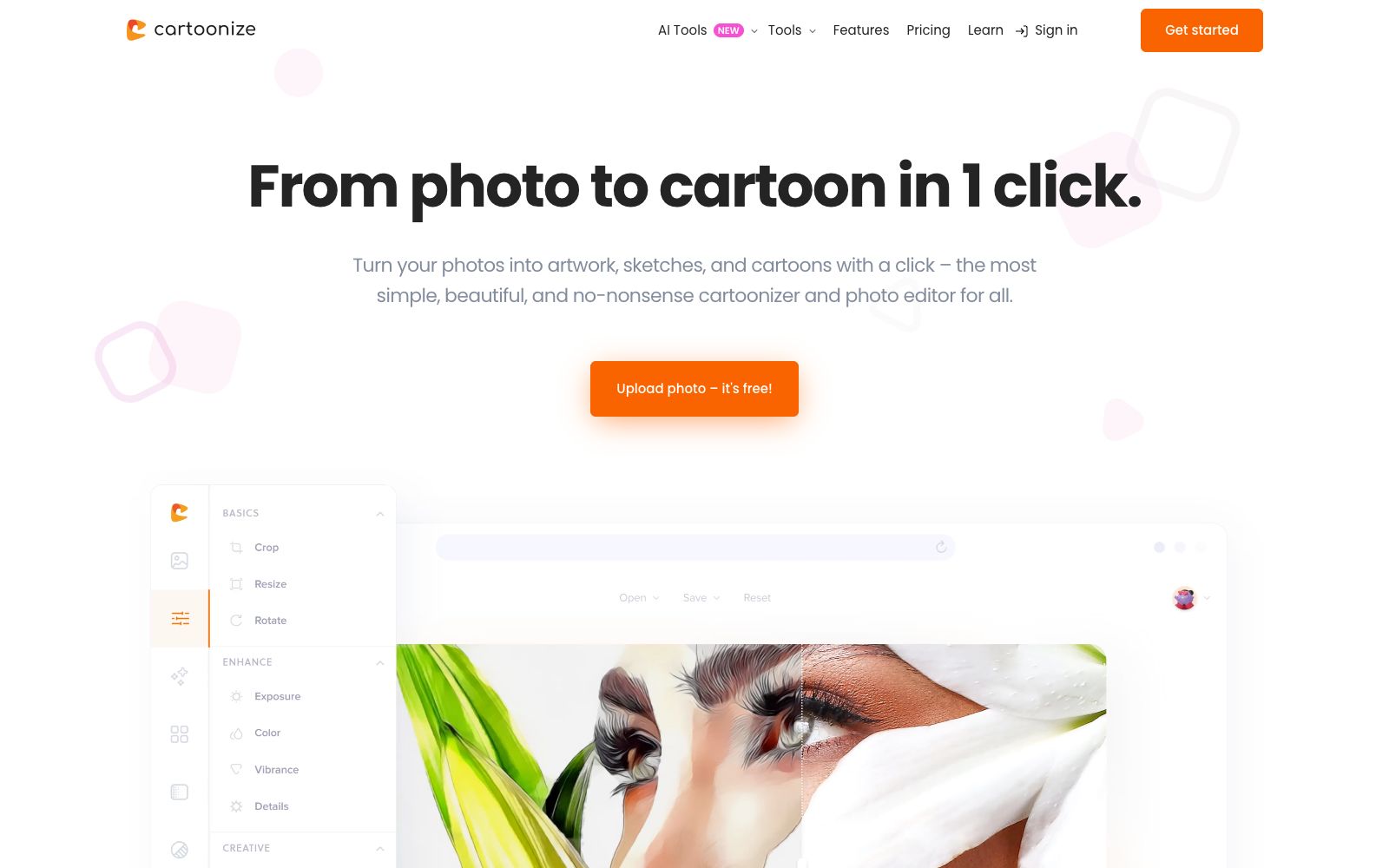
Cartoonize is a photo-to-cartoon and avatar tool. Officially, it can turn photos into cartoons, sketches and animations with one click. It provides 4 million materials and supports online and offline editing, covering avatar and sticker creation.
Updated: 2026-10-26
What is Cartoonize?
Cartoonize is a tool that turns photos into cartoons, sketches and anime. Officially, it is described as "From photo to cartoon in 1 click", emphasizing simplicity, good looks and no frills. It combines photo cartoonization with a set of photo and text editors. Officially, it states that there are more than 4 million photos, graphics and icons available, and supports both online and offline usage. For individual users, it is a low-threshold entry point for making avatars and memes, and you can start using it right away by opening the webpage. It has a variety of style filters, making it suitable for relaxed creation; after generation, you can make avatars, stickers and memes for download, covering social media and chat scenarios, and sharing is also convenient. It makes the process of turning photos into cartoons simple enough—you can open the webpage and get started easily with making avatars, memes and interesting posters.
Who is it for?
- Individual users who want to create cartoon avatars or anime-style photos to change their style at a low cost.
- Creators who make emojis, stickers and social media matching pictures for meme creation and interaction.
- Users who need simple photo editing and don't want to learn professional software can get started quickly.
- For enthusiasts who want to create interesting designs like posters and photo frames, to make souvenirs and gifts.
Key features
6One-click Cartoonization
The official claims that it can turn photos into cartoons, sketches and animations with just one click, featuring over a hundred special effect filters and a rich variety of styles.
AI Tools
The official claims to offer features such as face restoration, blemish removal, background removal, upscaling, anti-aging, face swapping, and prompt generation.
Photo Editor
It provides features such as background removal, cropping, scaling, flipping, brightness and contrast adjustment, text editing, and color replacement, with a complete set of basic functions.
Filters and Effects
The official claims it offers effects such as cartoonization, NFT creation, conversion to oil painting, conversion to sketch, conversion to painting, and posterization, with a variety of gameplay options.
Materials and Stickers
The official claims that there are over 4 million photos, graphics and icons available, including supporting the creation of avatars, stickers and emoticons, along with supporting materials.
Online & Offline
The official version supports both online and offline use, allowing you to pick up projects at any time without being restricted by network availability.
How to use Cartoonize
- 1First try one-click cartoonization to see the basic effect, then fine-tune the style with filters to find the version that looks most like you.
- 2AI facial tools involve portraits and privacy; pay attention to compliance for commercial use and be cautious when using them for real-person promotion.
- 3Note that the offline version may have different features compared to the online version. Choose according to your needs, and use the online version to ensure the quality of important images.
- 4Please pay attention to the scope of authorization for referenced materials. For commercial use, it shall be subject to the official instructions, and the authorization of paid elements shall be confirmed.
- 5Official features and quotas may be adjusted. Check the current terms again before official use to confirm coverage of rights and interests.
Traffic & popularity
Data month Sep 2026
Cartoonize receives about 260.7K visits per month and ranks #149,249 worldwide.
Monthly visits
12 monthsTraffic sources
- Search59.5%
- Direct24.2%
- Social11.0%
- Referrals4.9%
- AI assistants0.4%
Top countries
- United States18.5%
- Mexico7.6%
- United Kingdom5.5%
- Philippines4.8%
- Vietnam3.6%
Estimated from third-party traffic data.
Similar tools
 FotorFotor is a free online photo editor. Officially, it offers features such as AI enhancement, AI photo retouching, background removal, and text-to-image conversion. It also supports converting images to anime, coloring old photos, and batch processing, covering daily photo editing and creative design needs.
 ToonCrafterToonCrafter is an AI animation tool for cartoon frame interpolation. Upload two keyframes to generate intermediate transition animations. The official claims that a single generation takes about 10 to 20 seconds, outputs MP4 files, and it is suitable for emojis, social media animated images and presentation materials.
 ArtflowArtflow is an AI identity and content creation platform. Officially, it says you can use "Actors" to generate photos and videos that are always true to yourself, covering avatars, social media short videos, brand materials and posters, which is suitable for individuals and brands.
 Icons8Icons8 is a design material and AI tool platform. Officially, it claims to offer icons, illustrations, 3D models, photos and music in over 130 styles, and has launched Icons8 MCP to enable AI agents to call and use the materials.
 KachaAI avatar and portrait generation app that provides templates for professional portraits, ID photos, wedding photos, cartoon portraits and more. Its official website states that it can intelligently match styles according to skin tone, and also supports background removal and AI video functions.
 Picture to DrawingFree online tool to convert photos to paintings, which can turn images into pencil sketches, line drafts, charcoal drawings, colored pencil and watercolor styles with one click. The official website says no registration is required, and it supports JPG, PNG, WEBP and HEIC formats.