


Lovart
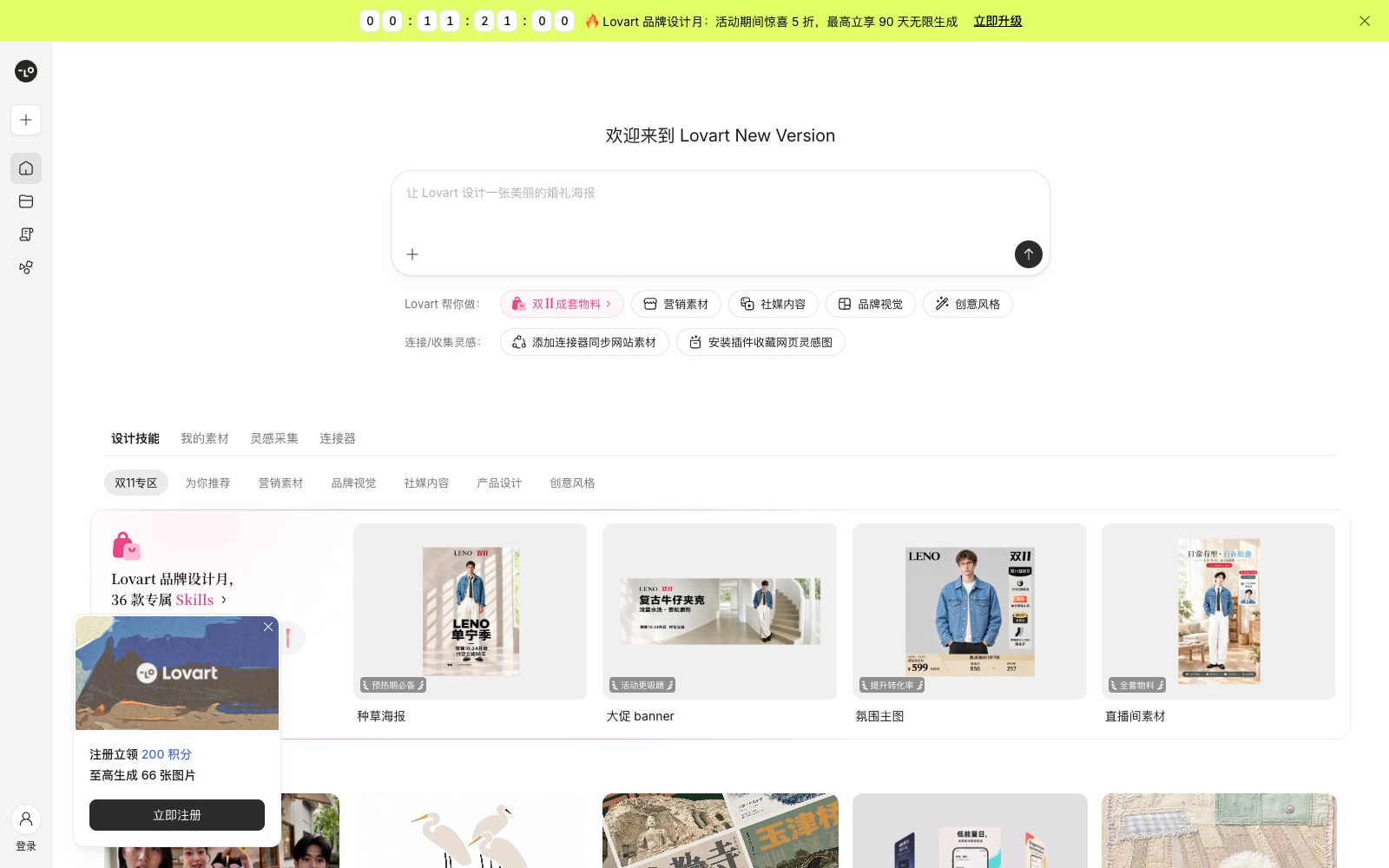
Lovart is a new generation of design Agent. Officially, it claims that everything from mood boards to brand visuals, from poster illustrations to product design, can be completed through dialogue. It has a built-in design skill marketplace, inspiration collection, a material library and connectors, which can synchronize website materials and collect inspirational images from web pages.
Updated: 2026-10-26
What is Lovart?
Lovart calls itself the "new generation of design Agent". The meta-description on its official website states that it can transform unique ideas into finished products, covering the entire workflow from inspiration boards to brand visuals, and from poster illustrations to product design. Different from tools that only generate single-point images, Lovart is more like a design workbench equipped with an Agent: the top-left corner is for creating new projects, the left side is divided into three sections: "Projects", "Skills" and "My Materials". The homepage examples directly write prompt words into the interface, such as "Let Lovart create a warm café-style menu poster" and "Design a beautiful wedding poster".
Who is it for?
- Brand designers: Batch produce posters, banners, social media graphic sets and product commercials based on a set of visual specifications.
- E-commerce and ad placement optimizers: Create Feed, Stories static ads and batch variants for channels such as Facebook and Instagram.
- Social media operators: Create Xiaohongshu 3:4 image-text notes, 9:15 full-screen image groups, and cross-platform series of marketing images.
- Product and Growth Teams: Create the screenshots, icons, and store promotion materials required for the launch of mobile applications.
- Content creators: Convert photos into posters or visual works in specific styles, and refine their fixed creative methods using Skills.
Key features
6Conversational Design Agent
You can submit requirements in natural language within a project, and the Agent will advance around the design tasks. Official examples include the complete set of designs for menu posters and wedding posters.
Design Skills
A built-in skill market with support for loading third-party skills. Official skill examples include UGC advertising video director, minimalist geometric abstract logo, marketing banner design, product commercial, poster design, Xiaohongshu marketing kit, social media marketing kit, Meta ad creative, mobile app listing toolkit, etc.
Creative Styles & Special Zones
Skills are categorized by marketing materials, brand visuals, social media content, product design, and creative styles, with special zones for events like Double 11. The official statement mentions that 36 exclusive Skills are available for brand design each month.
Inspiration Collection & Connectors
Supports adding connectors to sync website materials, and also allows installing plugins to collect inspirational images from web pages, bringing external materials into projects.
My Assets
Centralizes the management of personally uploaded and generated materials, making it easy to reuse the same set of visual elements across different projects.
Editing & Complete Set Output
The subscription page divides creation modes into three tiers: Quick, Balanced, and Expert, and lists the differences between web design and PPT, brand kits, concurrent tasks, and up to 4K images and videos.
How to use Lovart
- Prioritize using Skills over blank conversations: Skills already include creation methods, output specifications and verification steps, and choosing the right Skill can save a lot of communication.
- Before using others' skills, make sure you fully understand their applicable boundaries.
- The descriptions of official skills usually specify "scenarios where they should not be used", for example, only creating ancient architectural posters based on real evidence and not fictional ones.
- Plan the complete set of materials in one go: First define the main visuals and color palette, then derive different sizes within the same project to avoid style drift caused by generating each version separately.
- Put elements that need to be reused repeatedly into "My Materials", which is more reliable than regenerating them each time and also helps maintain brand consistency.
- There are significant differences between subscription tiers (in terms of creation modes, web design and PPT capabilities, number of brand kits, and concurrent tasks).
- choose a tier based on your actual output volume.
- The official pages state that each tier includes commercial usage authorization, but the scope of authorization and available models may be adjusted.
- Please refer to the latest official terms before official commercial use.
Traffic & popularity
Data month Sep 2026
Lovart receives about 115.9K visits per month and ranks #342,986 worldwide.
Monthly visits
10 monthsTraffic sources
- Direct51.7%
- Search28.5%
- Referrals13.3%
- Display ads4.1%
- Social1.5%
- Other0.9%
Top countries
- China89.6%
- United States4.5%
- Singapore2.6%
- Hong Kong, China1.6%
- Japan1.4%
Estimated from third-party traffic data.
Similar tools
 KiveAn AI platform for creating product photography and brand visuals for consumer brands. It can generate ad-level images from product links or materials, supports precise product integration and instruction following, and enables creation, editing, and collaboration in the same workspace.
 DuiyouAn all-round AI design Agent under Alibaba, its official website introduces that it provides official experience entrances for models such as Qwen and Tongyi Wanxiang Wan series, and supports image and video generation, 3D material online rendering and free commercial materials.
 MioraMiora is an AI agent creation studio with memory. Officially, it claims that inputting a one-sentence brief will output a complete set of visuals that align with the brand tone. Images, videos, UI/UX and 3D designs are all created on the same infinite canvas, and it supports a memory and skill marketplace.
 Stockimg AIStockimg AI is an all-in-one AI design tool that can quickly generate visuals such as logos, illustrations, posters and avatars, and extend to the generation, editing, scheduling and release of social media content, reducing the time-consuming content production.
 OJOAn AI design Agent workbench for product teams that generates editable UIs and interactive prototypes from a single requirement, an image, or a URL, and directly outputs front-end code that can be committed to a repository. The official claims it can combine more than 200 skills.
 STUDIO AIA no-code web design tool from Studio that publishes designs directly as websites. It comes with a visual editor, real-time collaborative CMS, Figma import, and one-click hosting and launch. Ideal for designers to create portfolios and landing pages.