


Tongyi Tingwu
Alibaba Cloud Tongyi Tingwu is a work and study AI assistant focused on audio and video content. Officially, it is said to rely on large models to help users record, organize and analyze audio and video content. It can perform real-time speech-to-text, simultaneous translation, intelligent summarization and podcast transcription.
Updated: 2026-10-26
What is Tongyi Tingwu?
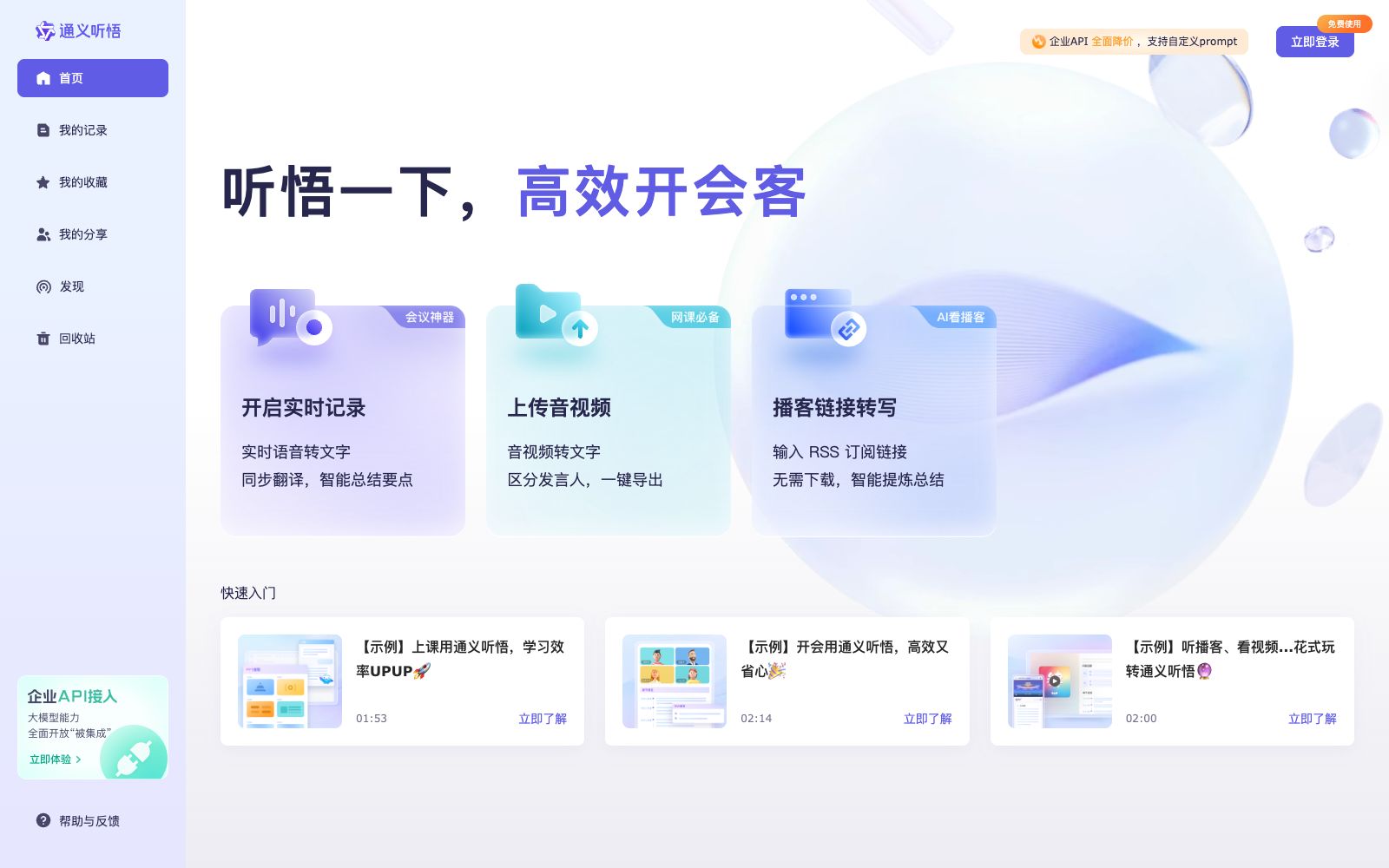
Tongyi Tingwu is an AI assistant for work and study launched by Alibaba Cloud, focusing on audio and video content. Officially, it claims to rely on large models to help users record, organize and analyze audio and video content. You can experience using large models to take audio and video notes and organize meeting minutes. The official website's slogan is "Tingwu it". The difference between it and general-purpose chat assistants is that the processing object is not text but audio and video: there are three entry points for real-time recording, uploading audio and video, and transcribing podcast links, corresponding to three scenarios: meetings, classes, and listening to podcasts respectively. The platform also provides enterprise-level APIs. According to the official website, the prices have been comprehensively reduced, custom prompts are supported, and low-code application templates are provided, which are ready to use out of the box and can be deployed privately.
Who is it for?
- Professionals who attend meetings frequently use real-time recording to generate key points and to-do items during the meetings
- Students who attend classes or lectures convert audio recordings into searchable notes
- For people who listen to podcasts and watch long videos, use RSS link transcription instead of full listening
- Researchers conducting interviews and user surveys organize raw materials by distinguishing between speakers
- Enterprises that need to integrate transcription capabilities into their internal systems can use the enterprise API and opt for private deployment
Key features
6Real-time Speech-to-Text
After enabling real-time recording, it converts ongoing speech into text. According to the official website, it can perform simultaneous translation and intelligently summarize key points, making it suitable for taking notes during meetings.
Audio and Video to Text
Upload existing audio and video files to convert them into text. According to the official, it can distinguish between speakers and supports one-click export.
Podcast Link Transcription
Enter an RSS subscription link to get a transcription. The official version states that there is no need to download files, and it can intelligently extract and summarize content.
Recording, Organizing and Distribution
The transcription results are all centralized in "My Records". You can use "My Favorites" and "My Shares" to categorize and distribute them, and you can browse other content on the "Discover" page.
Enterprise API
Provides an enterprise API access portal. The official website indicates that it supports custom prompts, offers low-code application templates, is ready to use out of the box, and allows for private deployment.
Scenario-based Quick Start
The official website provides examples such as "Using Tongyi Tingwu for Classes", "Using Tongyi Tingwu for Meetings", and "Listening to Podcasts and Watching Videos" in the quick start section, allowing new users to get started by following the instructions.
How to use Tongyi Tingwu
- Choosing an entry point by scenario is the most hassle-free method: For an ongoing meeting, use "Start Real-time Recording".
- for pre-recorded files, go with "Upload Audio/Video".
- for podcast episodes, simply paste the RSS link without downloading the audio first.
- Before a meeting or class, confirm the recording permissions—transcription quality largely depends on the clarity of the original audio.
- In multi-person scenarios, stay as close to the sound source as possible or use an external microphone.
- After transcription is complete, don’t just copy and paste the export directly.
- First use Smart Summary to review key conclusions and to-do items, then go back to the original text to verify proper nouns and numbers.
- For long-term use or team collaboration, you can evaluate the enterprise API.
- The official website states that it supports custom prompts and private deployment.
- Pricing and quotas are subject to the instructions on the official website’s corresponding page.
- When dealing with others’ recordings and meeting content, be sure to obtain the consent of all participants and comply with data regulations.
Traffic & popularity
Data month Sep 2026
Tongyi Tingwu receives about 1.4M visits per month.
Monthly visits
12 monthsTraffic sources
- Direct65.4%
- Search17.9%
- Social10.1%
- Referrals3.9%
- AI assistants2.1%
- Other0.6%
Top countries
- China82.3%
- Hong Kong, China7.5%
- United States4.3%
- Germany1.5%
- Singapore1.3%
Estimated from third-party traffic data.
In these collections
Similar tools
 UniScribeUniScribe converts audio, video and online video links into transcripts. Officially, it supports more than 60 languages, speaker recognition and AI summaries, and can export subtitles. It is suitable for meeting minutes and podcast organization.
 SpeechnotesA free online speech-to-text tool that allows real-time dictation and note-taking via a browser, as well as uploading audio and video files for automatic transcription and translation. It provides browser extensions and transcription APIs. The official website states that it has served millions of users since 2015.
 TranscriptlyA free online audio and video to text tool that can upload local files or paste video links, output subtitles with timestamps and export in multiple formats. It is suitable for organizing course, interview and short video copy.
 Transcri.ioOnline audio and video transcription tool that can convert recordings and videos into text without installation. It supports subtitle generation and translation for more than 100 languages, and can also summarize questions about documents, making it suitable for interview organization.
 LyraAn AI-native meeting platform that holds meetings in a browser with speaker-specific transcription, conducts background research before meetings, automatically updates CRMs and follows up after meetings, and enables cross-meeting retrieval of historical conversations.
 JotMeJotMe is a real-time translation tool for multilingual conferences. It supports simultaneous interpretation for over 200 languages, speaker-differentiated transcription, meeting minutes and in-meeting follow-up questions. It does not require a robot to join the meeting and is suitable for multinational teams and online events.