


Papago
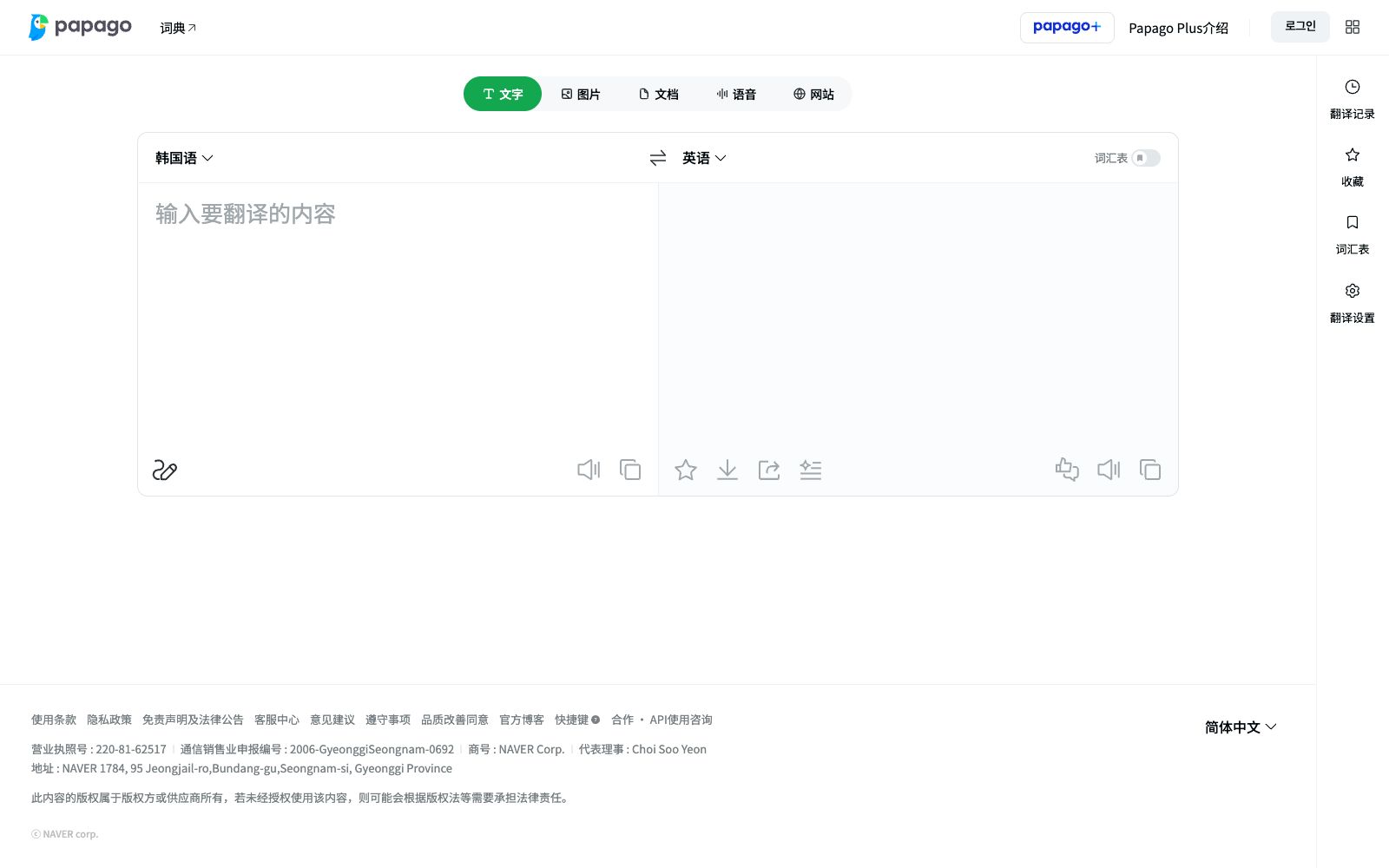
Papago is an AI translation tool launched by NAVER. It supports translation of text, images, documents, voices and web pages, and provides dictionaries and value-added features of PAPAGO PLUS, covering mutual translation of multiple languages.
Updated: 2026-10-26
What is Papago?
Papago is an AI translation tool launched by South Korean company NAVER, with its official slogan being "Dream of a world without language barriers where you can converse freely." Unlike single-text translation, it supports multiple forms including text, images, documents, voice, and web pages, and is equipped with a dictionary and value-added features like PAPAGO PLUS, making it suitable for daily and cross-lingual work scenarios. The web version also provides automatic language detection, syntactic analysis, and a series of keyboard shortcuts to facilitate frequent use.
Who is it for?
- Users who read Korean materials and need to translate between Korean and other languages.
- Ordinary users who need real-time image and voice translation during travel or daily life.
- People engaged in cross-border work or study who process multilingual documents and web pages.
- Language learners who need dictionary support to understand word usage.
Key features
6Text Translation
Enter text on the web version for real-time mutual translation, supporting automatic language detection and syntactic analysis to get results quickly.
Image Translation
Can translate text content within images, suitable for scenarios such as road signs, menus, and screenshots.
Document Translation
Supports uploading documents for translation, preserving the original structure, suitable for long-form materials.
Voice and Webpage Translation
Provides voice translation and full-page webpage translation capabilities, making it more convenient to browse foreign language websites.
Dictionary & PLUS
Built-in dictionary, and provides value-added features such as PAPAGO PLUS to meet higher needs.
Keyboard Shortcuts & User Experience
Provides keyboard shortcuts for language switching, language swap, confirmation, etc., for efficient operation.
How to use Papago
- Start with text and image translation first: these two are the most intuitive and suitable for daily verification of effects.
- Check the format for document and webpage translation: For long documents and full-page webpage translations, it is recommended to verify the layout and proper nouns.
- Pay attention to account and terms: For the PAPAGO PLUS paid features, first clarify the rights and billing.
- translation results are for reference only, and important contracts and official documents still require manual proofreading, as official rules may be adjusted.
- Manual check for proper nouns: It is recommended to manually verify the translations of personal names, brand names, and technical terms before using them.
- Check the PLUS benefits first: For paid features, review the pricing and scope of application before deciding whether to subscribe.
- Check the layout for web translation: Pay attention to layout errors after translating an entire page, and it is recommended to process important pages in sections.
- Shorter sentences yield more accurate results: Long and complex sentences should be broken down into shorter ones for more stable outcomes.
- Glossary can be enabled: Turn on Glossary to ensure consistent translation of proper nouns.
- When you start using it, it is recommended to first use the free quota to run through the core workflow, confirm that the output quality meets your expectations, and then evaluate whether it is worth upgrading to a paid plan.
Traffic & popularity
Data month Sep 2026
Papago receives about 12.4M visits per month.
Monthly visits
12 monthsTraffic sources
- Direct71.6%
- Search21.3%
- Referrals5.7%
- Mail0.5%
- Social0.4%
- Other0.6%
Top countries
- South Korea84.9%
- Japan5.9%
- United States3.0%
- China1.4%
- Philippines0.9%
Estimated from third-party traffic data.
Similar tools
 Sogou TranslateSogou Translate is an intelligent translation tool developed by Sogou. Officially, it supports mutual translation of more than 50 languages including Chinese, English, French, etc. It provides text, document, image translation and English polishing, and covers vertical fields such as general, biomedical and finance.
 Deep TranslateDeepTranslate is a free AI bilingual web translation browser extension that supports over 140 languages and multiple translation APIs, enabling bilingual comparison or immersive translation of webpages, articles and social media posts.
 TTimeA translation and text recognition software for Windows and macOS, supporting word-by-word translation, screenshot translation, image translation and OCR, and allowing self-configuration of multiple translation sources such as DeepL and OpenAI.
 Lara TranslateThe AI translation tool produced by Translated supports real-time translation of text, documents, images, audio and speech, and provides translation style switching, term memory, incognito mode and enterprise-level interfaces.
 DeepLAn AI translation tool focusing on translation accuracy, it supports text, document and speech translation, provides glossary, tone and style configuration. The official claims that it is trusted by more than 200,000 enterprises worldwide and used by millions of people every day.
 OpenLOpenL is an AI translation tool that supports text, image and document translation, covering more than 100 languages. It provides general, professional, legal, medical and other modes, and includes free quotas and subscription plans.