


Marble
A single prompt generates a high-fidelity, continuously browsable 3D world that can be downloaded and exported, and you can also stitch multiple worlds together in Studio to create videos; unlike 3D design tools, it provides ready-to-use spaces rather than deliverable models.
Updated: 2026-10-26
What is Marble?
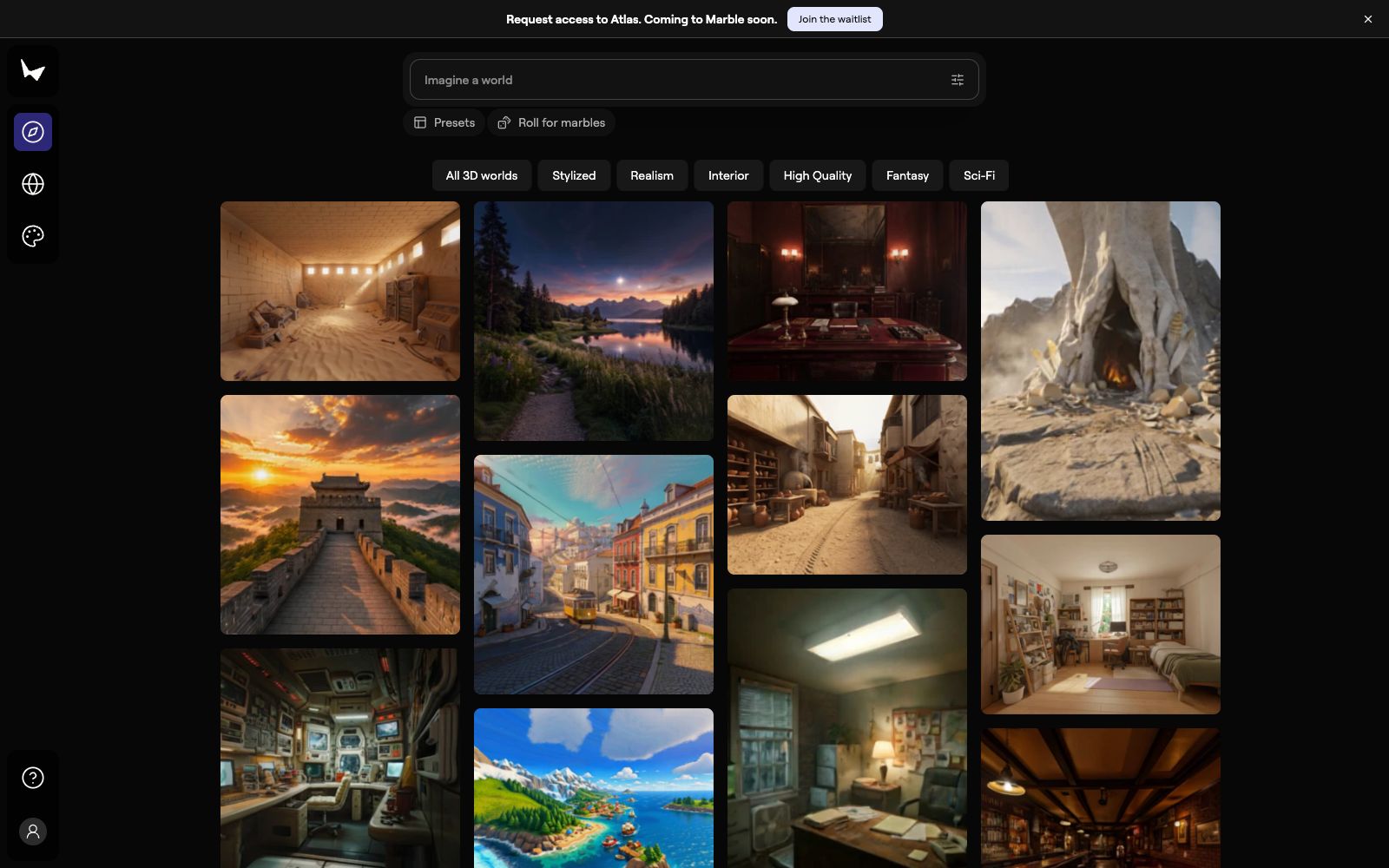
3D modeling has traditionally been a labor-intensive task, with a single scene taking at least several hours. Marble offers a different approach: with a single prompt, you can directly generate a high-fidelity 3D world that you can walk into and that exists long-term. It’s important to clarify the difference between this tool and 3D design software: instead of asking you to build boxes, draw lines, and adjust materials one by one in the software, it generates the space itself for you to explore, modify, and show to others. The homepage provides names and generation counts for community worlds, as well as style tags like Stylized, Interior, and Fantasy, making it feel like a portfolio to browse through.
Who is it for?
- Artists and designers who want to get a feel for the spatial layout during the conceptual design phase.
- Architects, interior designers and game developers who need to provide a visualized scene for proposals.
- Explorers who just want to see the current capabilities of 3D world generation.
- People who have image or video footage and want to directly convert them into navigable spaces.
Key features
6Create
Generate new 3D worlds from text, images, videos or 3D structures; inputs are not limited to just prompt words.
Explore
Browse worlds created by the community and get inspired by seeing how others do it.
Worlds
Browse, download or export all the worlds you have created.
Studio
Edit worlds with advanced tools, stitch multiple worlds together, and create cinematic videos for worlds.
Style Presets
The interface provides preset directions such as Stylized, Realism, Interior, High Quality, Fantasy, and Sci-Fi.
Learning Resources
The official website provides a complete set of tutorials and guides, and those who want to get started systematically can access them here.
How to use Marble
- Remember that it generates worlds rather than being a modeling tool: what it provides is a browsable space, not a model file that allows precise editing and delivery for production.
- If you need precise geometry and exact dimensions, you still need to go back to traditional 3D software.
- The homepage's Prompt Atlas currently requires application for access and will soon be available to Marble users, so for now, you'll need to join the waitlist.
- First, clarify the space type and style in the prompt, run a baseline with the preset styles, and then gradually add details.
- Compositing and video creation are advanced features of Studio.
- It is recommended to first adjust the texture quality of a single world before using Studio to combine multiple worlds.
- When using images or videos as input, the clarity and composition of the materials themselves directly determine the completeness of the output.
- When downloading or exporting the worlds you have created, pay attention to the corresponding license terms before releasing them to the public.
Traffic & popularity
Data month Sep 2026
Marble receives about 74.6K visits per month.
Monthly visits
12 monthsTraffic sources
- Referrals42.3%
- Direct30.6%
- Search20.2%
- Social4.1%
- AI assistants1.4%
- Other1.4%
Top countries
- United States29.4%
- China13.9%
- Italy4.5%
- India4.4%
- Germany4.0%
Estimated from third-party traffic data.
Similar tools
 GenmoGenmo is a research-driven open-source video generation lab. With the Mochi text-to-video model and open-world models, it enables users to create high-quality videos locally or in the playground.
 S-EngineThe AI interior design and spatial intelligence platform built by Shenzhen Habitat Technology is officially said to be able to generate personalized 3D spaces based on room outlines and needs, adapt to different activity scenarios in real time, and is targeted at home decoration design and space planning scenarios.
 HaimetaHaimeta is a creative platform focusing on "Human Vision Meets AI Art". According to the official statement, you can generate images, videos, 3D content and immersive worlds with just one sentence. It offers text-to-image, image-to-image, text-to-video, image-to-3D and a variety of popular special effects.
 Meshy AIA generation platform that converts text, images and sketches into usable 3D models. It provides high-fidelity image-to-3D generation, 3D printing-oriented generation, one-click PBR texture mapping, automatic bone-rigged animation and low-poly optimization, and supports export in multiple engineering formats.
 PLAYTEX AIPLAYTEX AI is an AI texture and material generation tool for browsers. Its official website states that it can generate seamless textures from text or images, split a single source image into seven aligned PBR channels, create 360° HDRI environments and exportable terrain worlds, covering scenarios such as game development, 3D art and virtual worlds.