


Phygital+
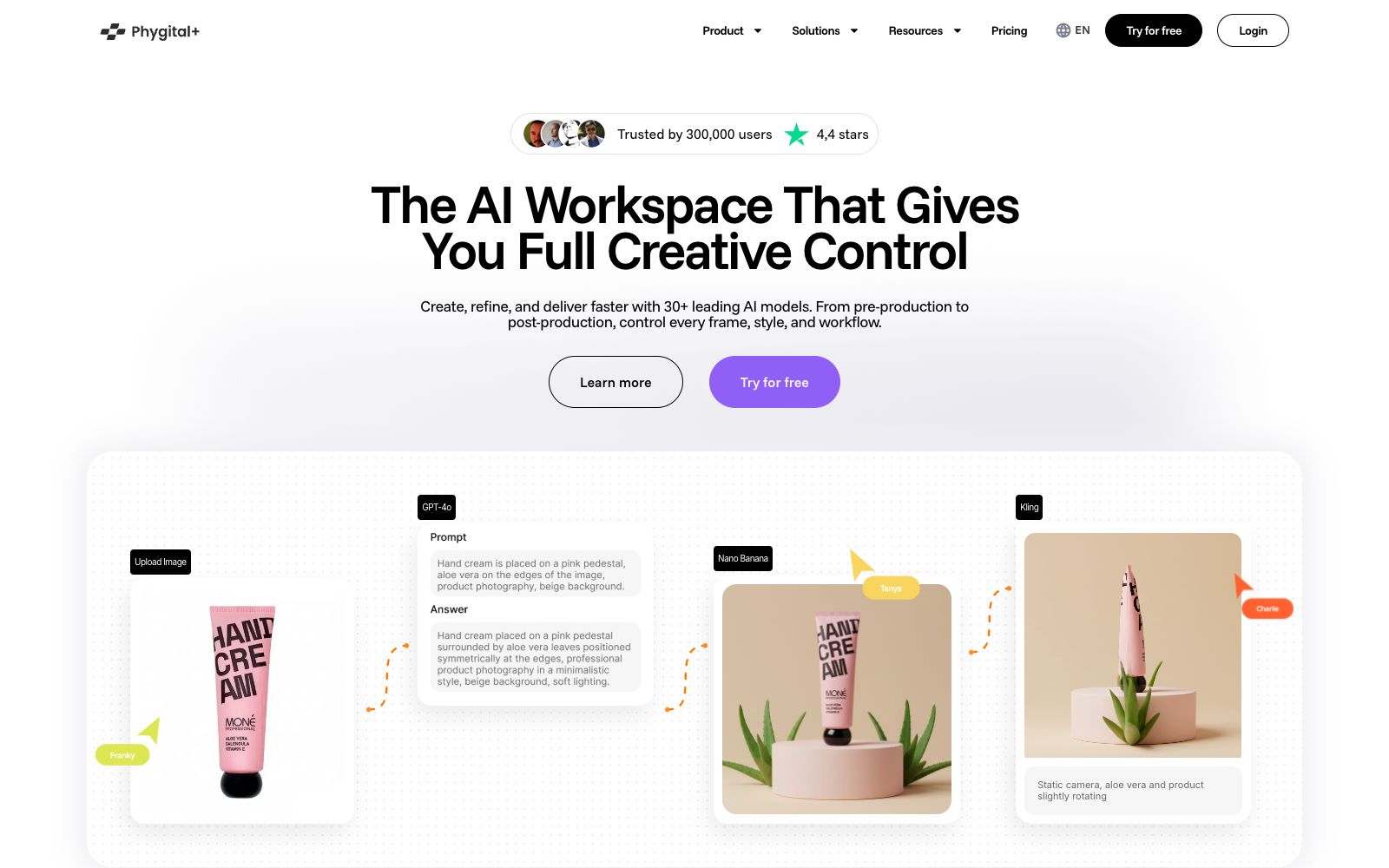
An AI creative workspace that integrates more than 30 mainstream generation models and editing tools. It can link processes such as image and video generation, inpainting, and image expansion, emphasizing control over the frame, style, and the entire creative workflow.
Updated: 2026-10-26
What is Phygital+?
Phygital+ is an AI creative platform that integrates various generative models and editing tools into a single workspace. Its official website emphasizes "complete creative control," covering the workflow from initial conception to post-processing. Users can combine capabilities such as image generation, video generation, inpainting, outpainting, and conditional control within a single project, eliminating the need to repeatedly download and upload materials across multiple websites.
Who is it for?
- Creative designers and AI art creators who need to compare the results of different models side by side and find a stable visual direction.
- E-commerce and marketing teams that need to continuously produce image and video materials for products, advertisements, and social media.
- Independent creators who handle creative conception, generation, retouching and delivery all by themselves and wish to reduce tool switching.
- Creative agencies that need to build reusable generation workflows and let their teams work in a sequential node-based manner.
Key features
6The AI Workspace That Gives You Full Creative Control
It enables centralized control over visuals, styles, and workflows, making it ideal for managing multi-step generation and editing processes within a single visual workspace.
Best AI Tools All in One Place
The official website states that it brings together more than 30 leading models, covering image and video tasks, and offers a selection of various mainstream generative models currently available.
Image Generation and Editing
The platform lists capabilities such as image generation and context editing. Users can start from text or existing materials and then continue to modify and refine the results.
Inpaint and Outpaint
Inpainting is used to replace or repair specified areas, and outpainting is used to extend the canvas and fill in the edges, making it suitable for adjusting a draft to the target composition.
Control Tools such as ControlNet
Constrain the generation results through structure or reference conditions, making the composition, posture, and visual direction more controllable than pure text prompts.
Video Models and End-to-End Workflow
The official website lists a variety of video generation capabilities, and emphasizes that the entire process from pre-production to post-production can be progressed, refined and delivered within the workspace.
How to use Phygital+
- First, use low-cost settings to test compositions and styles.
- once the direction is confirmed, switch to more suitable models and high-quality parameters to avoid wasting credits on ineffective attempts.
- Save the prompts, reference images, models, key parameters and the results together.
- only then can the team figure out which step caused the changes during review.
- Prioritize inpainting to fix local issues.
- expand the canvas only if the aspect ratio is insufficient, and there is no need to regenerate from scratch every time.
- pay special attention to hands and edges when dealing with human figures.
- Different models may have different input restrictions, output permissions and fees.
- For commercial projects, do not only refer to the general rules of the workspace, but also check the instructions of the models used.
- Confirm privacy and copyright requirements before uploading client materials, manually check brand logos, text, character portraits and music licenses before delivery, and re-verify when official rules change.
Traffic & popularity
Data month Sep 2026
Phygital+ receives about 745.0K visits per month and ranks #55,645 worldwide.
Monthly visits
12 monthsTraffic sources
- Direct44.1%
- Search40.2%
- Social5.9%
- Referrals5.1%
- Display ads1.9%
- Other2.7%
Top countries
- Russia54.7%
- United States7.1%
- United Kingdom4.5%
- India2.1%
- Vietnam1.9%
Estimated from third-party traffic data.
Similar tools
 SJinnSJinn is an AI agent for image and video creation. You can input descriptions to generate images, videos, audio and 3D content. It also provides tool mode, canvas mode and template skills, making it suitable for creative teams that need one-stop material production.
 DezgoDezgo is a multi-model aggregated image and video generation platform. With one interface, you can call models such as Flux, Qwen Image, and Nano Banana. It also provides free tools such as background removal, image upscaling, and redrawing, making it suitable for horizontally comparing image generation effects.
 insMindinsMind is an AI image and video platform for marketing scenarios. Its official website states that it uses Agents to turn ideas into directly deliverable content. It has multiple built-in image and video models, and provides capabilities such as background removal, outfit changing and material reuse.
 Designs.AIAn AI creative platform that integrates images, videos, copywriting, audio, presentations, and research agents into a single workspace. It can assign tasks from a single brief, select models, and output campaign materials that maintain brand consistency.
 ClicoClico is an AI creative workbench that brings research, writing, image, video, music, website, and browser game generation together in a single conversational space. It also supports reference images, templates, and seamless multi-model switching for flexible creative workflows.
 YouArtYouArt is a Chinese AI image and video creation platform that aggregates multiple image and video models. It provides video workflows, 3D director stations, e-commerce and tutorial templates. Some models are available for zero-point trial, making it suitable for creative teams that need to generate a large volume of content.