


Ghibli Style
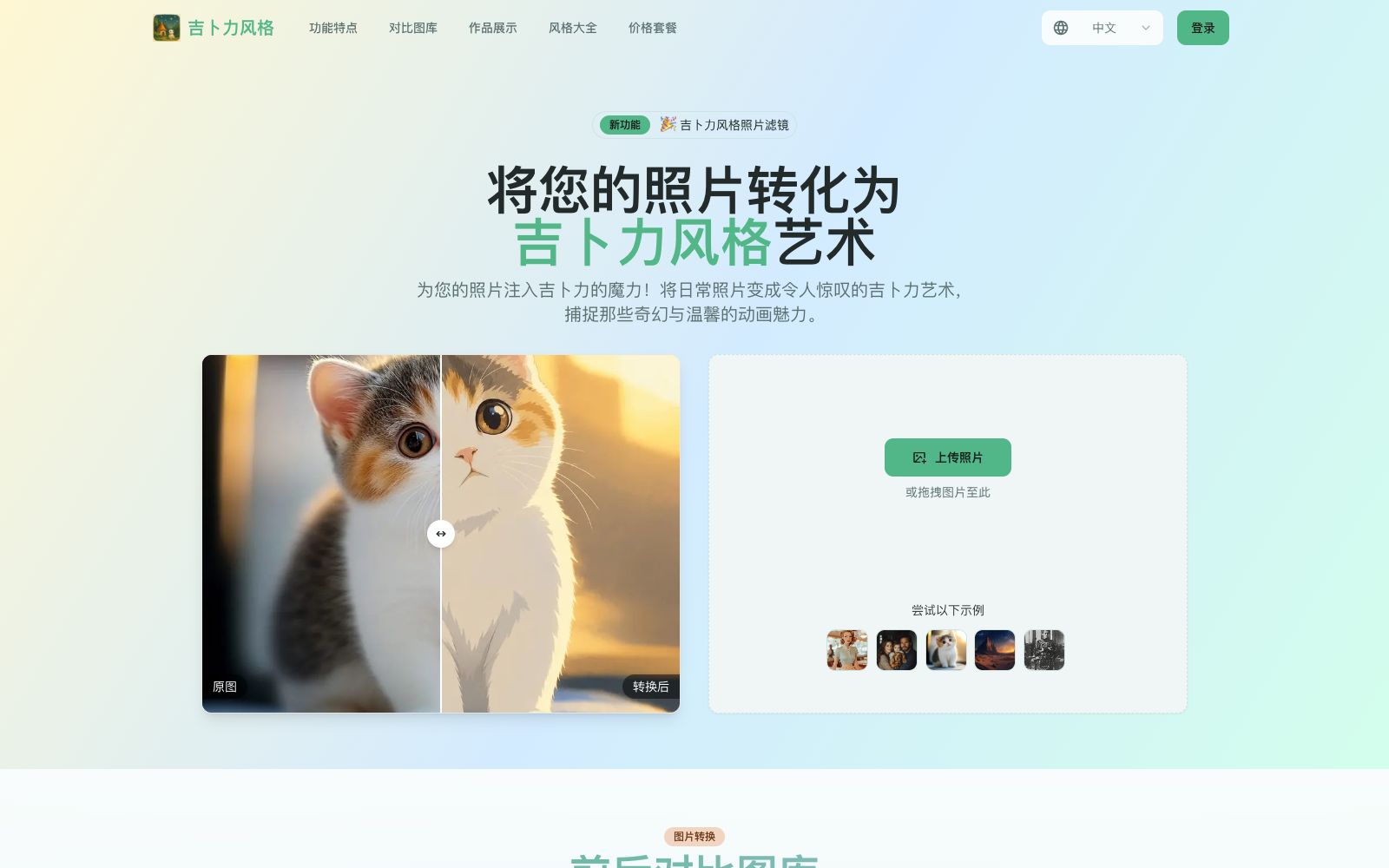
An online generator that converts photos into Studio Ghibli animation style, covering themes such as portraits, pets, landscapes and urban street scenes. Its official website claims that one-click image generation is available without design basics, and it also provides before-and-after comparison cases.
Updated: 2026-10-26
What is Ghibli Style?
Ghibli Style is an online generator that transforms photos into the Ghibli animation style. Its official website is titled "Ghibli Style - AI Photo to Anime Style Generator" and promotes the slogan "Transform any photo into beautiful Ghibli-style artwork". To use it, simply upload a photo and convert it with one click. The homepage of the official website showcases a set of before-and-after comparison images demonstrating the effects on various subjects, including portraits, pets, family photos, landscapes, cafes, still life, and urban street scenes.
Who is it for?
- Ordinary users who want to turn avatars and daily photos into anime style.
- Pet owners who want to add fun touches to their pet photos.
- Photography enthusiasts who want to turn travel landscape photos into animated scene-like images.
- Content creators who need social media images and want a unified dreamy style.
- Individual users who want to create commemorative pictures or invitation illustrations for friends.
Key features
7AI Ghibli Filter
Convert an entire photo into Ghibli-style artwork.
One-Click Transformation
The official website states that the conversion can be done with just one click, and no design foundation is required.
Studio Ghibli Aesthetic
Officially described as accurately restoring soft color palettes and textures.
Multiple Creative Filters
A variety of creative filters are available for selection.
Before & After Gallery
The platform provides multiple sets of before-and-after comparison cases covering themes such as portraits, pets, landscapes, and cities.
Easy to Use
The entire process from uploading to downloading can be completed directly.
Multiple Creative Filters
Provides a variety of creative filters to switch between different picture tones.
How to use Ghibli Style
- The effects of the portrait, pet and landscape examples provided on the official website vary greatly.
- It is recommended to first select examples that are close to the subject matter of your own photos for reference.
- Photos with clear subjects and simple compositions look cleaner after conversion, while scenes with too many elements tend to become blurry.
- It is fine to use the generated images for personal appreciation and sharing, but if you intend to use them for commercial purposes or printing, please confirm the scope of authorization first.
- For photos involving other people's portraits, obtain their consent before uploading.
- The number of styles, free quota and prices on the official website may be adjusted, and please refer to the latest instructions on the official website before use.
- The official homepage features multiple sets of comparison cases covering portraits, pets, families, landscapes, cafes, still lifes, couples, nature, cats, cities, fantasy and beach scenes.
- Check the effects of similar subjects before uploading.
- If you are not satisfied with one generation, you can try again with a photo that has a simpler composition and a more prominent subject.
Traffic & popularity
Data month Sep 2026
Ghibli Style receives about 17.9K visits per month and ranks #1,175,382 worldwide.
Monthly visits
12 monthsTraffic sources
- Direct39.2%
- Search34.7%
- Referrals9.8%
- Social6.3%
- Mail3.1%
- Other6.9%
Top countries
- United States38.6%
- India34.9%
- Vietnam13.2%
- Bangladesh11.7%
- Hong Kong, China1.6%
Estimated from third-party traffic data.
Similar tools
 Picture to DrawingFree online tool to convert photos to paintings, which can turn images into pencil sketches, line drafts, charcoal drawings, colored pencil and watercolor styles with one click. The official website says no registration is required, and it supports JPG, PNG, WEBP and HEIC formats.
 Style AIOnline AI image tool that can convert photos into styles such as Ghibli, Pixar, pixel, and sticker with one click. You can also edit images with one sentence, merge multiple group photos, and generate images and short videos.
 Nightmare AIOnline AI image upscaling and enhancement tool, which has two types of models for photos and anime respectively. According to the official website, it can upscale images by 2x and 4x and output them to 2K and 4K resolutions. It supports JPG, PNG and WebP formats.