


auxi
auxi is an executive-level PowerPoint tool for consulting and investment banking. It accesses large models through MCP and turns AI-generated drafts into formal slides in accordance with your templates and brand guidelines.
Updated: 2026-10-26
What is auxi?
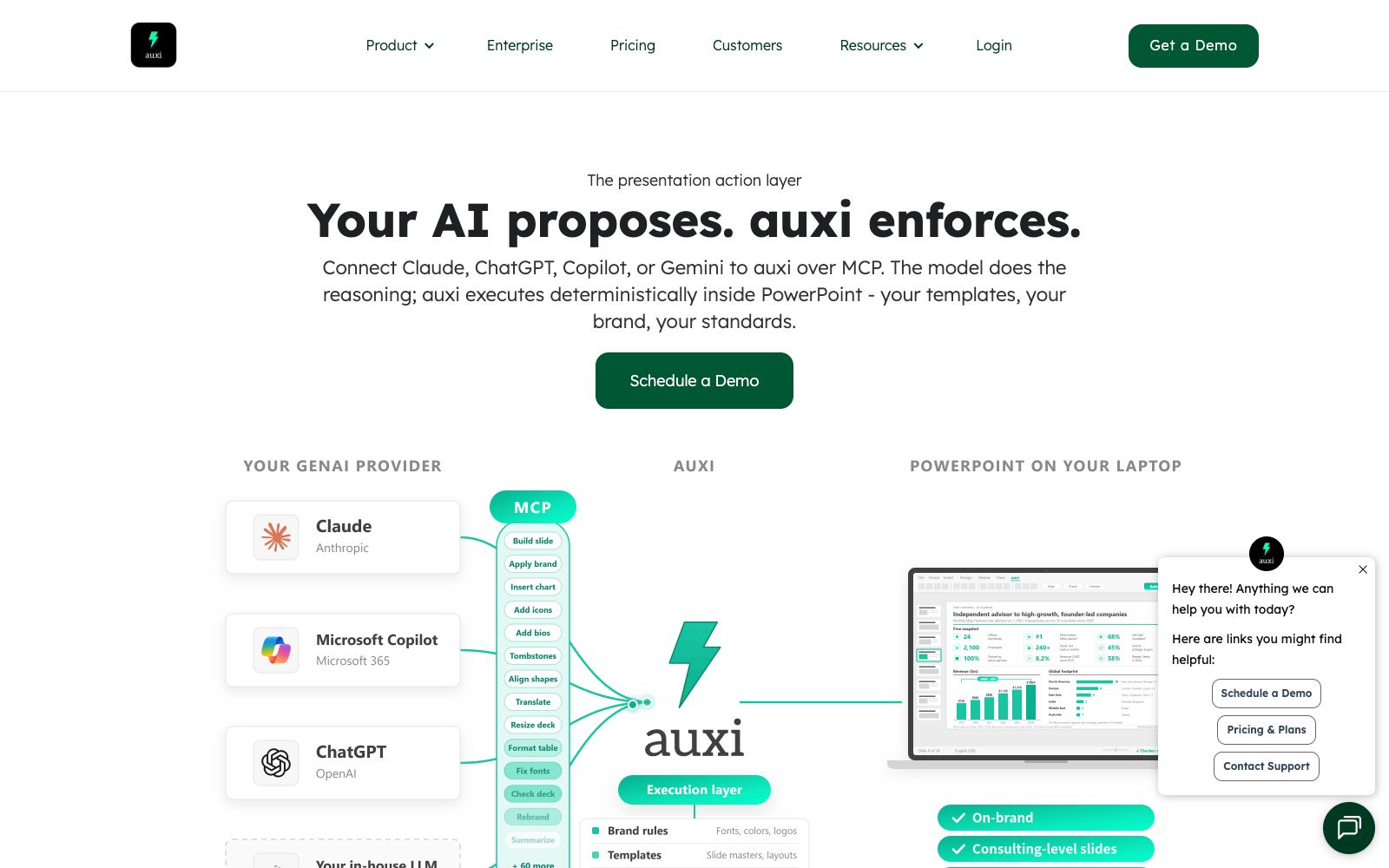
auxi's official website positions itself as "The presentation action layer" with the slogan "Your AI proposes. auxi enforces." Targeted at consulting firms, banking and capital markets teams, it solves the problem of large models being "able to think but unable to create compliant slides": according to official explanations, the model is responsible for reasoning and drafting, while auxi deterministically executes in PowerPoint via MCP—applying your templates, master slides, and assets. The website also mentions integration with Claude, ChatGPT, Copilot, or Gemini and offers over 200+ template resources.
Who is it for?
- Consultants whose client-delivered materials must strictly comply with brand and chart standards.
- Investment banking and capital markets teams involved in roadshows, transactions and pitchbooks.
- Financial professionals who already use tools like Claude, Copilot, etc., to create content but struggle with manual formatting.
- Enterprises that need to unify the PPT brand specifications across the entire company and wish to solidify the specifications into automatic checks.
Key features
6Chart design automation
The official website states that every chart is generated in accordance with the company's own chart standards.
Layout and master slides
Content is automatically placed on the correct layouts and master slides, rather than being randomly piled onto the page.
Placeholder and Work Zone
Titles and subtitles are always placed in placeholders, and all content stays within the safe area of the slide.
Look and feel automation
Shadows, rounded corners and styles are consistent throughout the entire text. The official website states that every rule in the brand manual will be followed, including brand colors, Logo placement, alignment, line spacing, bullet points, table styles, chart color schemes and legend positions.
GenAI and MCP Connection
Modules such as Edit, Create, Translate, Super Search, Darwin, and Claude MCP in the product line are used to connect model drafts to PowerPoint.
Productivity Toolkit
The official website lists efficiency-enhancing features such as Shortcuts, Smart Alignment, Smart Selection, AI Editing, Checker, and Agenda Maker. The Checker will review the materials before they reach you.
How to use auxi
- First, tidy up your company's templates and master slides before integrating auxi.
- The quality of auxi's execution depends on the standardization of the templates you provide to it.
- if the templates are disorganized, the final output will also be messy.
- Let the model only output up to the draft stage, and leave the rest of the formatting to auxi.
- the official website clearly states, "Your AI's life ends at the draft stage, and auxi takes over from here." Mixing the two tasks will only defeat the purpose.
- Run a check with Checker before finalizing, especially details like chart color schemes, number formats, and legend positions that are easy for humans to miss.
- It exists as a PowerPoint add-in.
- before deployment, confirm your enterprise's add-in installation and compliance approval processes.
- when handling client materials, comply with your organization's confidentiality and external distribution regulations.
- The official website homepage lists several data indicators with undisclosed calculation criteria and the number of resources such as "200+ templates".
- prices and compliance terms may be adjusted.
- Before formal procurement, recheck based on the official website's instructions.
Traffic & popularity
Data month Sep 2026
auxi receives about 24.2K visits per month and ranks #901,787 worldwide.
Monthly visits
12 monthsTraffic sources
- Direct39.2%
- Search34.4%
- Referrals10.1%
- Social6.3%
- Mail3.1%
- Other6.9%
Top countries
- United States48.8%
- India16.9%
- France14.5%
- United Kingdom8.6%
- Egypt6.1%
Estimated from third-party traffic data.
Similar tools
 Chronicle AIChronicle AI is an AI presentation creation tool for professional teams. It can convert documents, notes and business data into editable, brand-compliant slides, and supports chart visualization, tool embedding, as well as export in multiple formats such as PPT and PDF.
 Plus AIAn AI presentation assistant built directly into PowerPoint and Google Slides, which can generate slides from prompts or documents, supports rewriting, rearranging layouts, brand customization and image matching. The official states that the output is permanently owned by the user.
 PikesPikes is a creative generation kit for CPG brands. According to its official website, it can generate product images, lifestyle images and advertising materials with real products and brand specifications, and also convert product images into video advertisements. It covers scenarios such as detail pages, Amazon materials, ad creatives and email marketing.
 Slidely AISlidely AI is an AI presentation assistant focused on PowerPoint: after uploading a company's .pptx file, it extracts fonts, color schemes, master slide layouts and components to form a design system, then uses intelligent agents to generate or rewrite pages that comply with brand specifications, and it can be used on web pages, add-ins and ChatGPT.
 OriaOria is a professional AI for presentation slides tailored for consulting, investment banking and strategy teams. According to its official website, it can directly generate complex slides that comply with corporate visual standards within PowerPoint, output editable native shapes instead of images, and provide one-click comparison of multiple solutions.
 ClassPointA classroom interaction and teaching tool deeply integrated with PowerPoint, offering real-time quizzes, AI question generation, gamification, and presentation enhancements. The official stated that it has served 20 million educators.