


UPDF AI
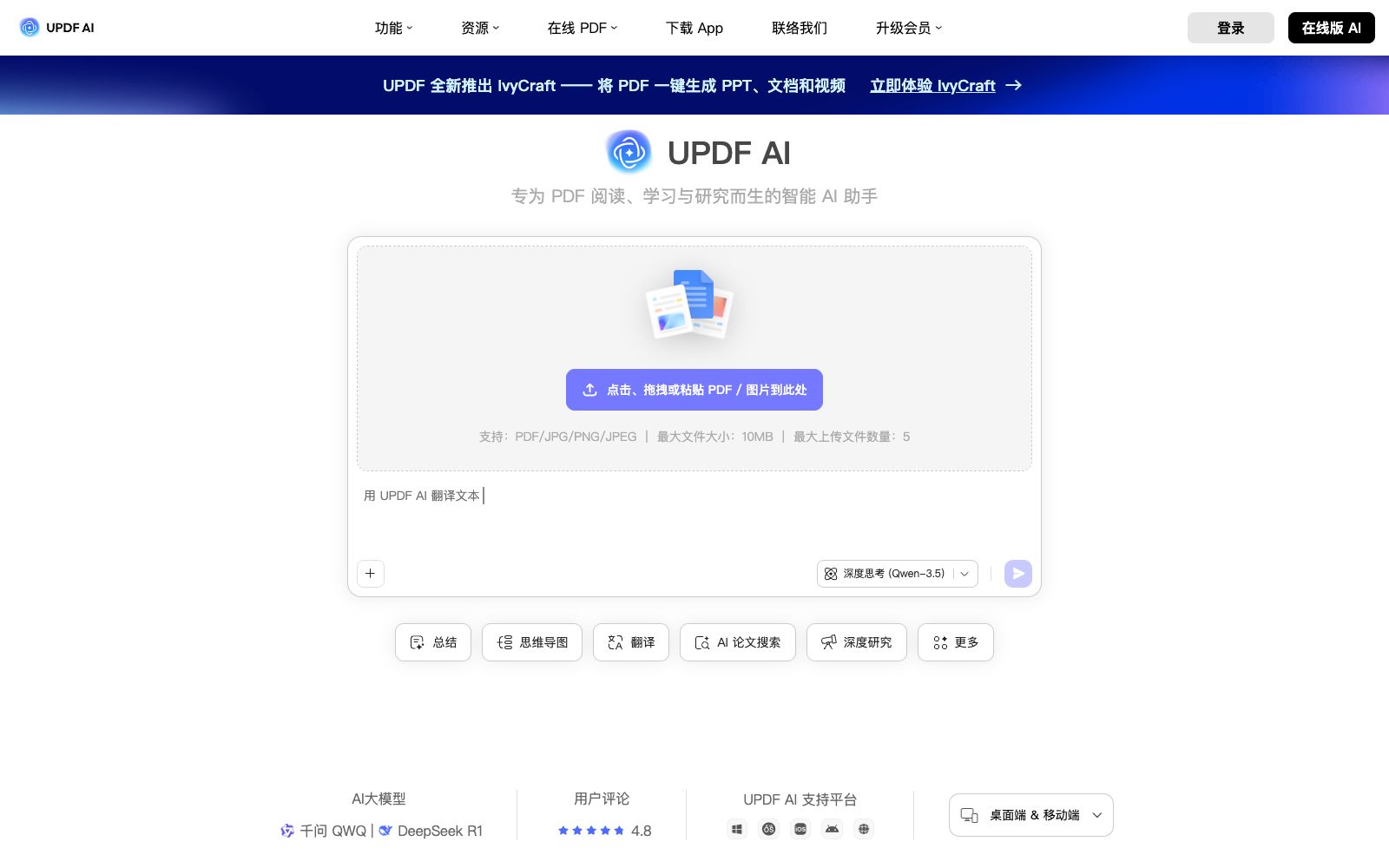
UPDF AI is a PDF intelligent assistant built into the UPDF Reader. According to its official website, it enables conversing with PDFs, summarizing, translating, and converting them into mind maps. It also supports Q&A on images, in-depth research, and paper searches, and is available across multiple devices and supports multiple models.
Updated: 2026-10-26
What is UPDF AI?
According to its official website, UPDF AI is specially designed for PDF reading, learning and research, serving as the intelligent assistant within UPDF. Its web version can be directly accessed at ai.updf.cn. Compared with standalone PDF Q&A tools, it is integrated with the client, and is available on Windows, macOS, iOS and Android. The web version allows you to upload files and start chatting without installation. The official website also provides a series of comparison pages with other PDF AI tools, as well as a contrast with Adobe Acrobat AI.
Who is it for?
- Students and educators who need to quickly read through literature and generate mind maps.
- Legal professionals who read foreign-language contracts and judgments and need to extract key clauses.
- Marketers who conduct competitor and market analysis and need to quickly digest research reports.
- Researchers who need to translate foreign language materials while keeping the original text for comparison.
Key features
6Chat with PDFs
Listed as one of the core capabilities on the official website, it supports simultaneous conversations with a single PDF or multiple files, and allows cross-questioning across multiple documents.
Summarize PDFs
The official description states that it summarizes content and explains complex data in the form of charts, making it suitable for quickly grasping key points.
Translate PDFs
Supports full-text translation and side-by-side reading, as well as word-by-word translation via selection and screenshot translation, making it easier to read foreign-language materials.
Convert PDF to Mind Map
Transform PDF content into a visually structured summary, shareable via link, and savable as PDF, image, or Markdown.
Chat with Images via AI
Identify and describe the content of images, extract text from them, recognize questions in the images and provide answers, making it suitable for textbooks and exam paper scenarios.
AI Free Chat & In-depth Research
The official website lists capabilities such as deep thinking mode, a vast knowledge base and information retrieval, as well as in-depth research, paper search and graphing, and multi-file chat.
How to use UPDF AI
- 1The free version of the web version is limited to five files, with a maximum size of 10MB per PDF. When exceeding the limit, switch to the client or upgrade to a membership.
- 2Mind maps are suitable for taking reading notes; after exporting to Markdown, you can continue editing them in your own note-taking system.
- 3The official website lists models such as Qianwen and DeepSeek, and their performance varies significantly for long documents. You can switch between several models for comparison before making a selection.
- 4For sensitive PDFs such as contracts and medical records, confirm the platform's privacy and retention policies before uploading; the official website states that encryption measures are adopted.
- 5The official website mentions that IvyCraft can generate PPTs, documents and videos from PDFs with one click. If needed, test it on a small number of files first before running it in batches.
- 6The official website provides a comparison table between the free version and the unlimited version. Please check the page limits, file size limits and AI usage limits before upgrading to a paid subscription.
Traffic & popularity
Data month Sep 2026
UPDF AI receives about 20.8K visits per month.
Monthly visits
12 monthsTraffic sources
- Referrals36.2%
- Search31.5%
- Direct17.9%
- Social13.8%
- Display ads0.7%
Top countries
- China88.5%
- Hong Kong, China6.2%
- Taiwan, China2.4%
- Canada2.2%
- Japan0.7%
Estimated from third-party traffic data.
Similar tools
 Doc2XOnline document workbench, providing PDF to Word/Markdown/LaTeX conversion, formula and table recognition, and document translation. The official claims that you can check first before editing and exporting.
 GitMindGitMind Sihu is an all-platform AI mind map and flowchart tool. It supports one-click generation of mind maps from text, documents, videos and images. It provides applications such as mind maps, whiteboards and meeting minutes, supports multi-device synchronization, and covers learning and office scenarios.
 Belin DocAn AI document translation tool featuring free, unlimited usage and no login required. Its official website states that it is powered by top-tier format parsing algorithms and large models, supporting multiple formats such as PDF, EPUB, and DOCX while preserving the original layout, and allowing switching between multiple models.
 FunBlocksAn AI tool matrix for mind mapping, documentation, presentations and writing, with AIFlow as the core workbench, combines thinking models for structured reasoning. The official website states that the free quota is ten AI accesses per day.
 Mind Map WizardOnline AI mind map generation tool: enter a topic, paste a link or upload a PDF to generate a mind map. The official website states it requires no registration and has no ads. You can edit it and then export it as PDF, JPG or SVG, as well as share it.
 3MinTopAn AI reading assistant for book lovers, officially said to break down complex books into chapter highlights readable in three minutes, with a built-in e-book reader, full-text translation, mind maps and content Q&A.