


MyMap.AI
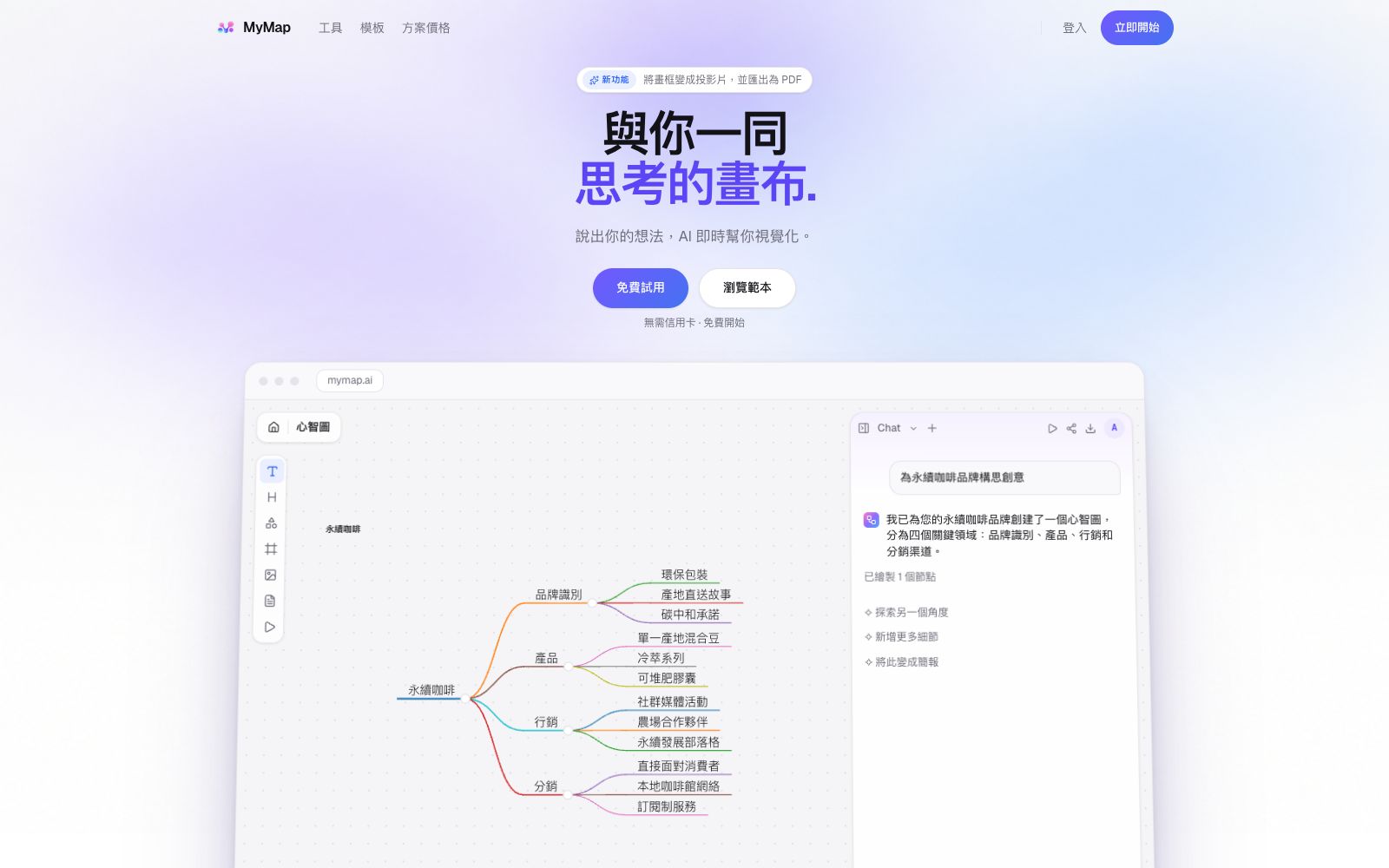
MyMap.AI is an infinite canvas that grows with your conversations. Just speak your ideas, and it will automatically generate mind maps, flowcharts, or analysis matrices. Select a node and say a sentence to modify it, and you can also frame content to export as slides.
Updated: 2026-10-26
What is MyMap.AI?
MyMap.AI positions itself as a canvas that thinks with you. While most AI chat tools give you text, it provides a diagram that can be dragged, connected and rearranged: you state what you're working on, and it selects diagrams, draws and lays out the content on its own, and you can watch it create the whole process. The company claims it has over 200,000 users, more than 2 million maps and over 50 million AI messages, emphasizing that each message is created by editing a real canvas rather than just stacking text in a chat window.
Who is it for?
- Process consultants: Turn interview transcripts into swimlane diagrams and SOPs, and directly proceed to client proposals.
- Quality and Compliance Professionals: Create A3 reports, Five Whys analyses, and audit trees in a single page and export them as PDFs.
- Students and Teachers: Generate review maps and course summaries from notes, courseware or video links.
- Family therapists: Use standard symbols to draw three-generation genograms and add or delete relationships by describing family members.
- Product and Engineering: Database structures, quarterly roadmaps, and feature priority matrices take shape as you chat.
Key features
6Select a diagram type in one sentence
No need to pick a template first. Ask a strategic question and get a SWOT analysis; ask why something happened and get a fishbone diagram; brainstorming automatically branches into a mind map; processes with judgments are drawn as flowcharts with loops.
Conversational Diagram Editing
Select a node, specify what you want to change, and it will only modify that section, fill in the missing content, and leave the rest of the canvas unchanged—no need to redraw.
Four Steps to a Finished Product
Input content, auto-draw, select to create slides, export and deliver. The materials can be a single sentence, pasted notes, PDF files, Word documents, or YouTube links.
Select any area for one slide
Draw a box around any section on the canvas to generate a single slide, which can be presented directly in the browser or exported as a PDF with one slide per page.
Comprehensive diagram types
Flowcharts, organizational charts, swimlane diagrams, timelines, kanban boards, concept maps, genograms, as well as ERDs, BPMN, UML, Sankey diagrams, empathy maps, and business model canvases.
Comprehensive export formats
PNG, SVG, PDF, Markdown and sharing links. The entire map or any selected area can be exported.
How to use MyMap.AI
- The free plan includes 20 credits per month and a maximum of 3 editable maps, which is sufficient to validate a complete workflow once.
- For long-term use, go for Pro: $12 per month when billed annually, 1000 credits, unlimited maps, and access to advanced models for every message.
- the official website also offers a 14-day trial for $1.
- The economical model in the free tier is sufficient for drawing structures, while the advanced model is reserved for diagrams requiring long-text reasoning.
- Define the scope clearly in the prompt: specify the audience, number of levels, and whether to include responsible persons and timelines.
- the generated diagrams will be much neater.
- Go through each node one by one before exporting, as AI formatting may miss details.
- confirm the privacy policy before uploading PDF or Word files.
- The interface supports multiple languages, but only Simplified and Traditional Chinese are listed so far.
Traffic & popularity
Data month Sep 2026
MyMap.AI receives about 554.7K visits per month and ranks #62,314 worldwide.
Monthly visits
12 monthsTraffic sources
- Search72.8%
- Direct20.5%
- Referrals3.8%
- Social2.0%
- AI assistants0.9%
Top countries
- Colombia10.4%
- United States8.8%
- Mexico8.0%
- India7.7%
- Peru4.8%
Estimated from third-party traffic data.
Similar tools
 AyoaAI mind map and task management tool that organizes ideas with organic mind maps and directly converts them into to-do items. The interface has been optimized for people with ADHD and dyslexia, and it's free to create up to 10 mind maps.
 Algor EducationAn AI learning platform developed by Algor Lab in Italy, which can convert PDFs, handouts, web pages or videos into concept maps, mind maps, flashcards and quizzes, and edit and review in the same study set, suitable for exam preparation and lesson planning.
 XiaohuazhuoA lightweight online real-time collaborative whiteboard that supports infinite canvases, multi-page canvases, file collaboration, audio and video calls, with built-in AI for generating mind maps and images, and can be used in conjunction with meeting tools.
 MapifyMapify is an AI mind mapping tool launched by the Xmind team. It supports importing text, PDF, videos, web pages, audio and video, and can generate mind maps in seconds. The official website states that it supports more than 30 languages.
 CreatelyCreately is a business-oriented AI visual collaboration platform. It offers products such as workspaces, clinical relationship diagrams, process documents and compliance reviews. It can connect the existing tools of teams and carry out planning, analysis and collaboration on a shared intelligent canvas.
 Whimsical AIAI features in Whimsical canvas generate flowcharts, mind maps and wireframes in one sentence, with Whimsical Agent and MCP integration for team collaboration.