


Ungrind
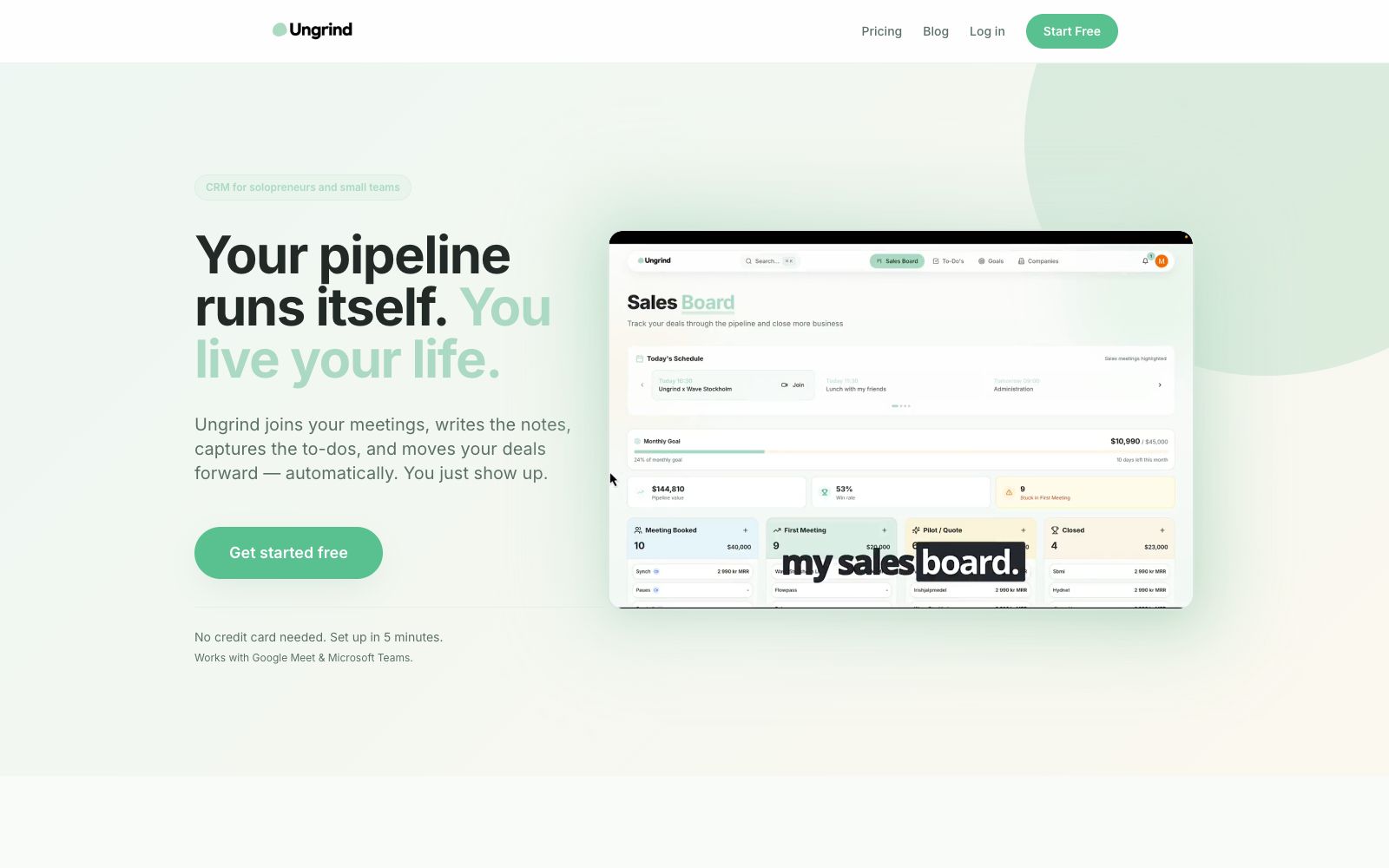
An AI sales CRM for individual entrepreneurs and small teams. According to its official website, it can automatically join Google Meet or Teams meetings, generate meeting minutes and extract to-do items, convert meeting content into follow-up reminders and business opportunity updates, and support direct inquiries within Claude.
Updated: 2026-10-27
What is Ungrind?
Ungrind's official website positions itself as "CRM for solopreneurs and small teams", aiming to transform CRM from manually maintained spreadsheets into an automatically running workflow: AI joins meetings, takes minutes, captures to-do items, updates business opportunities, and humans only need to attend meetings normally. The official website emphasizes that it is not yet another chat window, but directly integrates with calendars and video conferences, and supports querying the status of business opportunities in Claude through natural language.
Who is it for?
- Freelancers who have multiple client meetings every day and still have to spend time filling in the CRM in the evening
- Consultants and individual sales professionals who run their business using Google Calendar, Google Meet or Microsoft Teams
- Small teams that need to provide meeting minutes to clients and automatically extract action items
- Entrepreneurs who want to directly check business opportunities and to-do items in Claude without switching between multiple tools
Key features
6Auto-join Meetings
The official website states that after connecting Google Calendar, the AI robot will automatically join Google Meet or Microsoft Teams meetings and provide full transcription.
Meeting Minutes & Action Items
The official website states that structured meeting minutes will be generated within minutes after a meeting ends, and tasks and promised actions will be automatically extracted.
Opportunity Auto-Update
The official website states that meeting information is directly synced to the CRM, binding new leads, meeting outcomes and next actions to the corresponding customers without the need for manual form-filling.
Claude Integration
The official website states that you can ask "Which deals have been quiet in the past two weeks?" or "What did I promise Anna on Thursday?" and have Claude add reminders or notes for you.
AI Coach Scoring
The free version of the official website includes AI meeting summaries and coach scoring to help review communication and follow-up.
Calendar Sync
The official website emphasizes that you only need to connect your Google Calendar, with no need for repeated authorization or additional configuration.
Things to know
Usage Tips
- The official website states that the free version is available permanently, offers 2 hours of meeting time per month and no credit card is required. It is recommended to first use a real customer meeting to test the quality of the meeting minutes.
- Consider the Light or Pro paid tiers only if your weekly meeting time exceeds 10 hours, to avoid losing data when you switch after exhausting the free quota.
- Make sure the bot is visible in the guest list before the meeting starts. For first-time use, it's best to inform clients that an AI is auditing the meeting to avoid misunderstandings.
- Spend 10 minutes every day reviewing the meeting notes and auto-generated to-do items, manually correct any inaccurate entries, and the system will become more accurate with continued use.
- If your clients or team are not in the Google or Microsoft ecosystem, use the free version to confirm compatibility before deciding to upgrade. Set aside time once a week to review the to-do items identified by the AI, and add any missed commitments back to the system to keep the opportunity information complete.
Traffic & popularity
Data month Sep 2026
Ungrind receives about 614 visits per month and ranks #3,593,394 worldwide.
Monthly visits
10 monthsTraffic sources
- Direct36.5%
- Search32.4%
- Referrals14.3%
- Social6.7%
- Mail4.1%
- Other6.0%
Top countries
- Australia100.0%
Estimated from third-party traffic data.
Similar tools
 AmieAI meeting minutes and workflow assistant. Officially, it can generate meeting minutes and to-do lists without requiring a robot to join the meeting, and it allows external AI to access meetings, schedules, and to-do lists via MCP.
 LyraAn AI-native meeting platform that holds meetings in a browser with speaker-specific transcription, conducts background research before meetings, automatically updates CRMs and follows up after meetings, and enables cross-meeting retrieval of historical conversations.
 mymeet.aimymeet.ai is a meeting assistant that joins meetings on its own. It automatically records audio, generates transcripts with speaker labels, summaries and to-do lists. It supports custom templates and multiple languages, and can be exported as DOCX and PDF. It is suitable for sales reviews, job interviews and weekly project meetings.
 MeetGeekMeetGeek is an AI meeting recording and automation platform that records, transcribes and summarizes meetings, and automatically completes follow-up actions such as updating CRM and creating tasks, covering online, hybrid and offline meetings.
 VoicenotesVoicenotes is an AI meeting note-taking tool that works automatically in the background. Officially, it claims to comply with SOC 2 and GDPR. It supports all meeting applications and does not require bots to join meetings, turning every meeting into clear meeting minutes and answerable questions.
 RecordMeetingRecordMeeting is a recording extension for Google Meet. It allows one-click recording without adding bots or requiring host authorization. It can automatically transcribe meetings and generate AI meeting minutes, making it suitable for sales calls, user interviews, and team meetings.