OrderPost
OrderPost turns your published social media posts, posters or menu screenshots into an orderable page: the official version says it automatically reads out products, prices, pickup time slots and generates order links. It supports limited-time flash sales, deposits and custom questions. It is used by more than 500 food preparation sellers to replace private message order taking.
Updated: 2026-10-27
What is OrderPost?
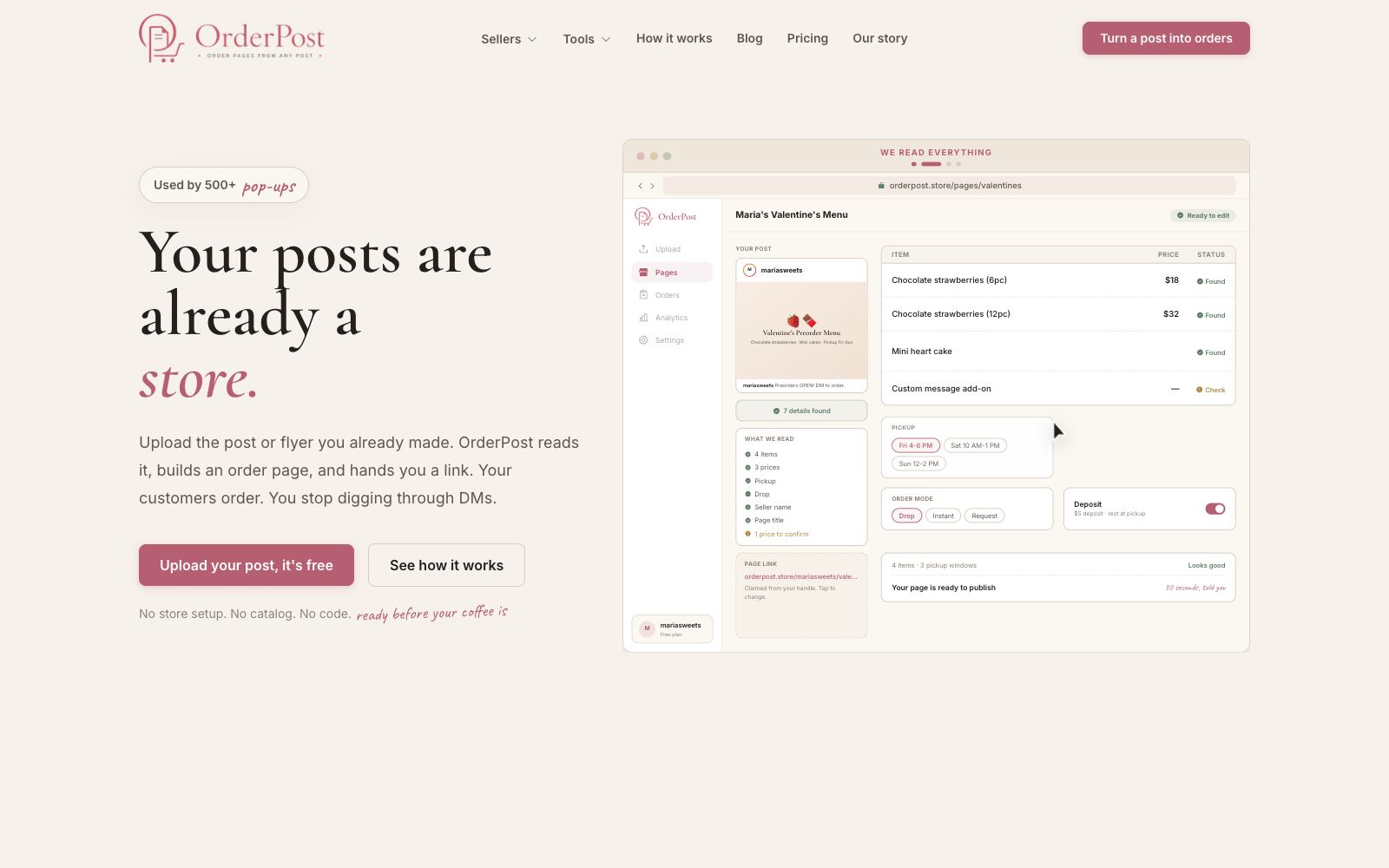
OrderPost targets small sellers who take orders on Instagram, Facebook or offline flyers. Its official slogan is "Your post itself is a store". After uploading photos of existing posts or menus, it reads out product information, prices, pickup details and seller information, generates a shareable order page, and customers can place orders directly. Sellers no longer need to check accounts by flipping through private messages.
Who is it for?
- Home bakers and private chef sellers who take orders via DM and are tormented by reconciling accounts.
- Niche brands and pop-up organizers that do limited releases and flash sales.
- Meal prep sellers who want to turn their weekly meal prep menus into a fixed order page.
- Handmade food producers and crafters who need to handle custom requests (engraving, allergens).
Key features
6Generate order pages from posts
The official version states that it supports Instagram posts, Facebook photos, screenshots, and even handwritten menus, with no need to set up a store, create a product catalog, or write code.
Automatic Identification and Confirmation
After uploading, it automatically extracts products, prices, pickup windows, and questions for customers to answer, which you can check and modify item by item before publishing.
Three Order Modes
Supports the limited-quantity first-come-first-served drop mode, instant ordering, and the request mode that requires seller confirmation. A deposit can be activated, with the remaining balance to be paid upon pickup.
Pickup & Question Configuration
The official version supports setting multiple pickup time slots and capacities, as well as adding custom questions like "Any cake message? Any allergies?"
Order Management
All orders are集中 into a single list, including the customer's name, purchased items, special notes, and payment status; the page link can be placed on the Instagram homepage, in comments, via SMS, or printed on flyers.
Free Supporting Tools
It provides free, no-registration tools for home bakers, such as an hourly wage calculator, recipe pricing tool, pickup scheduling tool, and label generator.
Things to know
Usage Tips
- Simply upload the post you shared last night, and the page will be generated within 30 seconds without having to reformat the menu.
- For limited-edition items, enable the drop mode and set a deposit to reduce no-shows and overselling.
- Double-check the prices and pickup times one by one before publishing, especially any custom markup items that may have been misidentified.
- Pin the link to the order page on your Instagram profile and attach it again when posting in groups to create a fixed order entry.
- Be aware of the cottage food regulations in your location. The official blog provides an introductory interpretation, and you should verify them on your own before commercial use. The official has defined the target audience very specifically: home bakers, pop-up and flash sale vendors, meal preparers, and custom order sellers, and explicitly states "for everyone selling goods via direct messages". In the actual process, it reads out details such as product names, prices, pickup time slots, and seller names from the post. For example, in the demo, it identifies 4 products, 3 prices, and 3 pickup windows, then proceeds to a confirmation page for you to modify or complete the information. The official emphasizes that "nothing will be published without your confirmation". After sharing, orders flow into the backend in list form, including the buyer's name, purchased products, notes, and payment status. In the demo, you can see statuses like deposit paid and full payment. The official website also offers a free toolset: an hourly wage calculator, a recipe pricing calculator, a pickup window planner, and a label generator, all with no registration required. The blog covers frequently asked questions for small sellers, such as cottage food regulations and deposit strategies.
Traffic & popularity
Data month Sep 2026
OrderPost receives about 4.6K visits per month and ranks #4,012,876 worldwide.
Monthly visits
7 monthsTraffic sources
- Direct32.7%
- Search30.7%
- Referrals12.5%
- Display ads6.7%
- Social6.6%
- Other10.8%
Top countries
- United States65.8%
- Canada34.2%
Estimated from third-party traffic data.