


Kuaijianji
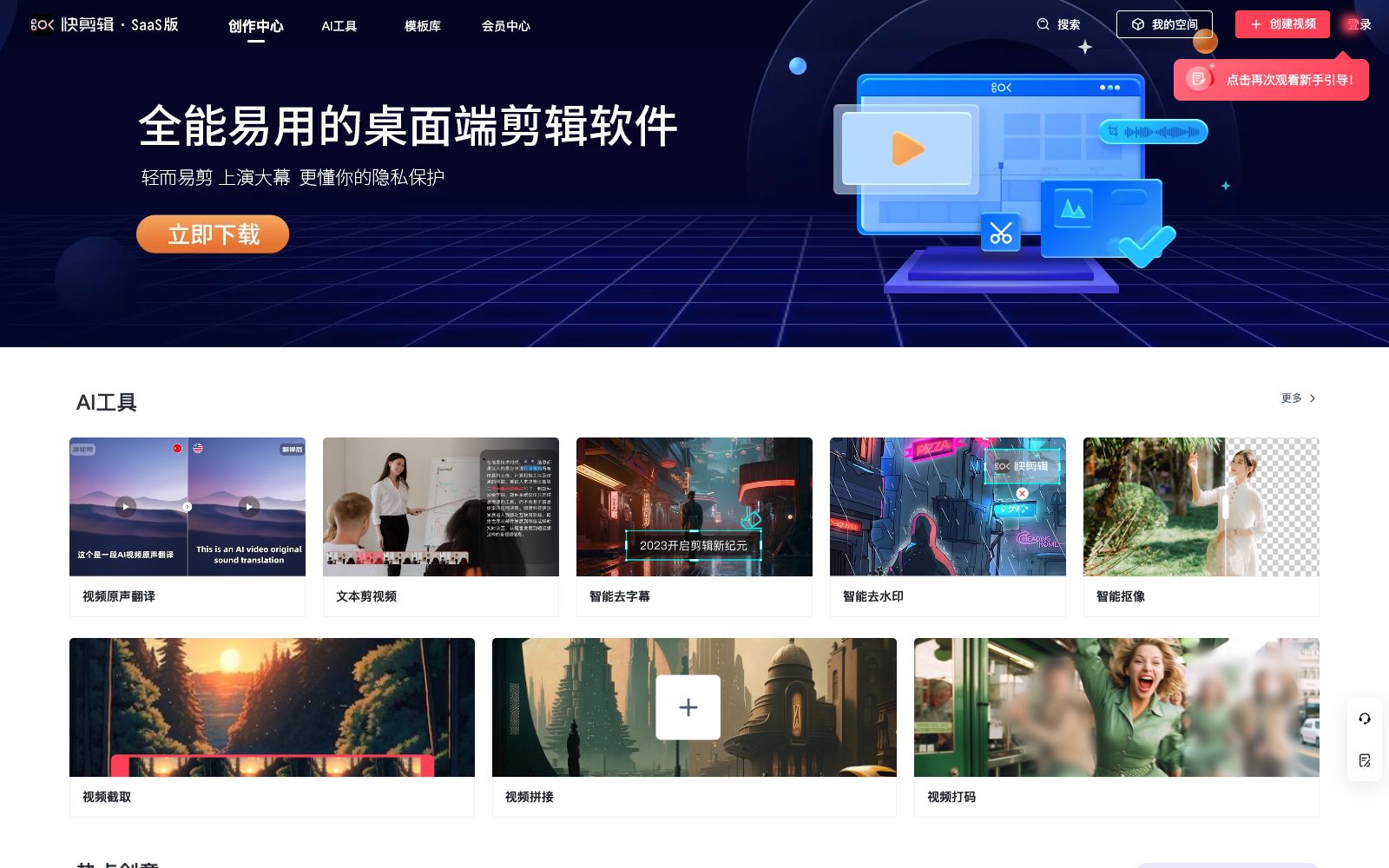
A domestic cloud-based video editing SaaS that offers online watermark removal, screen recording, video-text conversion and intelligent subtitles, built-in AI tools such as text-to-video editing, intelligent matting and video original sound translation, equipped with a massive amount of copyrighted template materials, and supports web, mobile and desktop platforms.
Updated: 2026-10-26
What is Kuaijianji?
Kua Jianji is a cloud-based video editing SaaS. Its official website positions it as a "video editing software and online video editing tool for computers". It brings editing, screen recording, audio recording, subtitle creation, watermark removal and format processing to the browser, and features a dedicated section of AI tools on its homepage. Compared with local video editing software, it leans more towards templatization and batch processing, with the web version, mobile app and desktop client sharing the same material and template library. The official website emphasizes its cloud-based editing capabilities, allowing individual users and small and medium-sized enterprises to complete the entire process from material organization to final video export directly in the browser without relying on a high-performance local computer.
Who is it for?
- Small and medium-sized enterprise markets and administrative staff who create short videos for corporate promotional films, campus recruitment, and event announcements.
- Individual creators who need to batch produce vertical short videos and do not want to install local video editing software.
- Education and training instructors who record courses and edit oral broadcast videos, who can quickly create finished videos using screen recording and subtitle features.
- Operations personnel who only need lightweight processing such as removing watermarks, compressing file sizes, and extracting audio.
- Retail and local life businesses that need to update short videos daily for their stores and communities but don't have full-time video editors.
Key features
6Text-based Video Editing
Edit videos based on text content, which is categorized into the AI toolbox by the official, suitable for quickly trimming long footage into short videos ready for direct release.
Video Audio Translation
Translates the original audio of the video, listed as one of the AI tools on the official website, suitable for multilingual distribution and overseas content.
Smart Subtitle Removal and Smart Watermark Removal
It is claimed that subtitles and watermarks in the video can be removed online, eliminating the cost of manual frame-by-frame processing.
Smart Keying
Separates subjects or objects from the background, facilitating post-compositing, background replacement, and overlay effects.
Video Trimming, Splitting, Compression and Audio Extraction
A set of common format processing tools that cover clipping, merging, volume compression and audio track export.
Massive Copyright-Video Templates and Materials
The official website states that it offers copyrighted video templates, music, special effects and stickers, which can be directly applied to your own materials by "cutting the same style".
How to use Kuaijianji
- 1First, go through the entire process using the "Create Same Style" feature in the template library, then replace it with your own assets, which saves a lot more time than starting from a blank project.
- 2For long videos, it is recommended to first cut and segment them, then process subtitles, translation, and matting segment by segment to avoid failures caused by overly large cloud tasks.
- 3AI features such as watermark removal and matting are sensitive to video quality; preview a short clip before exporting to decide whether to apply them in batch.
- 4The scope of commercial authorization for templates, music and stickers is subject to the official instructions. It is recommended to recheck the authorization terms before external release.
- 5Official features and membership benefits may be subject to adjustment. Confirm the current export clarity and quota limits before long-term batch production.
Traffic & popularity
Data month Sep 2026
Kuaijianji receives about 2.3K visits per month and ranks #9,477,070 worldwide.
Monthly visits
12 monthsTraffic sources
- Search41.8%
- Direct34.1%
- Referrals17.3%
- Social2.3%
- Display ads1.5%
- Other3.0%
Top countries
- China84.3%
- United States11.9%
- Hong Kong, China3.7%
Estimated from third-party traffic data.
Similar tools
 captionrichAn AI dubbing video editing tool based on text editing, the official website states that editing can be completed by modifying the transcription script. It automatically removes filler words and awkward pauses, supports B-roll insertion, motion graphics subtitles, and translation into more than 50 languages, and is targeted at the short video and podcast editing scenarios.
 PalmierPalmier Pro is a video editor built for AI. Officially, it claims to use Claude or Codex for automatic clipping, generate materials on the timeline, and then export them to professional editing software for further refinement, making it suitable for agency workflows.
 CapCutCapCut, the international version of Jianying, is a video editing platform covering mobile, desktop and web versions. It provides AI subtitles, text-to-video generation, intelligent templates and special effects tools, comes with a huge collection of creative templates, and is a leading short video editing tool worldwide.
 updreamupdream is an AI video creation product independently developed by Bilibili. Officially, it is designed for Bilibili UP owners. It organizes scripts, storyboards and characters with a canvas and a conversational assistant, and provides multi-track timeline editing, subtitle erasure and video super-resolution.
 PandaStudioPandaStudio is a desktop AI video editor. According to its official website, it supports screen recording and camera shooting, clips videos based on transcripts, generates subtitle graphics, creates AI titles and covers, and can be published to YouTube; its built-in intelligent agent can edit according to text instructions, and Claude Code and Codex can also drive it.
 DupDubDupDub is an all-in-one content creation platform that offers copy generation, text-to-speech, AI digital humans and video editing. It covers scenarios such as marketing, education, audiobooks and podcasts. New users can enjoy a 3-day free trial without binding a bank card.