

Flick
Turn your inbox into a card-swipe email management app. The official states that each email corresponds to one decision: archive, no reply needed, or generate an AI draft with one click. It supports iOS, Chrome and the web version.
Updated: 2026-10-27
What is Flick?
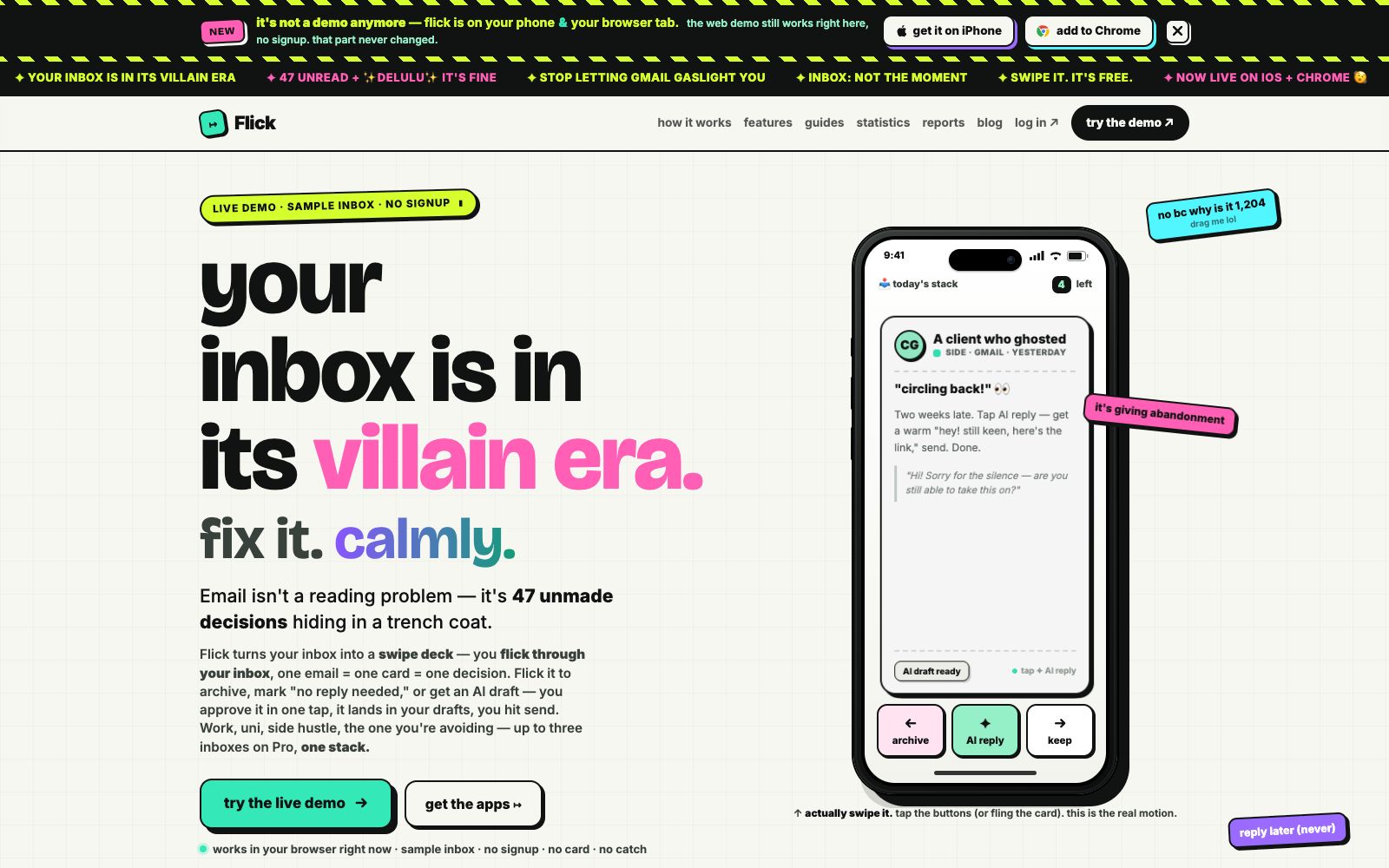
Flick's core idea is: the inbox is not a reading problem, but dozens of pending decisions. It turns emails into a stack of cards, showing only one at a time. Swipe left to archive them, mark them as "no reply needed", or tap to generate an AI draft reply. After confirmation, it is saved in the draft box for you to send. The product design deliberately avoids streaks, red dot anxiety and infinite scrolling, aiming to let you leave after finishing the processing.
Who is it for?
- Professionals with a backlog of emails who want to clear them using spare time.
- Freelancers and small teams managing multiple email inboxes simultaneously.
- Users who hate the anxiety caused by email apps and want to leave after finishing processing.
- People who occasionally need to quickly draft a follow-up or polite reply.
- **Clear Tiers**:Free users get 5 AI drafts per month, Lite users 75, Pro users 200 with support for merging up to three inboxes, and swiping and archiving are always free.
Key features
6Swipe-based Processing
Each email is a card; swipe left to archive or mark as no reply needed, swipe right to keep it, and complete triage with real swipe gestures.
AI Reply Drafts
Generate a draft with one click for emails that require a reply, such as a gentle follow-up for lost contacts. After confirmation, it goes to the draft box, and the user is still responsible for sending it.
Multiple Inbox Merging
Pro supports merging up to three inboxes into one deck for batch processing.
Multi-platform availability
Offers an iPhone app, a Chrome extension, and a web version. The web demo allows you to try the sample inbox without registration.
Restrained Design Commitment
The official lists no streaks, no unread anxiety, no infinite scrolling, no engagement traps, and enshrines some of these promises in actionable Never Contract checks.
Free Triage
Swiping, archiving and "No Reply Required" are permanently free, while AI drafts are limited by subscription tier.
Things to know
Usage Tips
- First experience the unregistered sample inbox on the web version, confirm the sliding rhythm is appropriate, then install the iPhone or Chrome version to connect your real email account.
- First try the unregistered sample inbox on the official website and feel the rhythm of one email at a time, sliding through and moving on.
- For daily triage, prioritize using the free archiving and "no reply needed" features; only consume AI draft credits when you really need to draft wording.
- When processing Newsletters, archive them decisively and unsubscribe at the same time to avoid old emails appearing repeatedly.
- Pro users can merge multiple mailboxes, but it's recommended to keep one "daily deck" to avoid recreating an endless inbox.
Traffic & popularity
Data month Sep 2026
Flick receives about 2.1K visits per month.
Monthly visits
7 monthsTraffic sources
- Search31.3%
- Direct29.3%
- Referrals12.0%
- Display ads9.4%
- Social7.4%
- Other10.6%
Top countries
- United Kingdom100.0%
Estimated from third-party traffic data.
Similar tools
 SaneBoxAn AI email sorting service that its maker says automatically keeps important messages in the inbox and moves less important ones to a follow-up folder. It also provides follow-up reminders, unsubscribe options, and a daily digest, and is compatible with Gmail, Microsoft 365, IMAP, and other services.
 ShortwaveShortwave is an AI-powered email assistant for inboxes. It can organize, draft, search and schedule emails in one sentence, integrate with tools like Slack and calendars, and turn your inbox into an automated workspace.
 EmailTriagerAn AI email assistant that runs in the background learns your writing style, automatically categorizes incoming emails and drafts ready-to-send replies. It's one-click to install and free to try, turning email processing into review and send.
 ChatmizerChatmizer brings seven channels — including WhatsApp, Instagram, and TikTok — into a single unified inbox. AI handles automatic replies and appointment booking, while the built-in WhatsApp store lets you sell directly in chat with zero commission.
 AgentMailAgentMail is an infrastructure that provides dedicated email inboxes for AI agents. With a single API call, you can create an inbox, send and receive emails, manage conversation threads and attachments, and trigger workflows. It is suitable for lead follow-up, customer service replies, and multi-agent collaboration.
 ToneBirdToneBird is a desktop AI reply assistant that can draft replies by reading past conversations and connected files, adjust the tone according to the recipient, and supports one-click insertion, scheduling meetings and follow-ups in email and chat applications.