


Vora
A free AI video generator under FineShare, it can create vertical and horizontal short videos by inputting text or images. Officially, it supports 720P and 1080P watermark-free output, and also comes with prompt reverse derivation, watermark removal, and image quality enhancement features.
Updated: 2026-10-27
What is Vora?
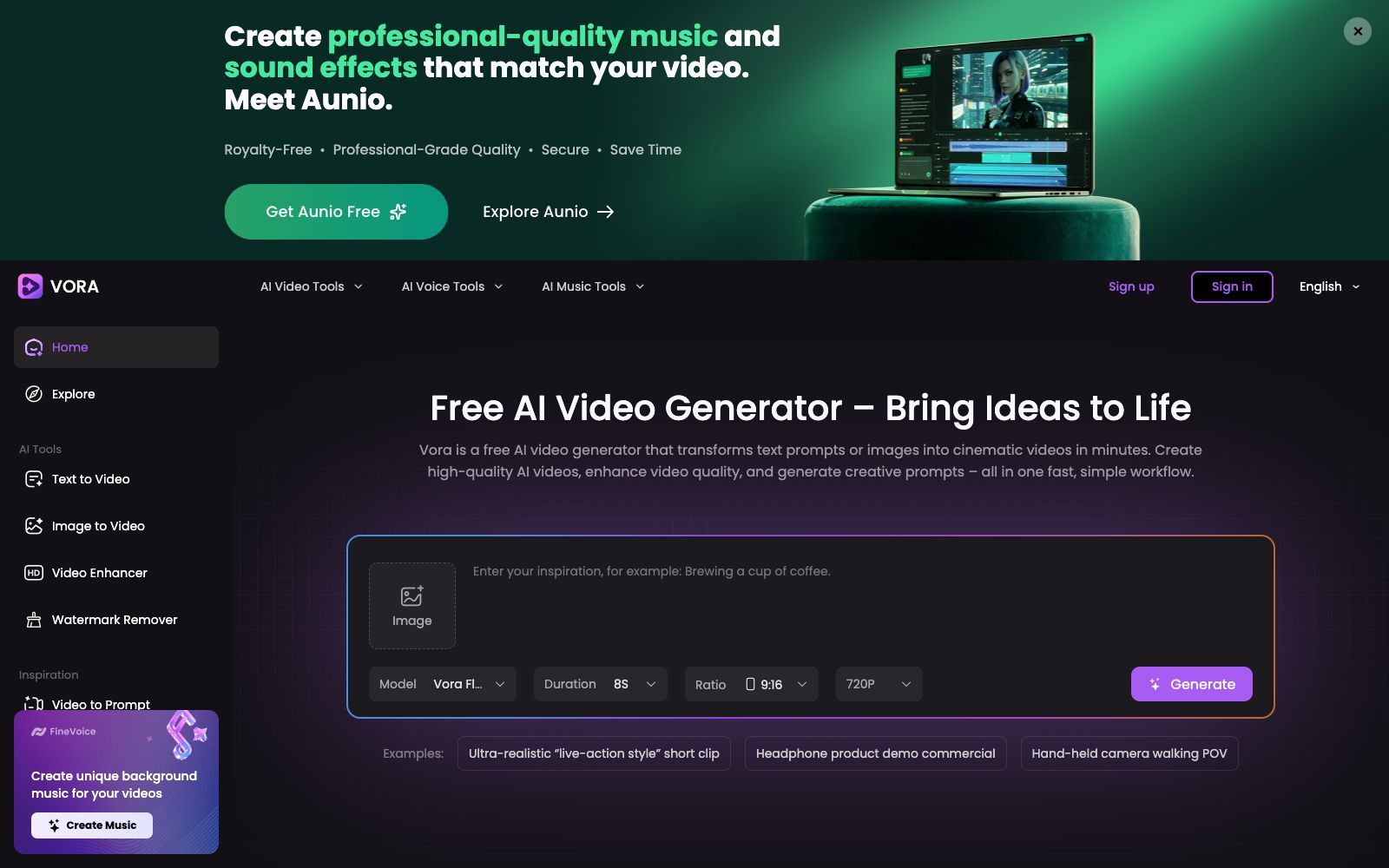
Vora is a free AI video generator hosted on FineShare's official website. Its core idea is to integrate "conceiving visuals" and "generating videos" on a single page: you can input a piece of text or a reference image, select the duration, aspect ratio and definition, and then generate the video. Different from tools that only generate videos from text, it also comes with several auxiliary tools such as prompt word reverse inference, prompt word generation, watermark removal and image quality enhancement, which means it provides a complete workflow for recreating popular videos.
Who is it for?
- Operators creating vertical screen content for TikTok, Reels, and Video Channels: Generate 9:16 vertical screen footage quickly from one piece of copy to first test which content performs well.
- Cross-border e-commerce merchants and independent website sellers: With no filming budget, they can use product images to generate 6 to 10-second product demonstration videos.
- Small advertising and brand teams: First, use 720P to create storyboard previews at a low cost, and switch to high definition once the direction is finalized.
- Independent developers and tool-based products: Create a dynamic demo for new features without needing to hire a dedicated editor.
- Content creators who need to replicate popular structures: Use videos to reverse-engineer prompts and break down others' camera movements and pacing into their own templates.
Key features
6Text-to-Video and Image-to-Video
You can generate a short video by entering a prompt or uploading a reference image. The duration can be selected from 4 seconds to 12 seconds, the aspect ratio supports 9:16 vertical screen and 16:9 horizontal screen, the clarity is divided into three levels: 720P, 1080P and PRO, and the models are divided into two levels: Vora Flash and Vora Pro. You can choose between fast rendering and detailed refinement according to your needs.
Prompt Inversion
The official platform provides Video to Prompt and Prompt Generator, which can convert existing videos or a vague idea into executable prompts. The page includes examples such as realistic-style short clips, headphone product demonstration advertisements, and walking POV with a handheld camera. You can directly follow the examples for imitation when starting out.
Watermark Removal
The official claims it can remove watermarks and logos from videos, including watermark removal for Sora videos. It also comes with supporting downloaders and enhancers, making it easy to rework externally generated materials.
Quality Enhancement
The official Video Enhancer claims to upconvert videos to 4K ultra-high definition, making it suitable for upscaling low-resolution test clips before final delivery.
Community & Inspiration
There is a Trending works wall and a prompt library on the platform, where you can see the effects produced by others with specific prompts and parameters, reducing the cost of blind trials.
Privacy and Security
The official separately emphasizes the data security and privacy protection during the generation process on the page. It is recommended to pay close attention to this section when using commercial materials.
How to use Vora
- Start short and then scale up: Use 4 to 8 seconds and 720P to test composition and movement, confirm it’s usable before rerunning with 1080P or PRO, avoiding high-spec settings right off the bat.
- Pay attention to official restrictions: The top of the page clearly states that you cannot use face photos as input.
- instead, you should use copyright-free characters, products or objects.
- If you want real people to appear, you should use materials with portrait authorization or post-synthesis.
- Image-to-video generation offers more control than pure text-based video creation: if you have clear composition requirements, first generate an image and then animate the model, which saves time compared to repeatedly revising prompts.
- Watermark removal requires respecting copyright boundaries: Removing watermarks from your own materials is fine, but removing watermarks from others' materials before republishing may constitute copyright infringement.
- Each platform also has its own independent rules regarding secondary reposting.
- The free quota, queuing policy and commercial usage scope are subject to the official website terms.
- the platform does not specify the quota on the page.
- official rules may be adjusted, so please recheck before official commercial use.
Traffic & popularity
Data month Sep 2026
Vora receives about 786.8K visits per month and ranks #55,777 worldwide.
Monthly visits
12 monthsTraffic sources
- Search43.0%
- Direct38.2%
- Referrals9.7%
- Social8.1%
- AI assistants1.0%
Top countries
- United States10.9%
- Japan6.0%
- Brazil5.8%
- Bangladesh3.6%
- India3.4%
Estimated from third-party traffic data.
Similar tools
 Vadoo AIVadoo AI is a creation platform that aggregates multiple video and image generation models in one workspace. It supports text-to-video, image-to-video and stylization conversion, and can also cut long videos into short ones, making it suitable for batch production of social media content.
 SendFameSendFame is an online creation platform that quickly turns photos and text into videos, images and songs. It specializes in one-click generation of dance videos from photos, image-to-video generation and full-song generation with lyrics, making it ideal for social media bloggers to create viral short videos and holiday greetings.
 Anijam AIAn AI tool for generating videos via chat divides cinematic short films, animations, UGC ads, and social media short videos into different studios. It supports four types of inputs: text, scripts, images, and audio, and requires no editing skills.
 RenoiseAn AI video and image workbench that aggregates models such as Seedance, Kling, and Midjourney. It can generate videos and images with just one sentence description. The official claims it can ensure the consistency of characters and products, and uses Agent to plan storyboards.
 AutoAEAutoAE is an AI tool that turns a single sentence, script or image into dynamic graphics. Templates allow for replacing text and materials, enabling the export of watermark-free 1080p videos in minutes. It can also be integrated into programming agents. Ideal for short video hooks, product launches and lip-sync packaging.
 Lanta AIOnline AI video generation platform that supports text-to-video, image-to-video and video-to-video. It allows setting scenes and camera movements, maintaining character consistency across shots, and synchronously generating sound effects and dialogue. It is suitable for social media short videos, product advertisements and story-based content.