


AutoSubtitles
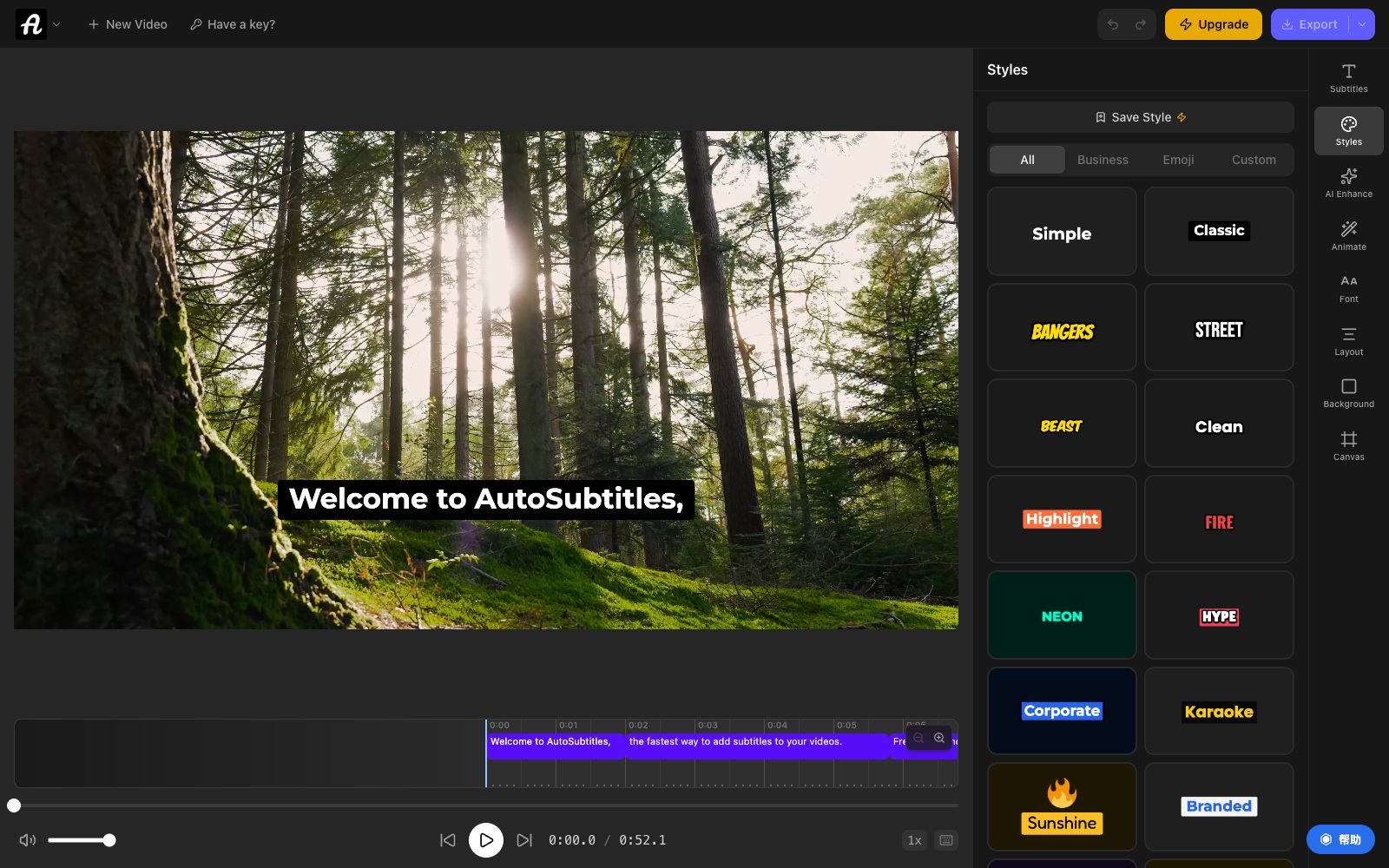
AutoSubtitles is an online subtitle tool. Upload a video to automatically recognize speech and generate subtitles in over 100 languages. It comes with 28 preset styles and sentence-by-sentence timeline editing. Exports come with hard-subbed subtitles, making it ideal for adding subtitles to short videos and teaching videos.
Updated: 2026-10-26
What is AutoSubtitles?
AutoSubtitles is a subtitle tool that runs in a browser, focusing on four steps: uploading, recognition, styling adjustment, and export. It lowers the threshold to the minimum: no registration, no login, no software installation required. Just open the webpage and drag the video in, and you can generate subtitles. Compared with the subtitle functions in video editing software, its difference lies in that it has more detailed style templates and timeline editing, and it explicitly promises not to upload video files to the server.
Who is it for?
- Long-video creators: Add subtitles to voiceovers to boost complete video views and accessibility, while also aiding in search engine optimization.
- Short video operators: Add dynamic subtitles to vertical screen videos and align with popular styles with one-click template application.
- Teachers and course creators: Create multilingual subtitles for course content to make it accessible to non-native speakers.
- Freelancers and agencies: Take on client video projects without the need to purchase expensive editing licenses.
- Podcast hosts: Convert audio interviews into subtitled clips and distribute them on social platforms.
Key features
5Speech-to-Text Transcription
Subtitles are generated within a few seconds after uploading a video. The official claims it can handle accents, background noise and multi-person conversations; it supports common formats such as MP4, MOV, WebM, and works for horizontal, vertical and square screen videos.
28 Style Presets
It comes with a complete set of styles such as Classic, Neon, Karaoke, Street, and Corporate, which can be applied with one click; you can also adjust the font, font size, color, stroke, background, position, and alignment item by item.
Sentence-by-Sentence Editing & Timeline Adjustment
Every word can be modified, start and end times can be dragged, clips can be merged or split, and there's no need to go back to the video editing software if the subtitles don't align with the video.
100+ Languages
Can generate subtitles in English, Spanish, French, German, Portuguese, Japanese and other languages, and automatically detect the language; Pro unlocks subtitle translation.
Local Processing & Export
The official instruction videos stay on the local device and are processed within the browser; only the audio tracks are sent for transcription and deleted immediately upon completion. The free version supports 720p export, with each clip under 10 minutes and a small watermark; the Pro version costs $9 per month, offering watermark removal, 30-minute clips per session, and SRT, VTT, and TXT file attachments; the Max version supports clips up to 1 hour long.
How to use AutoSubtitles
- First use the free version to process a familiar video, check if the recognition accuracy and styles meet your expectations, and then decide whether to upgrade.
- Check the volume of the material before uploading: For segments with heavy background noise or overlapping dialogue between multiple speakers, you still need to manually review the timeline after transcription.
- When dealing with customer confidential materials, note that the official only promises that the audio tracks are used for transcription and deleted immediately.
- It is best to confirm this processing method with the customer before formal cooperation.
- If you need to deliver subtitle files instead of burned-in videos, choose Pro or above, which supports exporting SRT, VTT, and TXT files.
Traffic & popularity
Data month Sep 2026
AutoSubtitles receives about 325.5K visits per month and ranks #126,373 worldwide.
Monthly visits
12 monthsTraffic sources
- Search50.3%
- Direct37.8%
- Referrals6.7%
- AI assistants3.5%
- Social1.7%
Top countries
- United States12.1%
- Italy8.6%
- India7.5%
- Poland6.1%
- Vietnam4.8%
Estimated from third-party traffic data.
Similar tools
 SubEasy.aiSubEasy.ai is an AI subtitle and transcription platform developed by a Hong Kong team. According to the official statement, it boasts a maximum accuracy rate of 99%, supports over 100 languages, and offers context-aware translation, animated subtitles, and AI dubbing services. It is ideal for video content going global.
 TranscriptlyA free online audio and video to text tool that can upload local files or paste video links, output subtitles with timestamps and export in multiple formats. It is suitable for organizing course, interview and short video copy.
 Transcri.ioOnline audio and video transcription tool that can convert recordings and videos into text without installation. It supports subtitle generation and translation for more than 100 languages, and can also summarize questions about documents, making it suitable for interview organization.
 UniScribeUniScribe converts audio, video and online video links into transcripts. Officially, it supports more than 60 languages, speaker recognition and AI summaries, and can export subtitles. It is suitable for meeting minutes and podcast organization.
 Happy ScribeMeeting and audio-video transcription tool, covering more than 150 languages, supporting robot-free recording, speaker diarization, glossary and one-click translation, capable of exporting subtitles, and the official website states that it is used by more than 41,000 teams.
 Video Transcriber AIVideo Transcriber AI is a login-free online transcription tool that can convert YouTube, Zoom recordings and local videos into text with speaker diarization, covering more than 200 languages.