


Anifusion
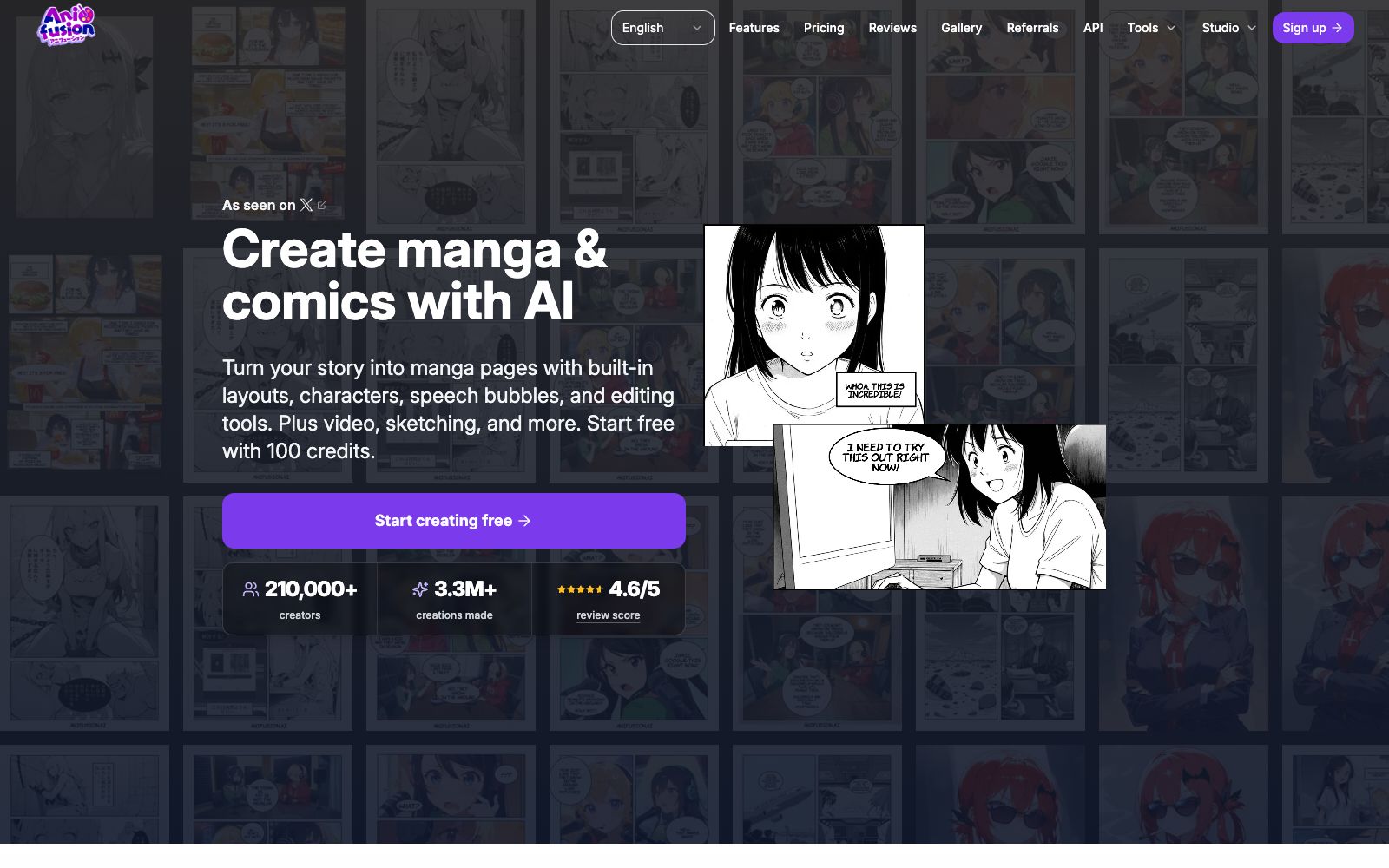
An AI creation tool for comic and strip cartoon creators that can turn stories into comic pages with storyboards, characters and dialogue bubbles. The official website offers 100 free points upon registration, and it has been used by more than 210,000 creators.
Updated: 2026-10-26
What is Anifusion?
Anifusion focuses on the specific stage of comic storyboarding: given a piece of text, it generates complete comic pages with layouts, characters, and speech bubbles, rather than standalone illustrations. The official website slogan reads "Turn your story into manga pages with built-in layouts, characters, speech bubbles, and editing tools." The operating entity is CodeConda LLC, an Arizona-based company as stated on its terms page.
Who is it for?
- Independent writers who want to create vertical comics or fan comics but don't have an artistic partner.
- Webtoon and vertical comic account operators: who need to stably output multiple installments of content.
- Screenwriters and pre-production animation teams who need to do storyboard previews or concept drafts.
- Educational and game demo creators who want to visualize existing scripts into rough manga pages.
Key features
5Create My Manga
Generate complete sets of manga pages from story text, which the official website positions as its core workflow.
Layout and Storyboarding Tools
The auxiliary tools listed on the official website include panel layout planning, breaking a screenplay into storyboard beats, and text typesetting for speech bubbles.
Character Consistency Tool
The official website mentions character setting cards and character lists, which are used to maintain the stability of the same character across different pages.
Diverse Style Presets
The official website lists directions such as Japanese manga, American comic books, color comics, black-and-white comics, shōnen manga, and superhero comics.
Image and Animation Expansion
The Studio section on the official website includes image generation, video animation, sketch-to-image conversion, a library of objects, and community presets.
How to use Anifusion
- The official website states that 100 points are given upon registration.
- Use these credits first to check if the art style suits your taste before deciding whether to subscribe.
- The figure of over 210,000 creators and more than 3.3 million works displayed on the official website is an official statistic.
- for the actual quality of the output, it is recommended to try generating a few pages yourself.
- Some style presets listed on the official website directly correspond to well-known manga works.
- Imitation carries the risk of secondary creation.
- Before public dissemination or commercial use, you must be cautious and confirm the copyright boundaries.
- For serialized content across multiple pages, make good use of character setting cards and community presets to maintain consistency and tell the story smoothly.
- When you need to print or publish on specific platforms, first use the printing and social media size tools provided on the official website to confirm the layout.
- Points consumption, export authorization and work ownership rules are subject to the official website's terms.
- please double-check before commercial use.
- There are many finished works in the official website's art gallery for reference.
- flipping through a few pages first will help you quickly master how to write prompt words.
- The official website provides API capabilities.
- If you are creating serialized products, you can consider connecting the generation process to your own CMS.
- Comics rely on coherence.
- It is recommended to clarify the plot beats for each page before generation.
- thinking about the plot while generating will waste a lot of credits.
- The official website also provides LoRA models and character sheets.
- stable IPs must be distilled into your own models or presets.
Traffic & popularity
Data month Sep 2026
Anifusion receives about 449.8K visits per month and ranks #84,254 worldwide.
Monthly visits
12 monthsTraffic sources
- Search62.9%
- Direct26.9%
- Referrals5.9%
- AI assistants2.4%
- Social1.9%
Top countries
- Japan17.2%
- United States11.2%
- India7.2%
- United Kingdom5.1%
- Brazil3.9%
Estimated from third-party traffic data.
Similar tools
 MangakaMangaka is an AI manga generator that can convert text scripts into manga storyboards. It supports designing custom characters and choosing art styles, requires no drawing skills, and also provides chapter opening animations with dubbing and background music.
 KomikoAIKomikoAI is an all-in-one AI anime creation studio. Its official website states that it can generate illustrations, animated videos, original characters, and chat with characters. It is built with multiple image and video models, and also provides tools for comic storyboarding and speech synthesis.
 Melies AIMelies AI is an AI film and television creation tool integrating more than 30 models. It can generate images, videos, movie posters and over 150 AI actors, focusing on consistent characters from concept to final production.
 ToonaToona is an AI toolbox designed for anime and manga materials, Offers image-to-video, black-and-white comic coloring, frame insertion up to 240 fps, 4K zoom, and frame correction in between, among other features. The official statement says that over 50,000 creators have joined.
 Translate ImageAn online tool that translates text in images into the target language. You can upload screenshots, comic pages or product images to complete the replacement while retaining the original layout. The official claims it supports more than 30 languages and font styles.
 AniFun AIA one-stop AI workspace for 2D creators, covering anime illustration generation, original character design, comic page layout and animation video generation. The official claims that you can go from an idea to a finished product without any art foundation.