


Gaituya
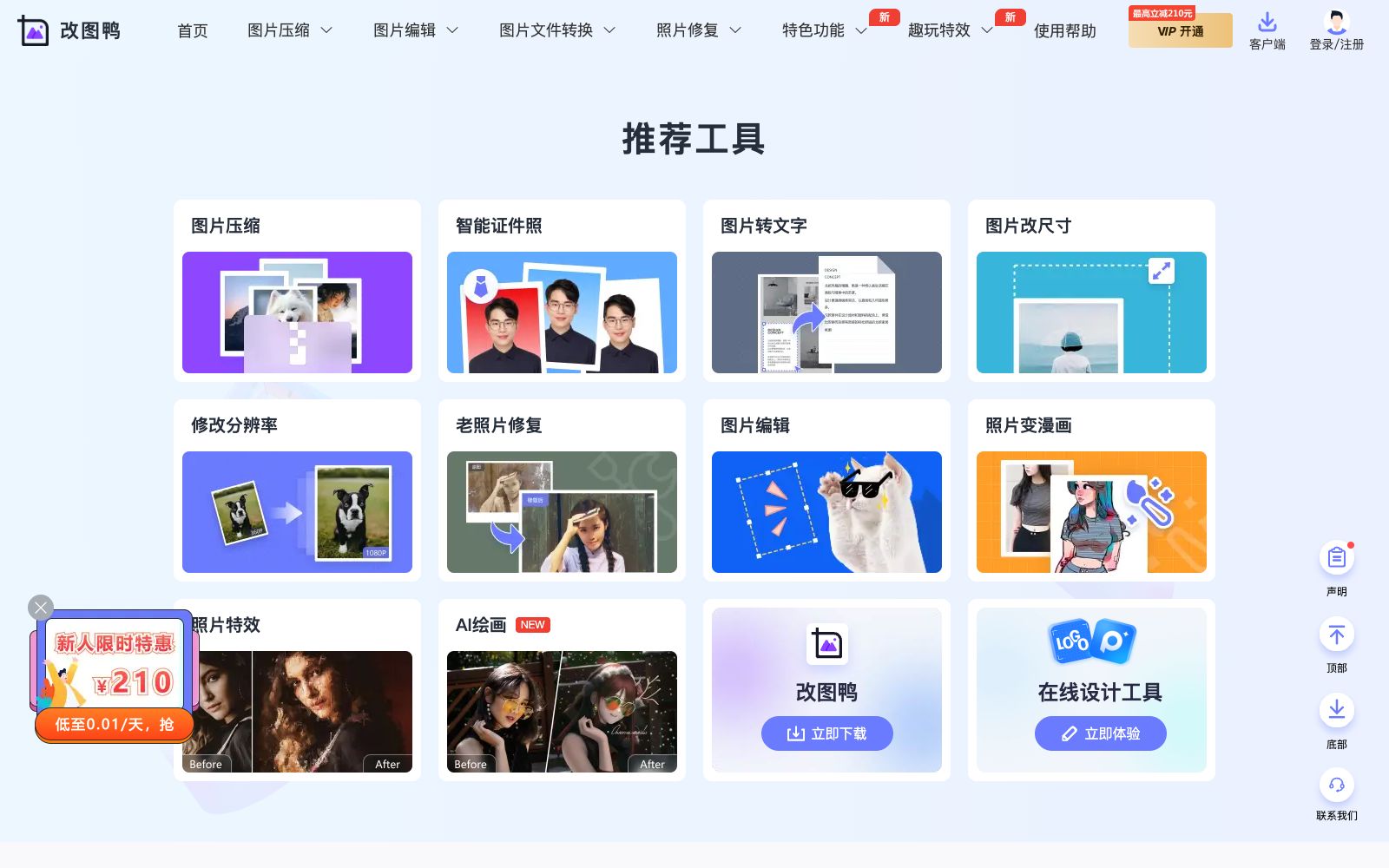
Gaituya is an online image processing tool. Officially, it offers image compression, format conversion, editing, ID photo and old photo restoration features. Most functions support batch processing, require no download or installation, and cover daily photo editing needs.
Updated: 2026-10-26
What is Gaituya?
Gaituya is an online image processing tool. According to the official statement, there is no need to download any software—just upload images to start editing. It integrates common functions such as image compression, editing, format conversion, ID photo production, and old photo restoration into a single website, and emphasizes that most functions support batch processing, making it suitable for users who do not want to install software but need to quickly process a large number of images. From office work to family photo albums, Gaituya turns frequent small needs into one-stop tools that can be used directly by opening a web page. It does not pursue professional depth but makes common operations fast enough—compression, format conversion, and size adjustment can be completed with one click. For volume-sensitive scenarios (such as uploading attachments and sending emails), it is preferable to compress and then convert the format in one step.
For volume-sensitive scenarios (such as uploading attachments or sending emails), prioritize compression followed by format conversion in one step. It also caters to both beginners and bulk users, who can complete the entire processing process on the web side without relying on local software environments.
Who is it for?
- Office and operation personnel who frequently compress, convert formats and adjust resolutions to process daily materials.
- For individual users who need to make ID photos or change photo backgrounds, it offers a one-stop solution for official errands and avatar creation.
- Family users with needs for coloring and restoring old photos to preserve memories.
- E-commerce and community operations who need to process a large number of images and want to run batch operations can achieve significant efficiency improvements.
Key features
6Image Compression
Officially supports compression for formats such as JPG, PNG, BMP, GIF, and JPEG, reducing file size for easier uploading.
Format Conversion
Provides image format conversion, covering HEIC to JPG, PNG, WEBP, GIF, ICON and more, ensuring cross-device compatibility.
Image Editing
Offers basic editing functions such as resizing, cropping, adding watermarks, rotating, and modifying resolution, which are sufficient for daily use.
Photo Restoration
It is claimed by the official that it supports blurry face restoration, old photo restoration, colorization of black-and-white photos, noise reduction, and defogging to recover old images.
ID Photos & Special Features
Provides smart ID photos, background replacement via cutout, template puzzles, photo frames, etc., covering official business and casual photo editing.
Batch Processing
The official states that most functions support batch processing, eliminating the need for single-image operations and making it suitable for scenarios with multiple images.
How to use Gaituya
- 1First test a single image to check the effect, then enable batch processing to avoid being unable to modify each one individually if the parameters of the entire batch go wrong.
- 2Compression and conversion are lossy; back up important original images before processing to prevent irreversible loss.
- 3For ID photos, the size and background requirements shall be subject to the handling authority; do not only rely on the website presets to avoid re-taking.
- 4Please pay attention to the scope of authorization for templates and materials within the site. For commercial use, it shall be subject to the official instructions, and paid elements need to be confirmed.
- 5Official features and quotas may be adjusted; check the current terms again before official use to confirm coverage of rights and benefits.
Traffic & popularity
Data month Sep 2026
Gaituya receives about 116.5K visits per month and ranks #276,449 worldwide.
Monthly visits
12 monthsTraffic sources
- Direct46.7%
- Search36.0%
- Referrals10.7%
- Social3.6%
- Display ads0.9%
- Other2.1%
Top countries
- China75.2%
- United States7.6%
- Taiwan, China4.2%
- Hong Kong, China2.6%
- Singapore2.5%
Estimated from third-party traffic data.
Similar tools
 IMG2GOAn online image editing and conversion toolset in the browser that offers 28 applications such as compression, resizing, cropping, background removal, AI photo retouching, AI colorization and AI upscaling, and supports mutual conversion of formats like JPG, PNG, WEBP and PDF.
 ShortPixelShortPixel is an AI-powered image optimization service that can compress JPG, PNG, WebP and AVIF, and provides batch optimization, format conversion, CDN and WordPress workflow.
 FotorFotor is a free online photo editor. Officially, it offers features such as AI enhancement, AI photo retouching, background removal, and text-to-image conversion. It also supports converting images to anime, coloring old photos, and batch processing, covering daily photo editing and creative design needs.
 TinyWowFree online toolbox that brings together hundreds of tools such as PDF, image, video, and AI writing tools, covering format conversion, editing, compression, and AI generation. The official offers a 7-day free trial of Premium membership.
 HitPawHitPaw is a software series that provides AI enhancement and editing for videos, images, and audio. It includes tools such as video restoration, format conversion, real-time voice changing, and translation, covering desktop and mobile platforms.
 Douhui AIDouhui AI is an AI image generation and editing platform. According to the official statement, it supports text-to-image generation, universal image modification, PSD layer export and e-commerce image sets. It also provides video creation, infinite canvas and image-to-3D functions, and is targeted at product and interior design.