


Douge Dubbing
An AI dubbing platform for short video commentary, which the official says offers popular voices for multiple roles and various track routes, supports voice cloning, copy extraction, automatic synchronization and vocal separation, and is built with creative tools such as voice conversion and sound effect modification.
Updated: 2026-10-26
What is Douge Dubbing?
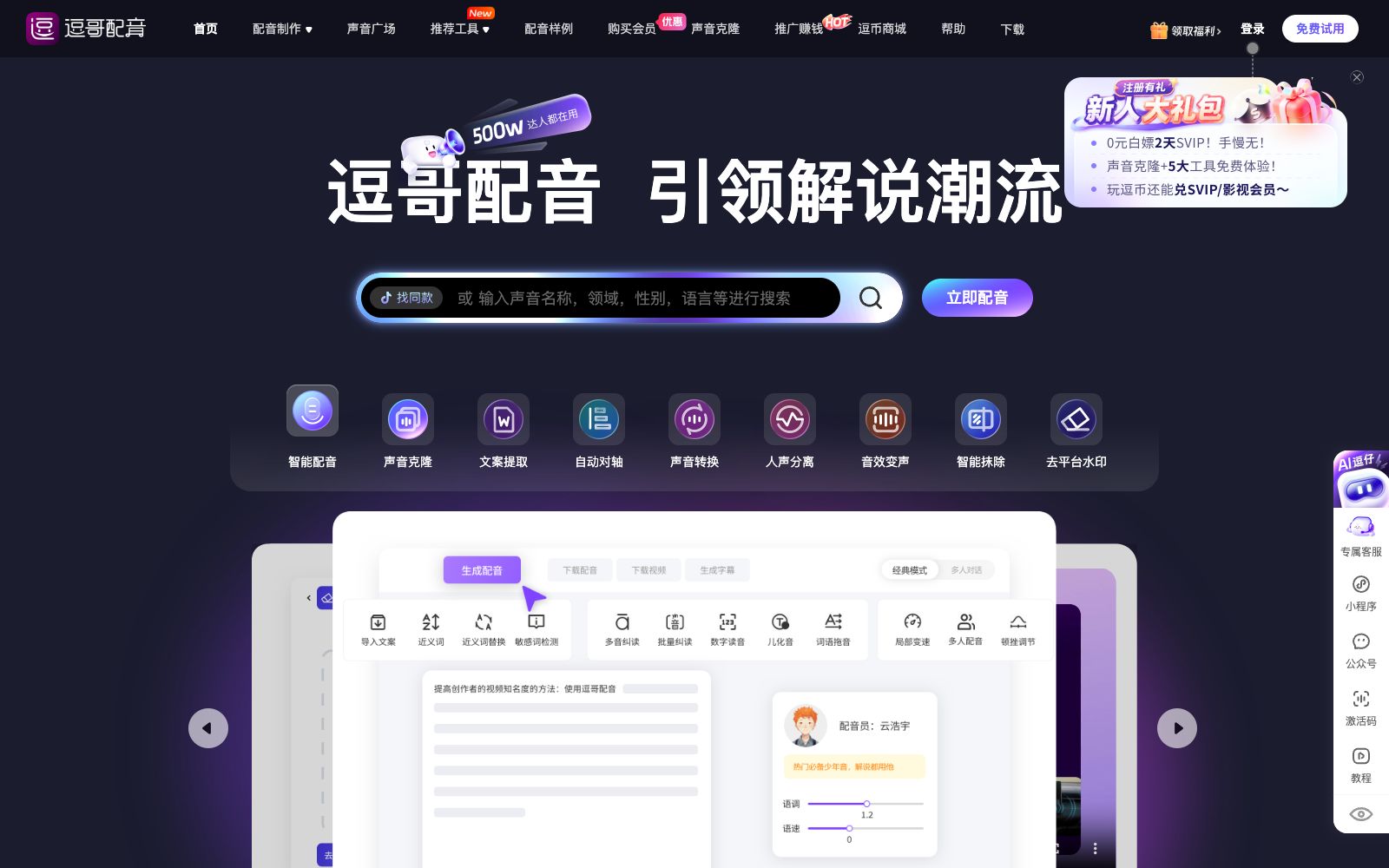
Doge Dubbing is an AI dubbing software for short video commentary, positioning itself as a "trendsetter in commentary" on its official website. Instead of simply offering a bunch of general voices for users to choose from, its approach is to turn the popular commentary voices already thriving on short video platforms into select dubbers. The voice square is categorized into "Most Popular on Douyin", "Favorite by Doge Users", "Multiple Tracks", "Multiple Roles" and "Multiple Languages". The sample voice Yun Haoyu (Film and TV Mode) is labeled as "The Most Popular Across the Internet, with uninterrupted commentary words and a tighter rhythm". Coupled with supporting tools such as text extraction, vocal separation and automatic synchronization, it is more convenient than pure dubbing tools in the chain of "finishing the script—completing the dubbing—synchronizing perfectly". The official website meta also describes it as a dubbing software integrating multiple creation tools.
Who is it for?
- Short video creators who do film and television commentary, documentary commentary and suspense stories, and need a fixed tone with a tight rhythm
- Accounts that do knowledge explanations, historical commentaries, and tutorial explanations, pursuing long-term and stable recognition
- For commentary on drama-themed content or multi-character dialogues, multiple character tones are needed to distinguish different characters
- For beginners starting from scratch, you can start with ready-made voices like "Most Popular on Douyin" on the official website without having to adjust parameters yourself
- For creators who need to handle scripts, dubbing and subtitle alignment in one go, use the supporting tools to form a seamless workflow
- Users for online course recording and corporate training; the user reviews displayed on the official website include identities such as online course teachers and training institution teachers.
Key features
6Intelligent Dubbing
The core feature highlighted on the official website. You can generate dubbing audio by inputting text, and it offers a variety of emotional modes such as Default, Cheerful, Excited, Sad, Angry, Fearful, Complaining, Serious, Disappointed, and Anxious.
Voice Square
The official website organizes voices by "Most Popular on Douyin", "Favorite by Dou Dou Users", "Multiple Tracks", "Multiple Characters" and "Multiple Languages", and displays the cumulative play count of each voice, making it convenient to choose voices by following the trend.
Premium Influencer Series
The official website states that it collaborates with influencers to launch a series of voices covering tracks such as film and television, suspense, history, stories, and games and animation. For example, Doubite, a Douyin-certified influencer, uses a radio male broadcast tone for film and television commentary, documentary commentary and warm commentary.
Voice Cloning
There is an entry for "Voice Cloning" within the platform, which is used to generate your own exclusive voice.
Text Extraction and Vocal Separation
A common feature for short videos listed on the official website. The former makes it easy to extract scripts from materials, while the latter separates vocals from background music.
Supportive Creation Tools
The "Recommended Tools" section on the official website also lists automatic synchronization, voice conversion, sound effect modulation, intelligent erasure, and platform watermark removal, among other features.
How to use Douge Dubbing
- First determine the account's niche before choosing a voice: the tone for film and drama commentary, knowledge explanation, and warm stories varies greatly.
- Once selected, it is recommended to stick to one or two styles for a long time.
- do not change the voice for each video, as recognition can only be accumulated.
- Before dubbing, break the script into sentences according to spoken rhythm, and set paragraphs with the emotion options provided on the official website, which is much more natural than having a single emotion for the whole text.
- If you need to make subtitle timelines, you can directly use automatic alignment, and only spot-check the first and last few sentences before exporting.
- if you want to unify the voice, you can consider voice cloning, but you must only use your own voice materials or those for which you have obtained authorization.
- Membership, points and billing methods are subject to the instructions on the official website's current page.
- make a trial run with short sentences before batch production.
- When quoting film and drama original sound, others' recordings or materials with platform watermarks, pay attention to copyright and platform rules, and when accepting commercial orders, it is even more necessary to verify the scope of commercial use.
Traffic & popularity
Data month Sep 2026
Douge Dubbing receives about 164.4K visits per month and ranks #200,531 worldwide.
Monthly visits
12 monthsTraffic sources
- Direct88.4%
- Search6.3%
- Social3.7%
- Referrals1.1%
- Display ads0.6%
Top countries
- China97.2%
- United States2.8%
Estimated from third-party traffic data.
In these collections
Similar tools
 Lanzao AIThe AI dubbing and voice cloning platform launched by CloudMinds, according to the official, offers AI voice actors with different genders, accents and languages. It supports text-to-speech, AI copywriting and exclusive voice cloning, enabling quick dubbing for short videos and audiobooks.
 MoyinOnline AI dubbing platform, the official claims it offers more than 1,500 voice styles and 800 tones, covering 19 languages and 15 dialects. It supports nearly 20 tuning functions such as sentence-by-sentence audition, polyphonic characters, pause and emphasis, and also enables voice cloning and cloud editing.
 iFLY TranslationiFLY Translation is an all-in-one video localization tool under iFLYTEK, providing AI video translation, AI dubbing, voice cloning and multilingual subtitle generation, helping short dramas go global and supporting cross-border e-commerce.
 VoiceDubAn AI cover studio in the browser that can replace vocals with tens of thousands of community voices to create covers. It also provides tools such as voice cloning, duets, vocal separation, and text-to-speech, and supports exporting WAV files and multi-tracks.
 Wavel AIAI video generation and dubbing platform that supports script-to-video conversion, voice cloning, multilingual dubbing and automatic subtitles, and provides editing capabilities such as lip sync, short video clipping and quality enhancement.
 MiniMax VoiceMiniMax's Speech and Music Generation Platform, officially powered by Speech 2.6 and Music 2.0, offers speech synthesis, timbre design, voice cloning and music creation, and supports vocal extraction and API access.