


Audio Enhancer
Online AI audio repair tool that removes background noise, echo and hum with one click and unifies loudness. Suitable for podcasters, voice-over videos and audio recordings to perform noise reduction before release.
Updated: 2026-10-26
What is Audio Enhancer?
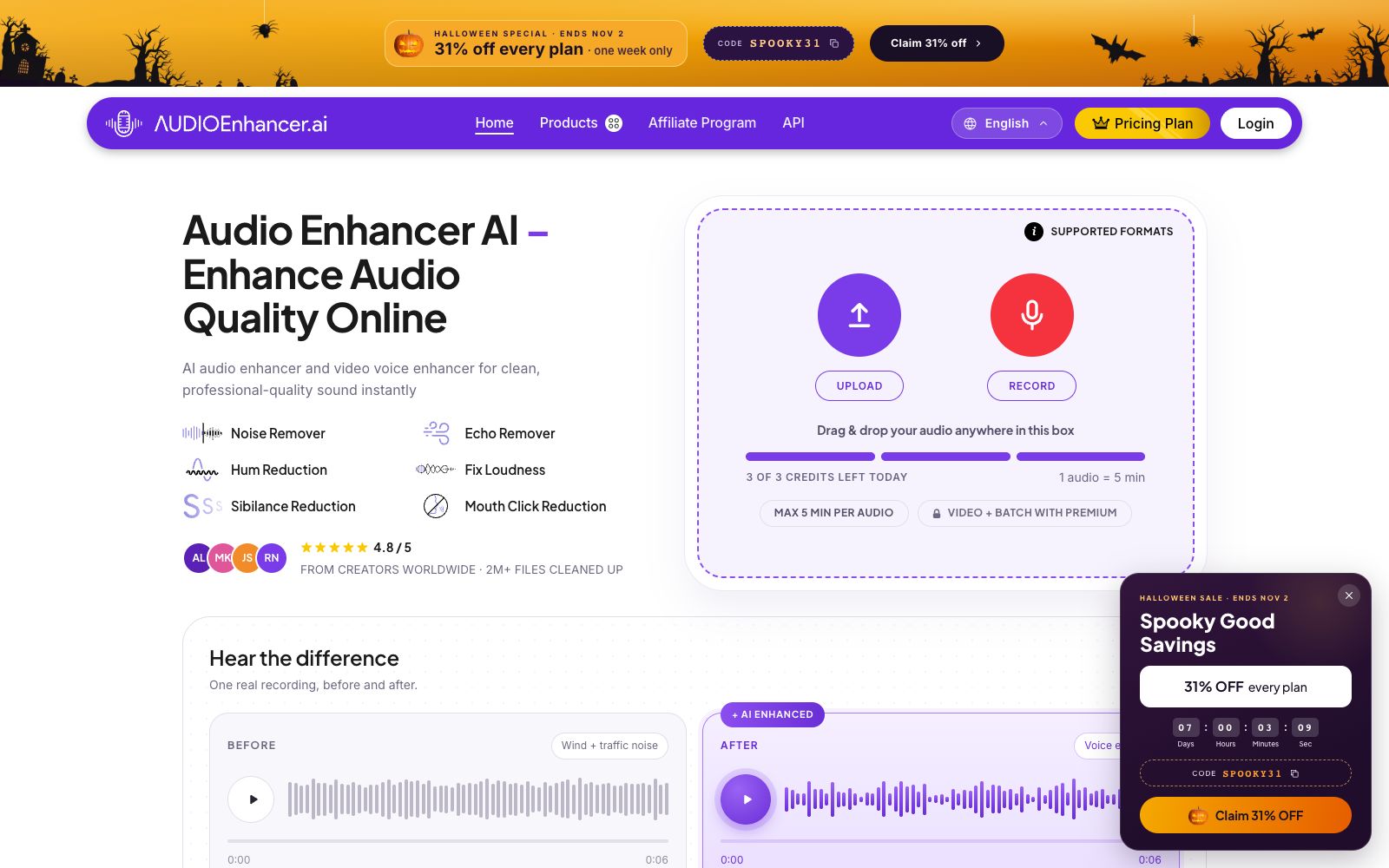
Audio Enhancer is an AI audio repair tool that runs entirely in the browser, with a simple three-step process: upload, select type, and download. Unlike professional host software that requires adjusting parameters one by one, it breaks common recording flaws into several presets, enabling people without audio engineering knowledge to process their voices to a publishable level. The official claims it has processed over 2 million files in total, with a user rating of 4.8 points.
Who is it for?
- **Podcast Hosts**: For interviews recorded in the living room or hotel, polish them into a finished piece with a consistent overall audio feel.
- **Video creators**: Get rid of the wind and traffic noise brought back from on-location shoots and clean them up in one go before posting.
- **Independent musicians**: Perform rough pre-release touch-ups on demos and vocal tracks to remove room reverb and sibilance.
- **Journalists and Researchers**: Organize interview recordings and ensure every word spoken by the interviewee is clear and audible.
- **Course and Meeting Recorders**: Organize recordings of long online meetings into replayable materials.
Key features
6One-click Processing in Six Categories
The official offers six modes: noise cancellation, echo cancellation, hum suppression, loudness correction, sibilance suppression, and saliva sound elimination, which can be selected individually according to the actual problems of the material.
Four Enhancement Modes
After importing the file, you can switch between Clean Up Speech, Noise Reducer, Fix Loudness, and Noise/Echo Remover, which correspond to voice cleaning, noise reduction, loudness adjustment, and reverb processing respectively.
Upload or Direct Recording
Supports drag-and-drop uploads and local file selection, and also allows direct recording within the page. The official states that it is compatible with various formats such as.alac,.mp3, and.webm.
Dual-channel for audio and video
In addition to pure audio, it can also process the sound in videos. The official note states that the maximum duration for a single file in the free tier is 5 minutes, and video processing and batch processing require upgrading to a paid plan.
Multi-platform & API Access
In addition to the web version, it provides iOS and Android apps, and also opens up APIs for programmatic calls.
Multi-platform rating
The page compiles a 4.8-star score from multiple review platforms and hundreds of reviews, which can serve as corroborating evidence beyond subjective audio perception.
How to use Audio Enhancer
- 1First, cut a 30-second sample to listen to the before-and-after comparison, confirm that the presets do not damage the original sound, and then process the entire material.
- 2The free tier has a daily quota, which is shown on the page as 3 uses per day and a 5-minute limit per clip; check the remaining uses for the day before officially processing long clips.
- 3Noise reduction and sibilance control are most likely to be overdone; for vocal material, it is recommended to only enable noise reduction and loudness correction, and not to enable all modes at the same time.
- 4After processing, you should still keep a backup of the original recording; automatic restoration is just a listening experience optimization and does not assume responsibility for master tape-level fidelity.
- 5Confirm the copyright and portrait authorization of the material before commercial use; the tool only improves sound quality and does not resolve authorization issues.
Traffic & popularity
Data month Sep 2026
Audio Enhancer receives about 426.4K visits per month and ranks #87,804 worldwide.
Monthly visits
12 monthsTraffic sources
- Search69.3%
- Direct26.3%
- Referrals1.9%
- Social1.7%
- AI assistants0.7%
Top countries
- United States12.0%
- India9.6%
- Vietnam4.1%
- Indonesia3.1%
- Italy3.1%
Estimated from third-party traffic data.
Similar tools
 Splitter.aiAn AI audio separation tool developed by a Swedish team can split a song into multiple tracks such as vocals, drums, piano and bass. It also provides reverb removal, noise reduction and karaoke vocal processing, and is available on web, desktop and mobile platforms.
 eMasteredeMastered is an online mastering tool created by Grammy-winning engineers. Upload your audio tracks to automatically apply EQ, compression, and loudness processing, get the final product in seconds, and it also supports reference mastering matching.
 FreeMusic AIOnline AI music generator: input text descriptions or lyrics to generate complete songs. Supports pure music with a maximum single track duration of 8 minutes. Also features vocal separation, 4-track splitting, mastering, and lyrics generation. The generated results are available for commercial use, making it ideal for video background music and podcast intro production.
 EndelEndel uses patented algorithms to generate ambient soundscapes in real time, adjusting the sound according to time, weather, heart rate and location. It covers four scenarios: focus, relaxation, sleep and exercise, and is suitable for people who rely on background sounds to get into the zone.
 KlangioKlangio is an AI transcription tool developed by a German team. It can convert audio or YouTube links into sheet music, guitar TABs, MIDI, and MusicXML. It offers instrument-specific applications and is suitable for musicians to transcribe and adapt music.
 LamucalLamucal can convert any song into chord charts and lyrics, supports transposition editing, multi-track separation and vocal elimination, and allows real-time accompaniment for guitar, ukulele or piano. It is ideal for music instrument lovers who want to quickly find sheet music and practice by dissecting songs.